
What Kling AI is
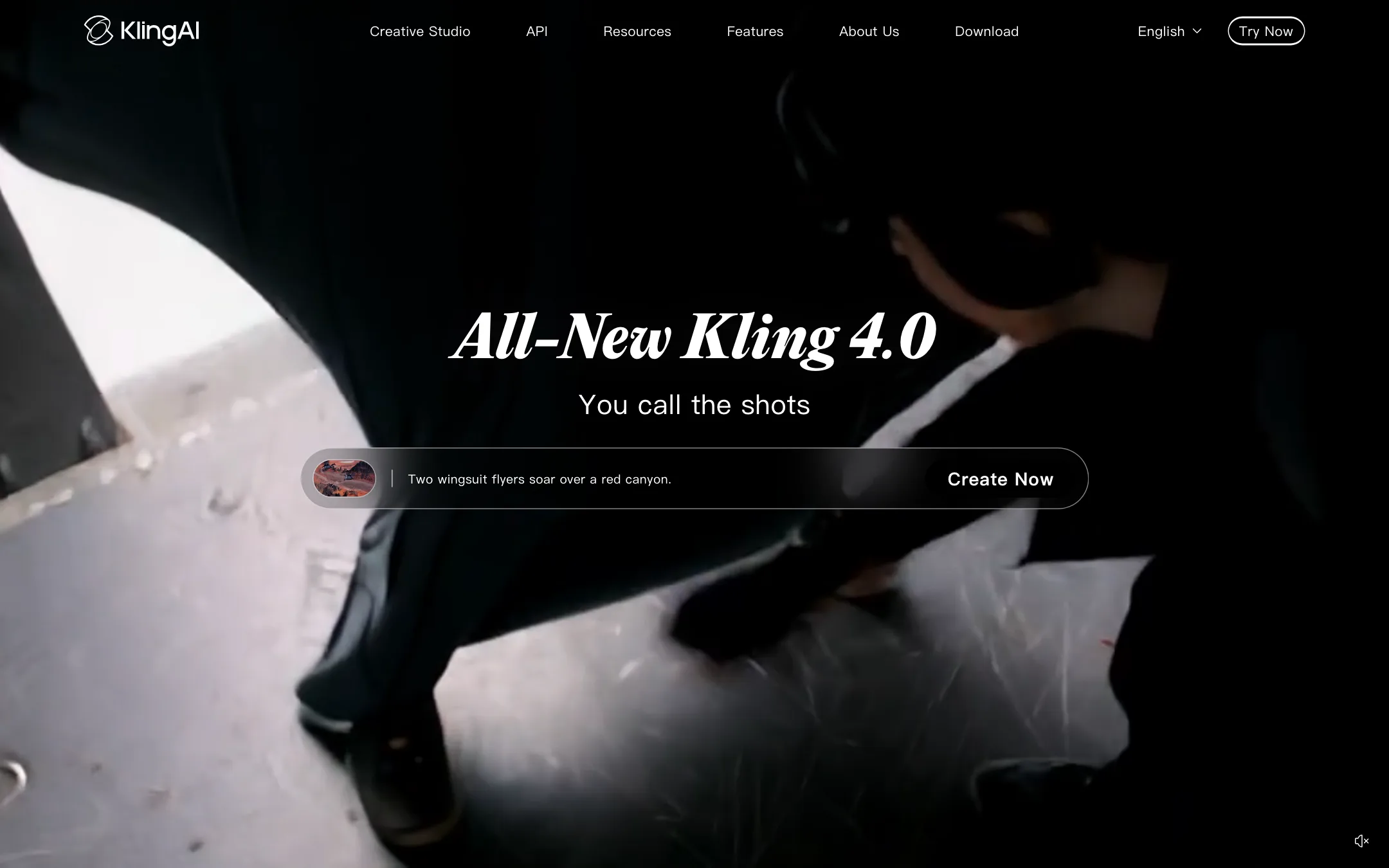
Kling AI is the video and image generation studio from Kuaishou, the Chinese short-video company. Kuaishou trains the Kling models itself and sells them direct, through a web studio, phone and desktop apps, and a developer API. Kling says it has more than 60 million users and has generated more than 600 million videos.
The current flagship is Kling 4.0. Kling describes it as delivering “stable dynamic motions” and “an immersive audio-visual experience.” Its headline numbers are native clips of up to 30 seconds per generation, two-channel stereo audio, dialogue in 9 languages and up to 15 reference assets in one prompt. Kling 3.0 and 3.0 Omni remain available, with multi-shot storyboarding and native audio, and older versions such as Video 2.6 are still in the app.
Kling also shows up inside other tools. Runway, for example, offers Kling 3.0 in its own model picker. This review covers Kling’s own studio, where new Kling models land first.
Who it is for
Kling fits you if:
- You want one of the leading video models straight from its maker, without a reseller’s markup.
- You make ads, music videos or short films and need longer shots. Thirty seconds in one generation saves stitching.
- You like control. References, keyframes and Motion Control let you steer a shot rather than reroll it.
- You need sound in the same pass. Dialogue, effects and ambience come out with the video.
- You work across devices. There are apps for web, iOS, Android, macOS and Windows.
- You build products. The API has a public per-second price list.
Skip it if:
- You want a simple template app. Kling has effects, but its studio is built for people who direct.
- You want clear per-clip pricing before you pay. The plan page lists credits, not clip costs.
- You want an editor for real footage first. Runway’s editing suite goes further there.
How it works
Kling’s Creative Studio is a cloud workspace. You pick a tool, a model and your settings, then spend credits per generation.
Text to video and image to video
Write a prompt, or upload an image, and describe the action, camera movement and any dialogue. Kling’s text-to-video page lists 720p, 1080p and 4K, durations of 3 to 15 seconds on Kling 3.0, and 16:9, 9:16 or 1:1 framing. Kling 4.0 extends a single generation to 30 seconds. Higher resolutions and some models need a paid plan.
For image to video, Kling says start and end frames guide a transition, and Kling 4.0 adds up to 10 flexible keyframes. You can set extra compositions, poses and scene changes along the way.
Omni Reference
Omni Reference is Kling’s way of mixing inputs. You attach up to 15 combined assets, such as character images, reference videos and subject references, and Kling 4.0 uses them to keep the look consistent. Kling 3.0 Omni does a similar job with element references.
Multi-shot and audio
When your prompt describes several scenes, Kling says Kling 3.0 can organise them into up to five connected shots with transitions. Native audio covers dialogue, sound effects and ambience. Kling lists English, Chinese, Japanese, Korean and Spanish for Kling 3.0, with American, British and Indian English accents, and 9 dialogue languages for Kling 4.0.
Canvas, Agent and Motion Control
Canvas is a node workspace. You brainstorm with an Agent, write a script, generate images, video and storyboards, then refine in later rounds. Kling says Skills can produce storyboards, posters and e-commerce assets in parallel. Motion Control copies movement and facial expression from a reference onto your character. There are also Digital Human, Restyle and lip sync tools, and Kling Image 3.0 for stills.
MCP, CLI and API
Kling lets agents drive it through MCP and a CLI, for batch generation and automated pipelines. The separate developer platform sells API access for text to video, image to video, extension, avatars, lip sync, effects and audio.
Teams and apps
Kling launched Team workspaces with owner, admin and collaborator roles, shared assets and credit transfers from personal accounts. The desktop app for Windows and macOS arrived at the same time.
Output quality
We have not run Kling ourselves for this review. Here is what Kling and its customers point to:
- Real productions. Kling cites Amazon Prime’s “House of David,” a Longchamp brand film and two ads that won at Cannes Lions 2026. It also cites “ODYSSEUS: The Fall,” a 135-minute feature whose visuals were, Kling says, generated entirely with Kling.
- Creator use. Directors such as Samuele “SK2” Poggi and PJ Ace say they use Kling daily for client work. These are testimonials on Kling’s own pages, so read them as such.
- Long, stable motion. Kling claims Kling 4.0 stays stable through large movements, fast action and fight choreography. Thirty-second takes are where weaker models drift, so test this on your own prompts.
- 4K is native. Kling advertises native 4K generation rather than upscaling. It is a paid feature.
Pricing
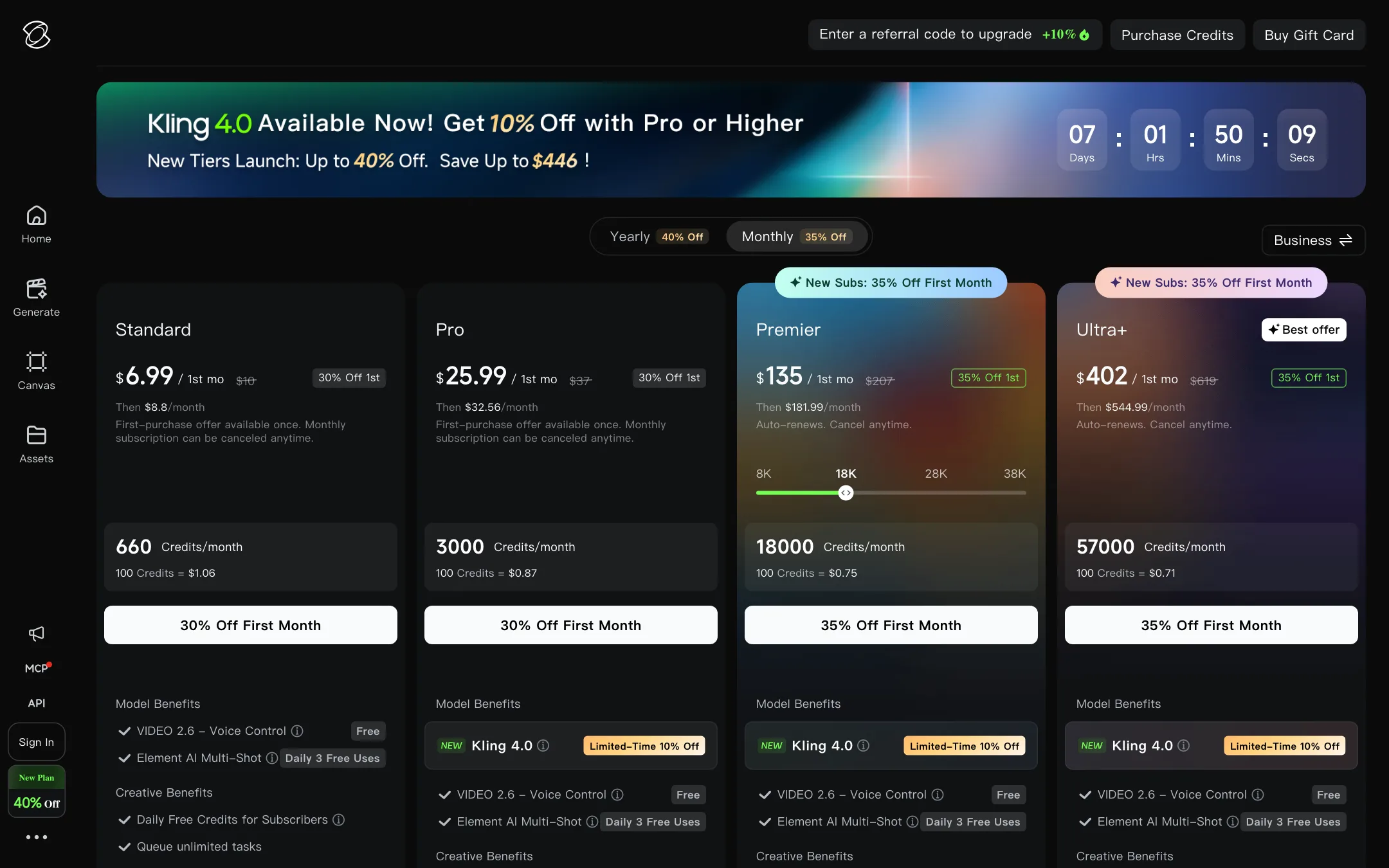
Kling charges in credits. You buy a monthly plan, and each generation spends credits based on the model, resolution, length and whether audio is on. Prices below are what Kling’s membership page showed with monthly billing on 2026-10-22, in US dollars. A yearly toggle advertised up to 40% off, and Kling’s banner said “Save Up to $446,” but we did not record yearly prices. Prices may differ by region.
| Plan | First month | Then | Credits a month | Per 100 credits, then |
|---|---|---|---|---|
| Basic | Free | Free | Daily free credits | n/a |
| Standard | $6.99 | $8.80 | 660 | $1.33 |
| Pro | $25.99 | $32.56 | 3,000 | $1.09 |
| Premier | $135 | $181.99 | 18,000 | $1.01 |
| Ultra+ | $402 | $544.99 | 57,000 | $0.96 |
What the page makes clear, and what it does not:
- The headline price is a first-month offer. Standard shows $6.99, struck through from $10, then $8.80 a month. Kling notes the first-purchase offer is available once.
- Free means watermarked. Basic lacks 1080p and 4K, watermark removal and commercial use. Every paid plan includes all three.
- Premier has sizes. The card offers 8K, 18K, 28K and 38K credit options. The prices above are for 18,000.
- Per-clip costs are not on the page. Kling’s FAQ says you can check the cost before you generate. The plan page itself only lists credits.
What the credits buy
Because Kling does not publish clip costs on its plan page, we lean on a third party here. Atlas Cloud, citing Kling’s Video 3.0 user guide, reports that a 5-second Kling 3.0 clip costs 30 credits at 720p without audio and 60 credits at 1080p with audio.
On those figures:
- Standard (660 credits): about 22 silent 720p clips or 11 clips at 1080p with sound. That is 55 to 110 seconds of video a month.
- Pro (3,000 credits): about 50 clips at 1080p with sound, or around 4 minutes.
- Premier (18,000 credits): about 300 such clips, or 25 minutes.
Kling 4.0 likely costs more per second, and Pro and above got 10% off it during the launch offer. Confirm the live cost in the app before you commit.
API pricing
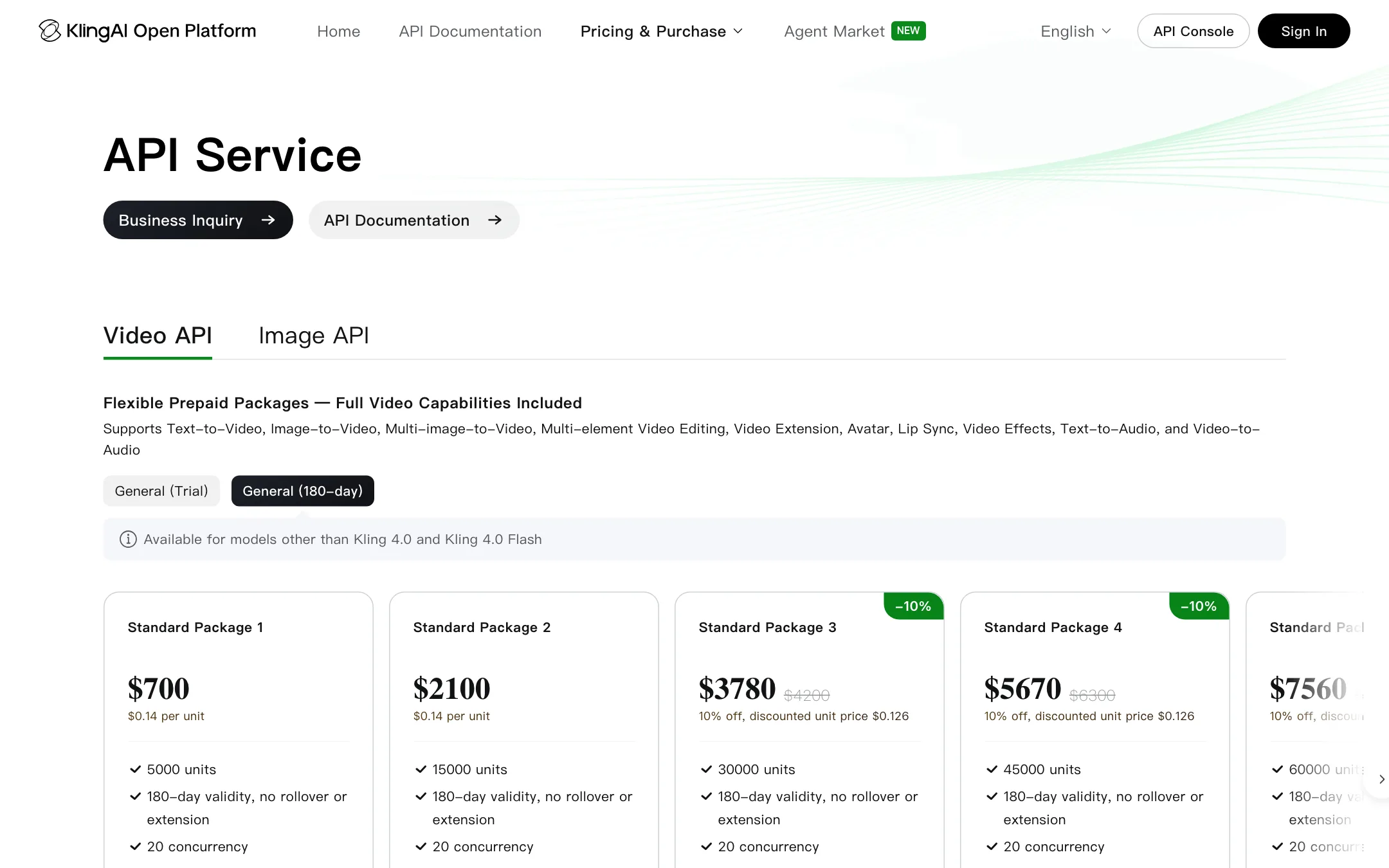
The developer platform is separate. Packs start at $700 for 5,000 units, or $0.14 a unit, valid for 180 days with no rollover. Bigger packs drop the unit price by 10%. Those general packs cover models other than Kling 4.0. Kling 4.0 is listed at 1 unit a second at 720p and 1.5 units at 1080p. If a unit costs the same $0.14, that is $0.14 and $0.21 a second, or about $2.10 for a 10-second 1080p clip. Kling 3.0 Turbo with audio is listed at 0.8 units a second.
Pros and cons in practice
Kling’s strengths are the model and the control around it. Long native takes, references, keyframes and sound in one pass mean fewer rerolls and less stitching in an editor. Buying direct also means you get new Kling versions first, often before resellers.
The weak spot is clarity on cost. The plan page leads with first-month prices, hides yearly prices behind a toggle and leaves clip costs to the app. None of that is unusual in this market, but it makes budgeting harder than on Runway, which publishes a per-model credit table. The jump from Pro to Premier is also steep, from $32.56 to $181.99 a month.
How Kling compares
Kling’s closest rivals are the other model makers: Runway, Google Veo, Hailuo, Vidu and PixVerse. Against Runway, Kling offers longer native clips and lower entry pricing, while Runway has the stronger editing suite and plugins for Premiere Pro and After Effects. Runway also resells Kling 3.0, so you can try it there, though at Runway’s credit rates.
Against Vidu and PixVerse, Kling is the more cinematic, director-led option. Vidu is strong on character references and anime, and PixVerse leans on viral templates and effects. If you mostly make short social clips, those can be cheaper per video.
Verdict
Kling is one of the most capable AI video tools you can buy, and you buy it from the company that builds the models. Kling 4.0’s 30-second clips, stereo audio and 15-asset Omni Reference give you real control over a shot, and the apps and API cover almost every way you might want to work.
The catch is pricing clarity. Start on Standard, watch the credit cost the app shows for your usual settings, and only move to Pro once you know how many clips a month you really need.