
What PixVerse is
PixVerse is an AI video generator built by its own research team. It trains its own video models, and the current flagship is PixVerse V6. You type a prompt or upload an image and get back a short clip, often with sound.
It is the most-clicked text-to-video tool among our readers by a wide margin. That tracks with what PixVerse is good at. It makes AI video feel easy. You do not need to write a cinematic prompt. You can pick a template, drop in a photo and get something shareable in under a minute.
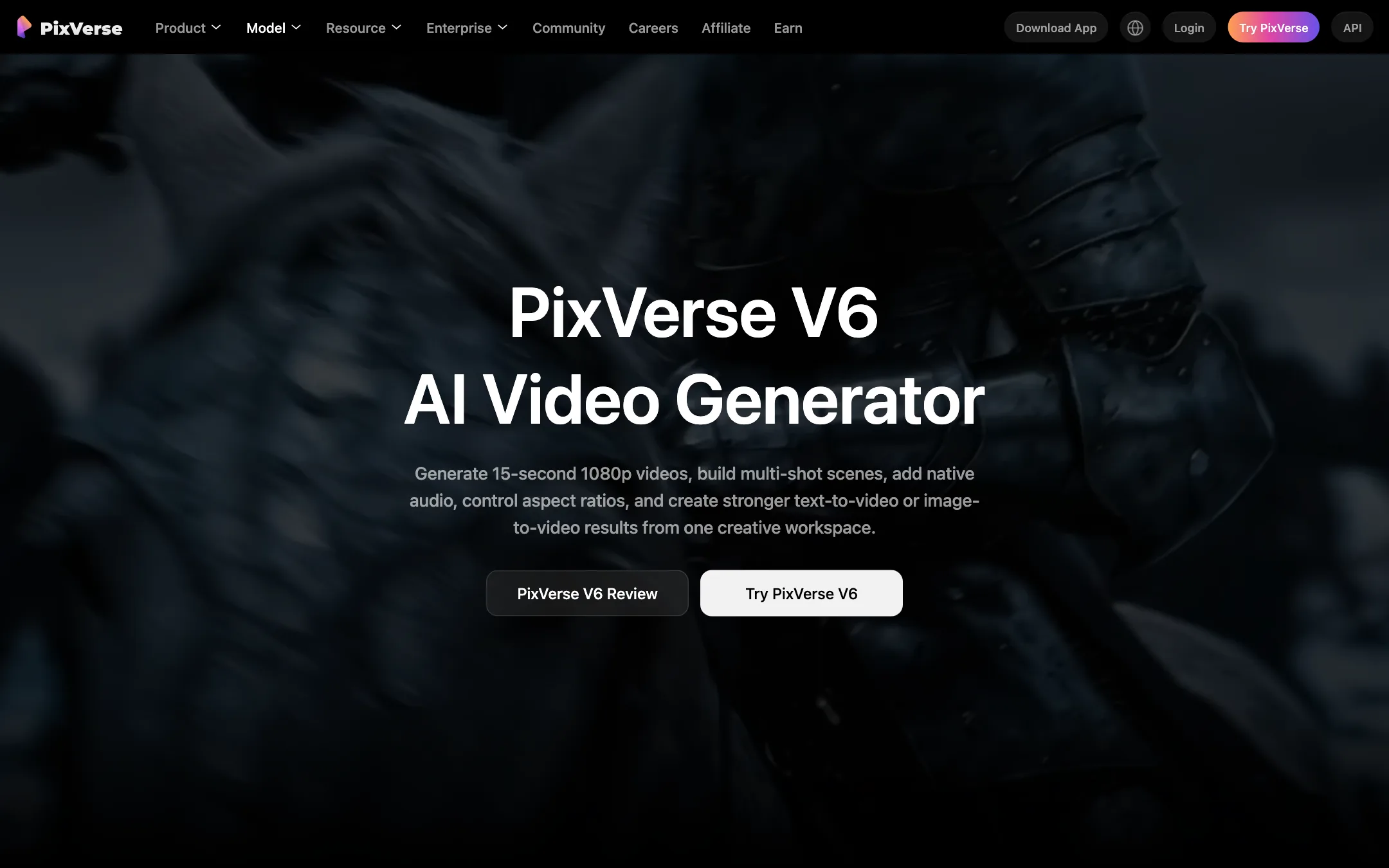
Underneath the templates there is a serious model. V6 generates clips up to 15 seconds at 1080p, plans several shots in one run and adds dialogue, effects and ambient sound.
Who it is for
PixVerse fits you if:
- You post on TikTok, Reels or Shorts and want effects, trends and quick visual hooks.
- You want to try AI video without paying first.
- You run ads or an online store and need lots of short variations fast.
- You like the idea of trying several models in one place without separate subscriptions.
Skip it if:
- You need consistent, long-form footage for a film or a client brand film. The big-lab models and dedicated studio tools give you more control.
- You need 1080p or 4K on a tight budget. The cheapest paid plan stops at 720p.
- You hate credit systems. PixVerse prices everything in credits, and the cost per clip moves with every setting.
How it works
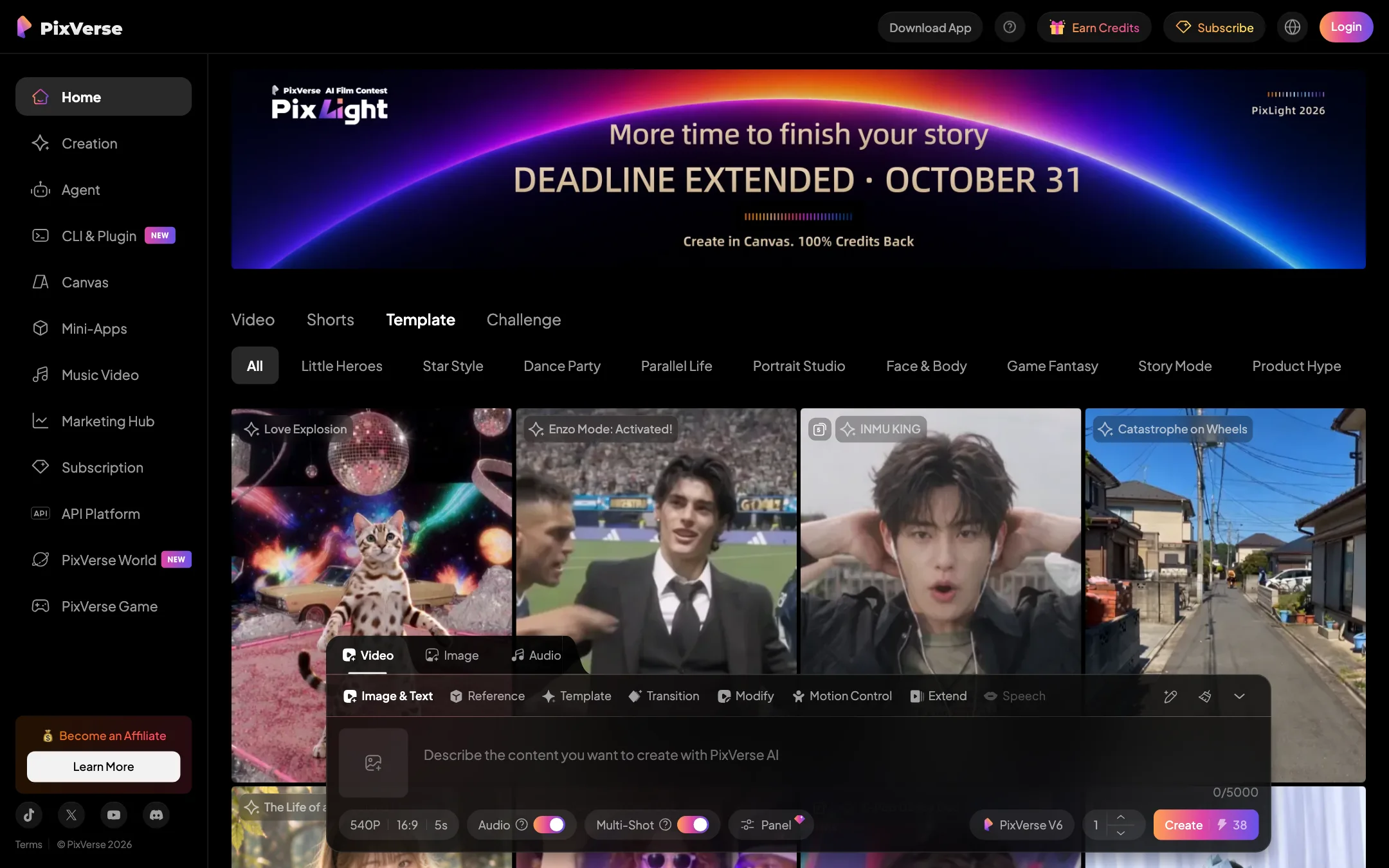
Everything lives in one composer at the bottom of the web app. Tabs along the top switch between video, image and audio. Under the video tab you get these modes:
- Image & Text: classic text-to-video, with an optional starting image.
- Reference: keep a character or object consistent by feeding in reference images.
- Template: apply a ready-made effect to your own photo.
- Transition: morph from one image to another.
- Modify: change part of an existing video.
- Motion Control: guide how the subject or camera moves.
- Extend: continue a clip past its original length.
Below the prompt box sit the settings that matter: resolution, aspect ratio, duration, an audio toggle, a multi-shot toggle and the model picker. The credit cost updates live on the Create button as you change them. With the defaults of 540p, 16:9, 5 seconds, audio and multi-shot on V6, it showed 38 credits.
A typical text-to-video run
- Pick V6 in the model picker.
- Write the scene like a note to a camera operator. Name the subject, setting, action, camera move, light and sound.
- Set the aspect ratio for where the clip will live. Use 9:16 for Shorts and 16:9 for YouTube.
- Turn multi-shot on if you want a short sequence instead of one continuous take.
- Hit Create. Paid plans get faster generation on PixVerse’s own models.
- Extend, modify or upscale the result if it is close but not quite there.
PixVerse’s own prompt advice is good. Use this structure: subject, setting, action, camera, light, sound, format. Vague prompts like “a cool city” give you vague clips.
Templates
The template gallery is where most new users start, and it is huge. Categories run from dance trends and portrait styles to game fantasy and product hype. You upload a photo, pick a template, and PixVerse does the rest.
This is PixVerse’s biggest strength and its biggest weakness. The templates make it easy to get a striking clip on day one. They also lean hard into memes, celebrity-style looks and viral gimmicks. Use them for social hooks. Do not expect them to fit a polished brand.
Agent, Canvas and Mini-Apps
PixVerse has grown well past a single prompt box:
- Agent lets you describe what you want in a chat. It splits your brief into several shots and generates them. You can then ask for changes in plain language.
- Canvas is a node editor. You connect prompts, reference images and settings into a graph, then rerun it. It suits teams that make the same kind of video over and over.
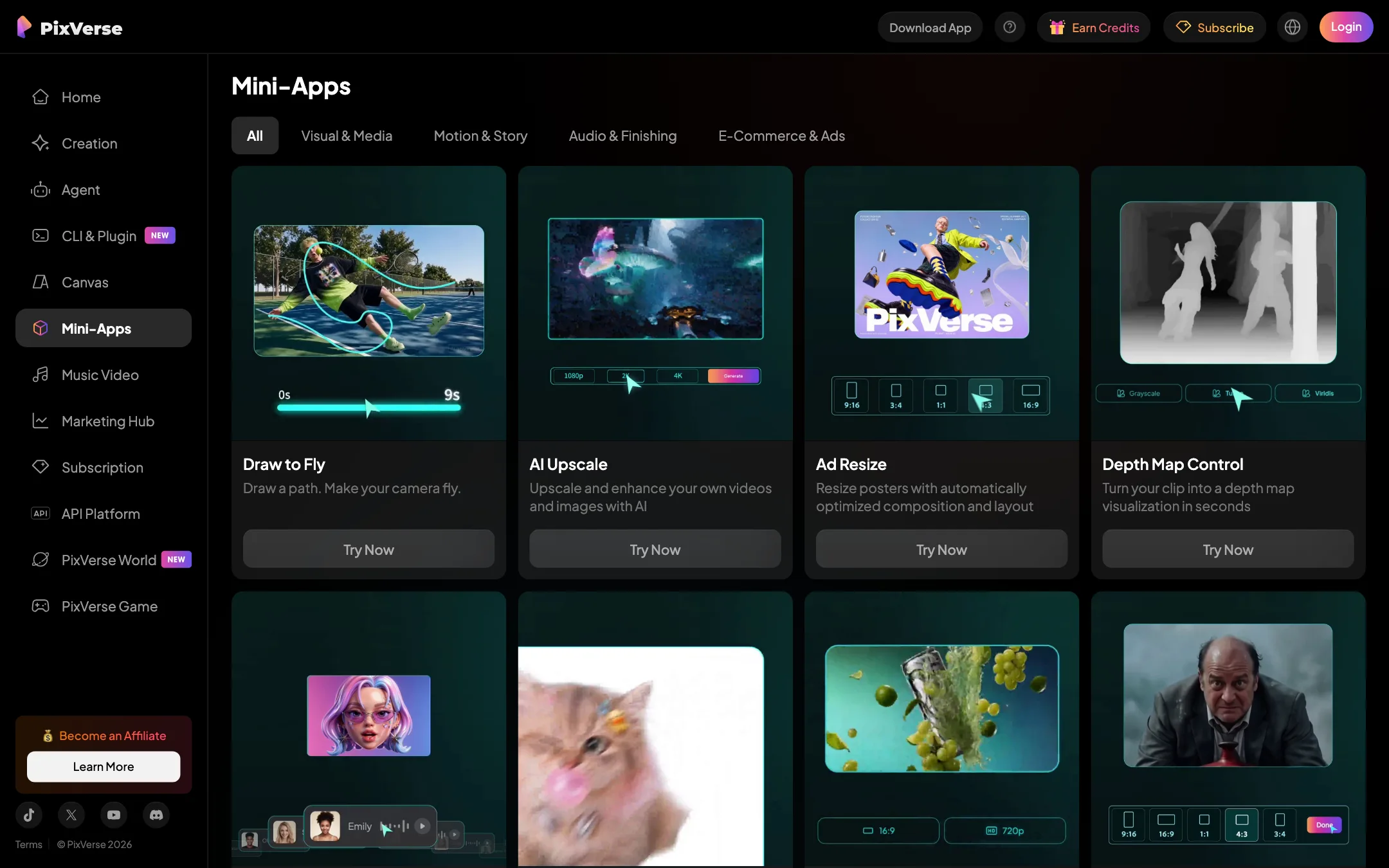
- Mini-Apps are single-purpose tools: AI upscaling, ad resizing for different placements, depth maps, and “draw to fly,” where you sketch a camera path.
- Marketing Hub walks you through product and e-commerce ads from a product image or URL.
- CLI and API let developers generate from a terminal or their own app.
You do not need any of these to get value from PixVerse. They are there when your needs grow.
Output quality
V6 is a strong model on paper. PixVerse cites an Elo score that places it alongside Grok Imagine on the Artificial Analysis image-to-video leaderboard, a public ranking based on blind viewer votes. Treat any leaderboard as a snapshot, since positions shift every few weeks.
Where PixVerse aims V6:
- Stylized and social content. The template gallery shows its range across anime, game-style and surreal effects.
- Product shots. Its own examples focus on slow push-ins, orbits and studio lighting on a single object.
- Speed. Paid plans get a faster queue on PixVerse models, and PixVerse markets near real-time generation to API customers.
Where every model in this class still struggles:
- Hands and fine detail in busy scenes.
- Consistency across separate generations. PixVerse’s own FAQ addresses why V6 results vary between runs. Use reference images and multi-shot to keep things on track.
- Long continuous action. Fifteen seconds is long for AI video, but anything longer means extending or stitching clips.
If raw cinematic realism is your only goal, test Google Veo, Kling and Runway side by side with PixVerse. On Pro and above you can run Kling and other partner models inside PixVerse itself.
Pricing
PixVerse runs on credits. You get daily credits that expire at midnight UTC, monthly membership credits on paid plans, and bonus credits from packs that never expire.
| Plan | Price | What you get |
|---|---|---|
| Basic | Free | 60 starter credits, 30 a day, 540p, watermark |
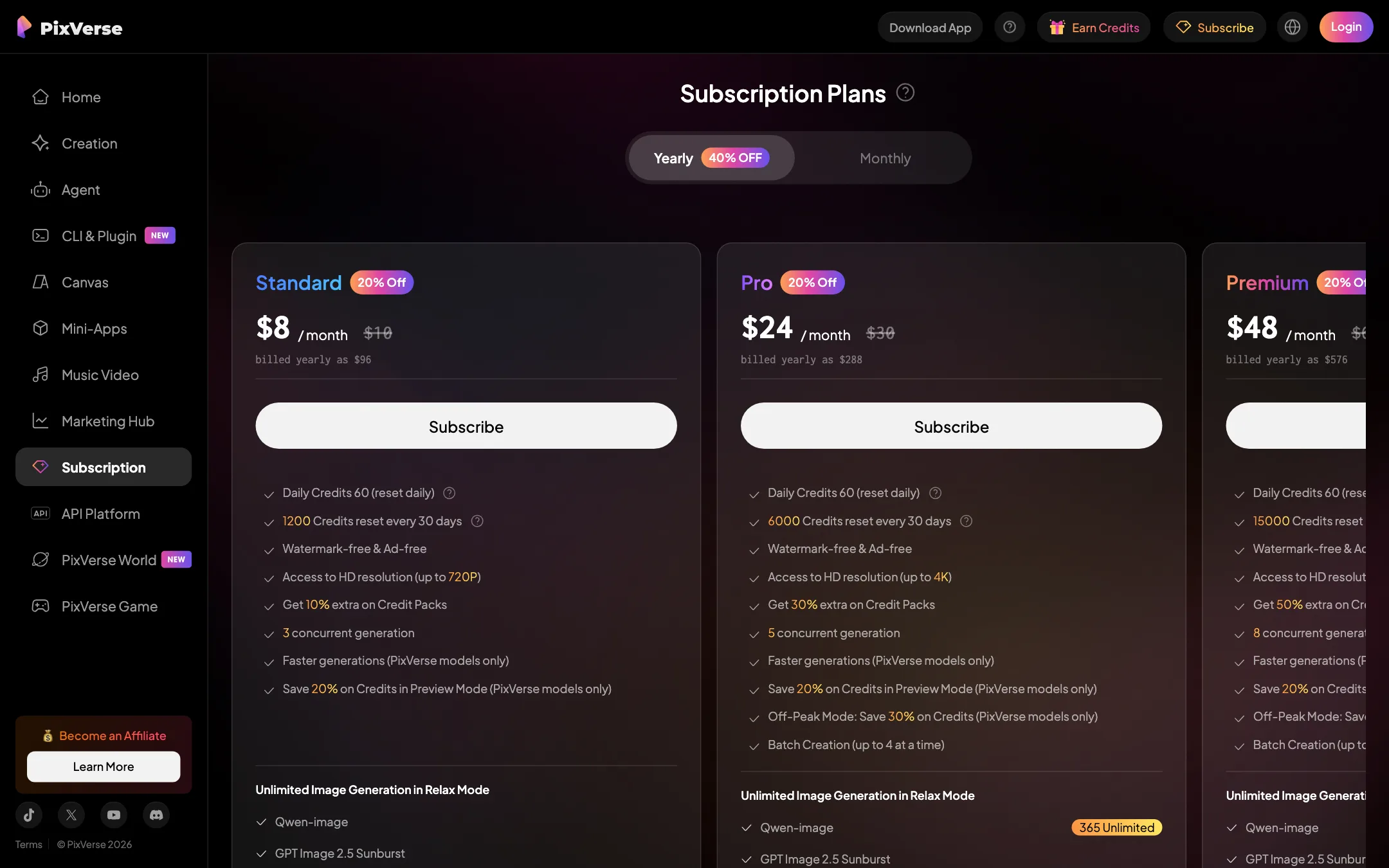
| Standard | $8/mo yearly, $10 monthly | 1,200 credits a month + 60 a day, 720p, no watermark |
| Pro | $24/mo yearly, $30 monthly | 6,000 credits, up to 4K, partner models |
| Premium | $48/mo yearly, $60 monthly | 15,000 credits, 4K, bigger off-peak discount |
| Ultra | $149/mo yearly, $249 monthly | 25,000 credits, unlimited off-peak on PixVerse models |
A few things the pricing page does not make obvious:
- The free tier is real but thin. Thirty daily credits do not cover one default clip with audio. You build up credits over a couple of days or start with the 60-credit sign-up bonus.
- Standard stops at 720p. If you need 1080p or 4K, Pro is the real starting plan.
- Off-peak mode is the hidden value. Pro saves 30%, Premium 50%, and Ultra makes PixVerse-model generations free off-peak. If you can queue work overnight, the higher plans pay for themselves fast.
- Partner models cost more. Running Seedance or Kling inside PixVerse uses credits at those models’ own rates.
How to make your credits go further
Credits disappear fast if you generate blind. A few habits make a real difference:
- Spend daily credits first. They expire at midnight UTC whether you use them or not. Membership credits expire at the end of each 30-day cycle. Bonus credits from packs never expire, so save those for last.
- Draft in Preview Mode. Paid plans save 20% on PixVerse models in Preview Mode. Use it to check composition and motion, then render the keeper at full quality.
- Start short and small. Test a prompt at 5 seconds and 540p before you commit to 15 seconds at 1080p. The cost on the Create button climbs with every step up.
- Turn off what you do not need. Audio and multi-shot both add to the cost. If the clip is going under music in an editor, switch audio off.
- Queue big jobs off-peak. On Pro and above, off-peak discounts range from 30% to free. Batch creation lets you queue four variations at once.
- Buy packs on a paid plan. Standard adds 10% bonus credits to every pack, Pro 30%, and Premium and Ultra 50%. If you top up often, a higher plan can cost less overall.
Watch the model picker, too. Partner models such as Seedance or Kling are charged at their own rates, and off-peak discounts apply only to PixVerse’s own models. Use them when you need their look, not by default.
Refunds
PixVerse refunds only an unused, active subscription. Credit packs are never refunded. Bad generations are never refunded. Spend your free credits testing the exact kind of clip you need before you pay.
Verdict
PixVerse is the best place to start with AI video if you make social content. The free tier lets you try it properly, templates give you good results without prompt skills, and V6 holds up when you do write a proper prompt.
It is less of a fit if you need long, consistent footage or high resolution on the cheapest plan. Budget for Pro if 1080p matters. If you can live with 720p, Standard at $8 a month is one of the cheapest ways to get watermark-free AI video.