What Checksub is
Checksub is a web app for subtitles, subtitle translation and AI dubbing. You upload a video. It transcribes the speech, lets you fix the text, translates it, and can then replace the original voice with an AI voice in another language.
It is made by a small French team and has been around for a while. Checksub says it has spent six years building the platform, and its homepage claims more than 153,000 videos processed and 500+ companies as customers. Those numbers come from Checksub, so treat them as marketing.
The product sits in two of our categories. It started as a subtitle tool, and that is still the core. Dubbing, voice cloning and lip-sync were added on top and live on the more expensive plan.
Who it is for
Checksub fits you if:
- You publish training videos, courses or webinars and need them in a few languages.
- You run a YouTube channel and want translated subtitles or dubbed versions of your back catalog.
- You want subtitles you can edit carefully, not just flashy word-by-word captions.
- You like predictable costs. Checksub prices everything in minutes of video.
Skip it if:
- You only make 30-second TikToks and want viral animated captions with emojis. A short-form caption tool such as Submagic is built for that.
- You need many translations of the same video on a self-serve plan. Junior and Starter allow one translation per project.
- You need dubbing on a small budget. The plan that includes dubbing starts at $48 a month billed yearly.
- You need several people in one account without talking to sales. Both self-serve plans are single-user.
How it works
The workflow is linear, and Checksub is strict about the order.
- Upload your video. Checksub says it accepts every common format, including MP4 and MOV. Paid plans allow files up to 4GB.
- Generate subtitles in the original language. This step always comes first. Checksub’s FAQ explains that translating straight from audio gives worse results, so it transcribes, then translates the transcript.
- Edit the subtitles. The editor shows the text, timing and video together. Checksub says you can edit and regenerate any sentence.
- Translate. Pick a target language and Checksub machine-translates the subtitles. It says its translation is designed for subtitles, meaning it respects line length and timing.
- Dub, if you want. On Starter or higher, Checksub generates a new voice track for each speaker in the target language.
- Style and export. Burn the subtitles into the video, or download an SRT, VTT or TXT file. On Starter, you can also publish to a connected YouTube channel.
Script to subtitles
If you already have a script, Checksub can sync it to the video instead of transcribing from scratch. Checksub says this removes the need to proofread, since the words are already yours. Timing is the part to check.
Subtitle styles
Checksub offers fonts, colors, animations and templates for burned-in subtitles. One setting applies a karaoke animation, where each word lights up as it is spoken. Custom fonts and brand colors are listed on the plan table.
These styles are fine for social clips. They are not Checksub’s focus, and dedicated short-form caption tools offer more trendy presets, emojis and auto-zooms.
AI dubbing
This is the newer half of the product. Checksub describes its dubbing in four parts:
- Per-speaker voices. It generates a separate dubbed voice for each speaker in the video.
- Voice isolation. It separates the voices from the music and background noise, then replaces only the voices. The ambience stays.
- Voice cloning. It can make the dubbed voice sound like the original speaker. Checksub says this works in 30 languages.
- Lip-sync (beta). It adjusts the speaker’s mouth to match the new language. You can regenerate the lip-sync after editing the translated script.
The dubbing editor lets you change the text, timing and even the delivery of each line, then regenerate that part. That editability is Checksub’s main pitch against one-click dubbing apps.
All of the dubbing claims come from Checksub’s own pages. Voice quality and lip-sync are the parts most worth testing in the trial before you pay.
The language numbers do not agree
Checksub’s site gives at least five different language counts:
- The meta description says more than 180 languages.
- The homepage says translation in 200 languages.
- The Enterprise plan lists 187 languages.
- The dubbing page says “80 other languages” in one section and “more than 120 languages available” in another.
- Voice cloning is listed for 30 languages.
The likely reading is that subtitle translation covers the most languages, dubbing fewer, and voice cloning fewer still. Checksub does not spell this out on the pages we checked, and its “languages supported” link returned a not-found page. If you need a less common language, confirm it in the trial.
Pricing
Checksub charges in minutes of credit. The rules are published on the pricing page:
- Subtitles: 1 minute of credit per minute of video.
- Each translation: 1 more minute per minute of video.
- Dubbing: 3 minutes of credit per minute of video.
- Lip-sync: 5 minutes of credit per minute of video.
So a one-minute video translated into three languages uses four minutes: one for the transcription and three for translations. Checksub also links a Google Sheet estimator to plan your usage.
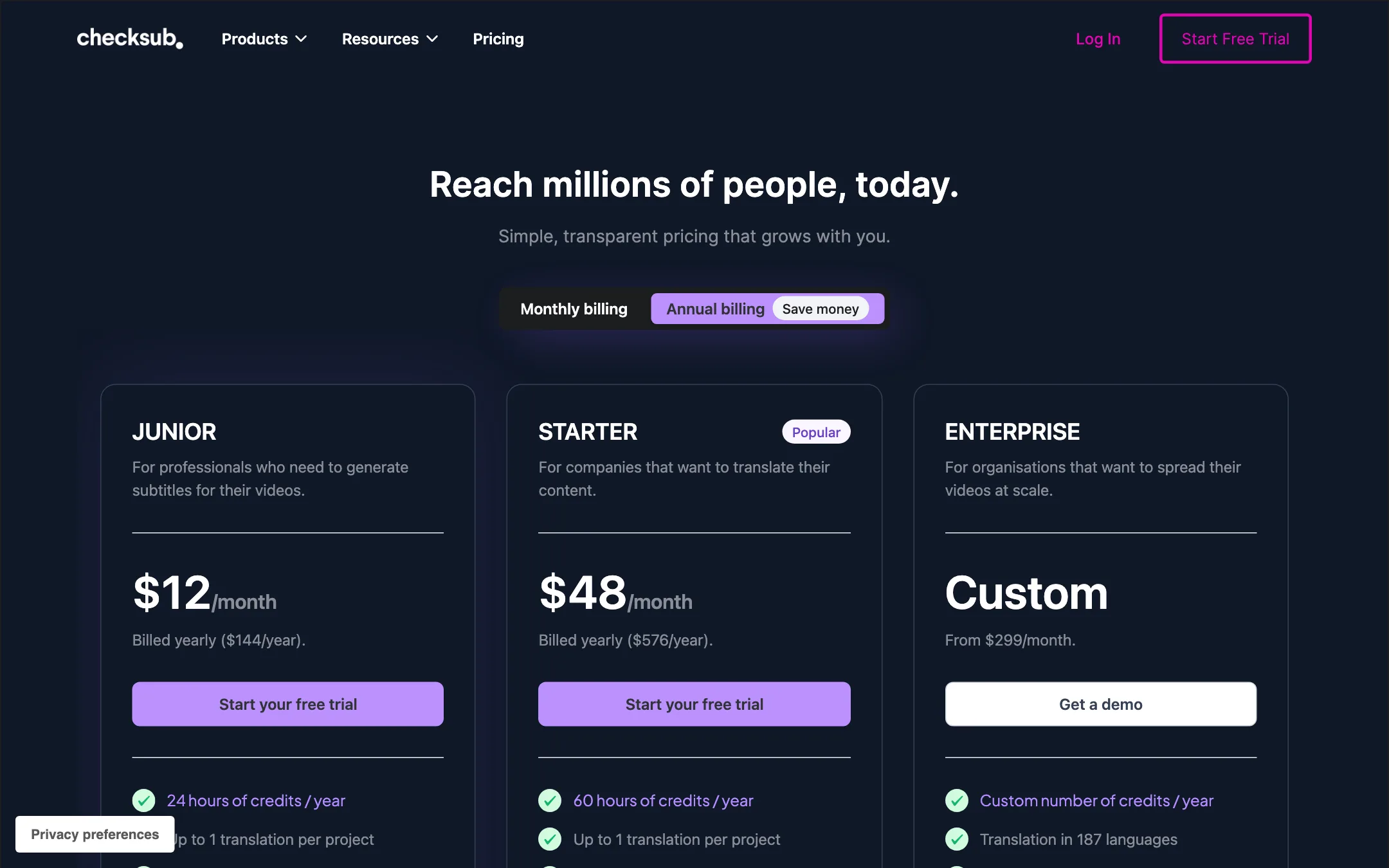
| Plan | Price | What you get |
|---|---|---|
| Free trial | Free | Credits for about 1 hour of video, all features, no subtitle file download |
| Junior | $12/mo yearly, $18 monthly | 24 hours a year or 2 hours a month, subtitles and translation, SRT/VTT |
| Starter | $48/mo yearly, $59 monthly | 60 hours a year or 5 hours a month, no watermark, dubbing, voice cloning, lip-sync beta |
| Enterprise | From $299/mo, billed yearly | Custom credits, 187 languages, API, account manager |
A few things the pricing page does not make obvious:
- Yearly billing gives you a pool, not a monthly drip. Junior yearly gives 24 hours for the year. If your volume is lumpy, Checksub itself recommends the annual plan for this reason.
- Rollover is generous. Unused yearly credits carry into the next year while your yearly plan is active. Monthly credits are kept for six months.
- Junior is subtitles only. It has no dubbing, and only Starter lists “No watermark,” so expect Junior’s burned-in exports to be watermarked. Check this in the trial if you plan to export finished video rather than SRT files.
- Dubbing eats hours fast. At 3 minutes of credit per minute, Starter’s 5 monthly hours cover about 100 minutes of dubbed video. With lip-sync on top, far less.
- One translation per project. On both self-serve plans, a project can have one translation. For more languages, you either duplicate the project or talk to sales.
- No pay-per-project option. Checksub says it is built for regular users. For a single project, you subscribe monthly and cancel after.
How to use the trial hour well
An hour of credit goes fast once translation and dubbing are involved. A few habits help:
- Test with a short clip. Two or three minutes is enough to judge transcription accuracy on your own voice and accent.
- Pick your hardest language pair. If the tool handles it, the easy ones will be fine.
- Try one dubbed minute. At 3 minutes of credit per minute, a short dubbing test still leaves room for subtitles.
- Check the export. Download the burned-in video and confirm the watermark and quality match what you need.
Cancelling is self-serve from your dashboard. Your plan runs to the end of the period you paid for.
Weak spots to know about
- The good stuff is on Starter. Dubbing, voice cloning, lip-sync, watermark-free export and YouTube publishing all start at $48 a month yearly. Junior is a subtitle tool and nothing more.
- Lip-sync is still beta. It has carried that label on the pricing page and dubbing page, and it costs the most credits.
- Social proof is old. The reviews quoted on the homepage are dated 2022, and the footer copyright says 2025. That does not mean the product is stale, but it is worth knowing.
- A few dead links. Footer pages such as languages supported and API returned not-found pages when we checked. The pricing and dubbing pages worked.
Alternatives
- Hello8 focuses on proofread subtitles in many languages for agencies and documentary teams.
- Submagic is the better pick for short-form creators who want animated captions, B-roll and clipping.
- Snapvid suits talking-head creators who want styled captions and smart cuts, especially in French.
If dubbing is your main need rather than subtitles, look at the dedicated dubbing tools in our dubbing and voice category.
Verdict
Checksub is a solid subtitle and translation tool with a clear credit system and a real editor. If you translate courses, training or YouTube videos on a regular schedule, the minutes-based pricing and yearly rollover make it easy to budget.
The dubbing side is promising on paper but costs $48 a month at minimum and leans on a beta lip-sync. Use the free trial hour to test your own language pair, your own voices and the export you need before you commit.