What HitPaw VikPea is
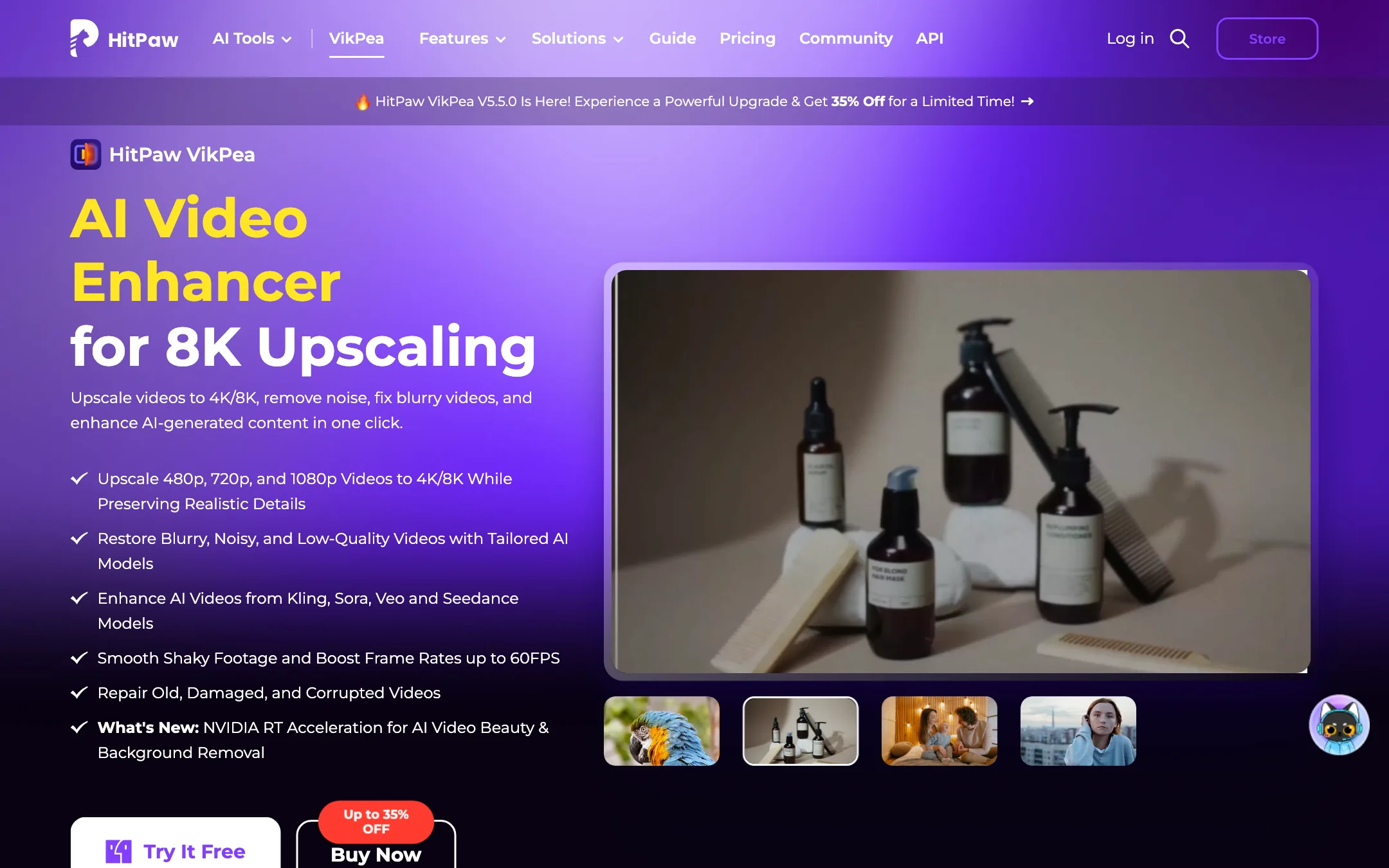
HitPaw VikPea is a desktop AI video enhancer for Windows and Mac. You load a clip, pick an AI model that matches the footage, preview the result and export a sharper, cleaner version. HitPaw says it can take 480p, 720p or 1080p video up to 4K or 8K.
It used to be called HitPaw Video Enhancer. HitPaw renamed it on 29 October 2024 and is now on version 5.5. The rename came with cloud rendering, 8K models and a pitch aimed at people who make clips with AI video generators and want to clean them up afterwards.
HitPaw makes a lot of software. This review covers VikPea only. The company’s timeline editor, HitPaw Edimakor, has its own review, and its photo enhancer FotorPea, converter Univd and voice changer VoicePea are separate products with separate licenses.
Everything below comes from HitPaw’s public product, pricing, support and affiliate pages, checked on 2026-10-21. We did not install or run VikPea for this review, so quality claims are HitPaw’s.
Who it is for
VikPea fits you if:
- You have old family tapes, VHS transfers or camcorder footage that looks soft and noisy on a modern TV.
- You shoot on a phone in low light and want to rescue grainy clips.
- You make AI videos in Kling, Veo, Sora or Seedance and want to upscale the 720p or 1080p output before you publish.
- You want one-click results from a model list, not a node graph or a page of sliders.
- You prefer software that runs on your own computer.
Skip it if:
- You need a free tool. The free version cannot export.
- You need a timeline editor. VikPea enhances clips; it does not cut them together.
- You are on a Mac and price-sensitive. The Mac plans cost more than the Windows ones.
- You do high-end finishing work and want fine control over each model’s parameters. Topaz Video is the usual pick at that level.
How it works
HitPaw describes a three-step flow:
- Import your video. VikPea accepts MP4, MOV, MKV, AVI, FLV, WMV and other common formats, per HitPaw. You can load several files for batch processing.
- Pick an AI model. Each model targets a type of problem or footage. HitPaw also has an “AI Pilot” option that is meant to choose for you.
- Preview and export. Check a short preview against the original, then export at the resolution you want.
The model list is the heart of the product. HitPaw’s pricing table names these:
- General Restoration and UHD Restoration for overall cleanup and upscaling.
- AI Generative Model for rebuilding detail more aggressively.
- Portrait, Portrait Restoration and Portrait Generation for faces.
- Video Quality Repair for heavily compressed or damaged clips.
- HD Sharpen and Fast Sharpen for soft footage.
- Animation for cartoons and anime.
- Professional Decompression, Denoise and Sharpen for targeted fixes.
Alongside those sit separate tools for frame interpolation, stabilization, AI colorizing, color enhancement, low-light enhancement and SDR to HDR conversion. There is also a video repair tool for files that will not play, and a background remover.
Frame rate and stabilization
HitPaw says the frame interpolation model turns 15 or 30 FPS footage into 60 FPS. One FAQ answer on the same page goes further and says 24 FPS can go to 60 or 120 FPS. The main feature list only mentions 60 FPS, so treat 120 as possible but unconfirmed.
The stabilization model targets handheld and action-camera shake. HitPaw pitches it at GoPro users and sports footage.
Cloud rendering
Upscaling to 4K or 8K is slow on an average laptop. VikPea offers cloud accelerated rendering, which HitPaw says sends work to remote hardware alongside your own machine. Its product page shows a sample job dropping from over three hours on one GPU to 18 minutes on four. That is a vendor example, not a benchmark you can rely on. HitPaw recommends cloud rendering if your CPU or GPU is weak or you are on a deadline.
Cloud rendering means your footage leaves your computer. If you work with client or private footage, check HitPaw’s privacy policy first.
The video generator
VikPea’s plan list now includes “Generate videos with Seedance 2.5, Kling, VEO 3.” So the enhancer also resells third-party AI video models, paid for with credits. HitPaw does not train these models. If generation is your main goal, a dedicated generator or the model makers’ own apps will give you more control, and you can still bring the output into VikPea to upscale it.
Other tools in the app
HitPaw’s product page also lists background removal with more than 100 template backgrounds and an “invisible watermark removal” tool. Only remove watermarks from footage you own or have rights to. Removing someone else’s watermark can break their license or the law.
Output quality
HitPaw’s examples focus on four kinds of footage:
- Old home video and VHS. Its own FAQ says the AI works best on archival tapes, low-light phone clips and grainy AI-generated video.
- Faces. The portrait models are meant to recover skin and facial detail in soft footage.
- Compressed downloads. The decompression and repair models target blocky, over-compressed files.
- AI-generated clips. HitPaw says VikPea can sharpen and upscale output from Kling, Sora, Veo and Seedance.
What to expect from any AI upscaler, including this one:
- Invented detail. Generative upscalers guess at texture that was never recorded. Faces and text can come out looking slightly off. Always compare against the original before you deliver.
- Flicker. Frame-by-frame enhancement can shimmer between frames on fine textures.
- Long renders. 8K output on local hardware can take hours for a short clip.
Run the free preview on your worst footage before you buy. It is the only way to know whether the models suit your material.
Pricing
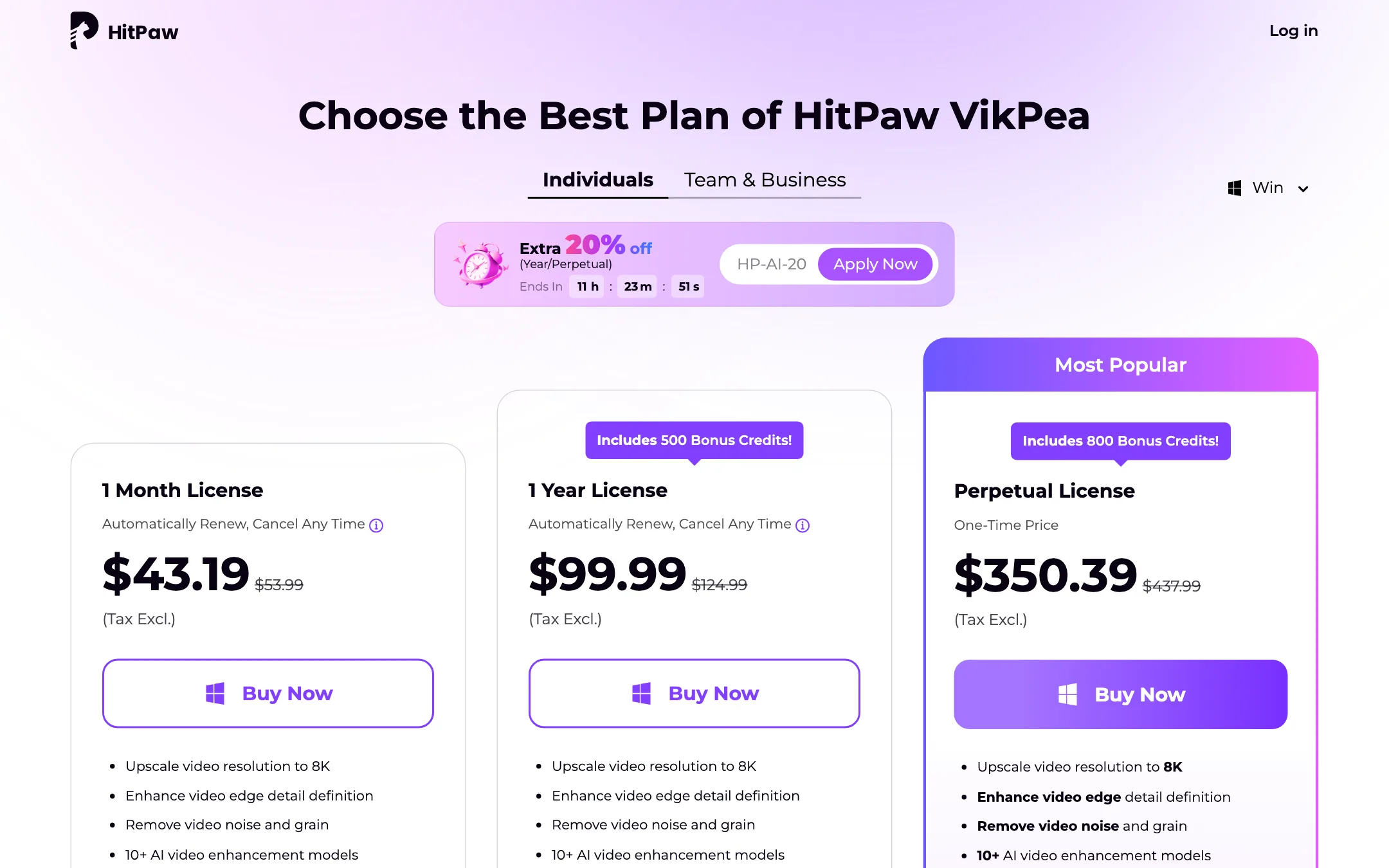
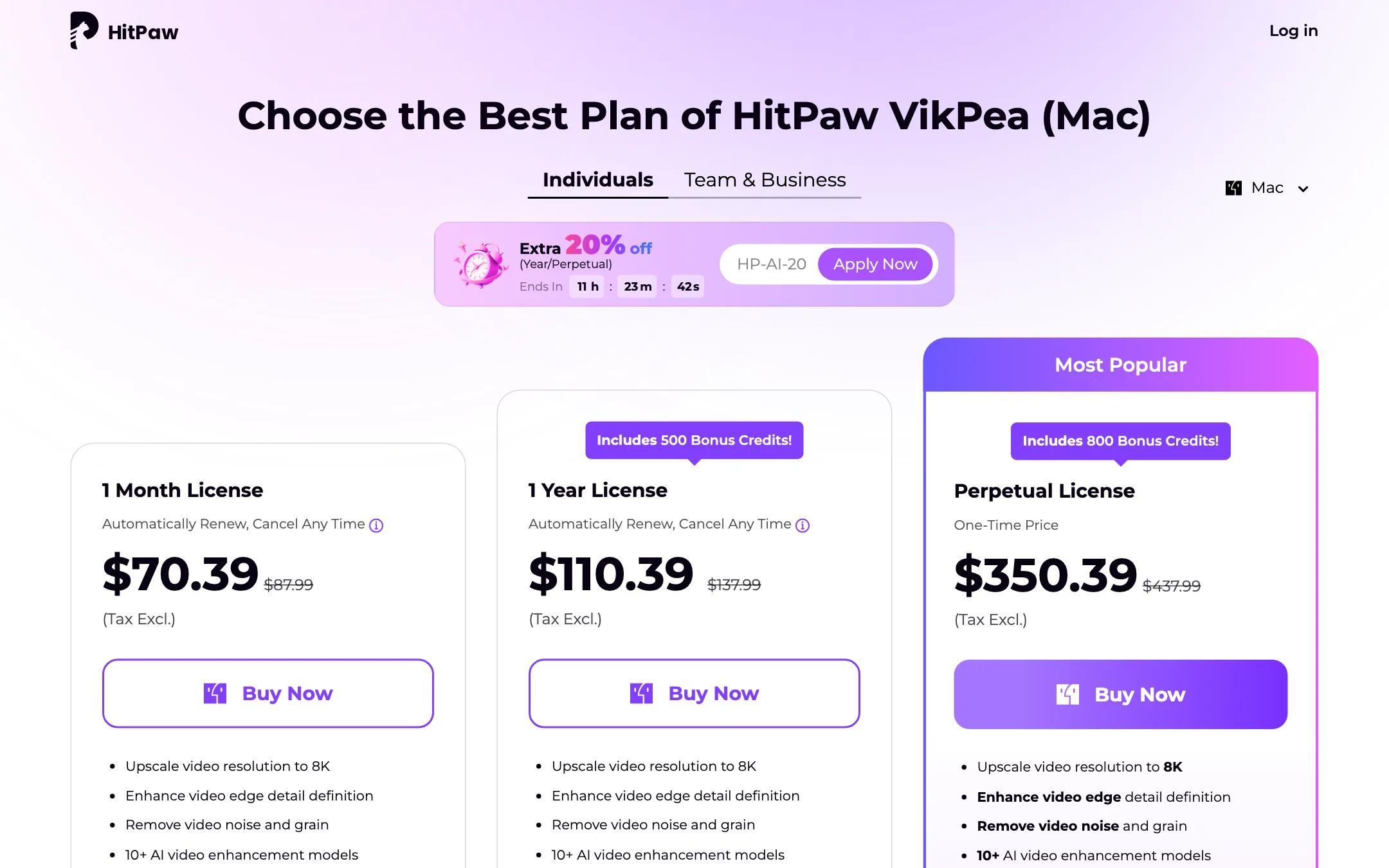
VikPea sells as a subscription or a one-time license. Prices below are the sale prices HitPaw showed on 2026-10-21, with an “extra 20% off” code and a countdown timer.
| Plan | Windows | Mac | Bonus credits |
|---|---|---|---|
| 1 Month | $43.19 | $70.39 | Not stated |
| 1 Year | $99.99 | $110.39 | 500 |
| Perpetual | $350.39 | $350.39 | 800 |
A few things the pricing page does not make obvious:
- The free version is a preview only. HitPaw’s purchase FAQ says the free license supports previews and you need a paid license to export. The product FAQ calls this a free trial with no time limit.
- Some models cost credits on top of your license. The comparison table marks the UHD Restoration, AI Generative and Portrait models as “export with credits”, with three free previews. The yearly and perpetual plans come with bonus credits; HitPaw does not list per-clip credit costs on the public page.
- Mac costs more. The Mac monthly plan is about $27 more than Windows. The perpetual price is the same on both.
- Licenses are platform-locked. A Windows license does not work on a Mac.
- Perpetual covers the current major version. Subscriptions get major upgrades during the term; the perpetual license gets updates “within the current big version” only.
- The sale never seems to end. The struck-through “regular” prices are 25% higher, and the countdown resets. Judge the price you see, not the discount.
The yearly Windows plan works out to about $8.33 a month, which is cheap for a desktop upscaler. If you only have one box of tapes to restore, a single month may cover it.
HitPaw also sells an enhancement API with an MCP server for developers. Its pricing card offers 5,000 free credits, while the FAQ on the same page says 1,000. Paid API credits start at $9.90.
Refunds
HitPaw advertises a 30-day money-back guarantee. Its FAQ adds that you are entitled to a refund if support cannot solve your problem, which is narrower than “no questions asked”. Use the free preview to check your footage first.
Trust and claims
HitPaw’s marketing numbers are loose. On its homepage it says “Over 5 billion reviews from our users” next to a Trustpilot score, which cannot be right. The same page says 1.5 million creators, “over 2 million professionals” and 7.3 million users. The VikPea page shows a “22.9% Satisfaction” stat beside the 98% on the homepage. The Mac spec lists “Apple M-series processor from 2015 onward”, though Apple’s M-series chips arrived in 2020. None of this says the software is bad. It does mean you should rely on your own preview, not the numbers.
Alternatives
- Topaz Labs is the long-running AI upscaler, with a local desktop app and a browser app for AI clips.
- AVCLabs is the closest match: a desktop upscaler and restorer with similar models and pricing.
- Winxvideo AI bundles upscaling, stabilization and frame interpolation with a converter on Windows.
Verdict
HitPaw VikPea is an easy way to upscale and clean up video on your own computer. The model list covers most real problems, from VHS noise to shaky action-cam clips, and the yearly Windows plan is fairly priced.
Go in with your eyes open. The free version cannot export, the strongest models cost credits, Mac users pay more, and HitPaw’s marketing is full of numbers that contradict each other. Test the preview on your hardest footage. If it looks good there, the yearly plan is a reasonable buy.

