
What Hailuo AI is
Hailuo AI is the video app from MiniMax, a Chinese AI lab that also builds language, speech and music models. MiniMax trains its own video models and puts them in Hailuo first. The current flagship is MiniMax H3, which MiniMax also calls Hailuo 3.0.
MiniMax released H3 at the end of July 2026 and announced it as open source on August 3. MiniMax describes it as a “general-purpose omni-modal” video model. In plain terms, one model takes text, images, video and audio together, and handles jobs that used to need separate tools: text to video, image to video, first and last frames, subject reference, motion reference and editing. MiniMax says it outputs 2K video up to 15 seconds long with stereo sound.
Hailuo is more than the one model. The app also offers the older Hailuo 2.3, 2.3-Fast, 02 and 01 models, the third-party Wan 3.0, image and audio generation, an agent, and a large gallery of one-tap templates.
Who it is for
Hailuo fits you if:
- You want a capable video model from a major lab at a lower price than the premium suites.
- You need consistent characters. H3 accepts up to 12 references in one generation.
- You want sound in the same pass, without a separate audio tool.
- You make social content and like ready-made templates and effects.
- You build products and want cheap per-second API pricing.
Skip it if:
- You need to see full pricing before you sign up. The plan table sits behind sign-in.
- You want editing tools for real footage, plugins and team review features. Runway is stronger there.
- You need native 4K. Hailuo’s top setting on H3 is 2K.
How it works
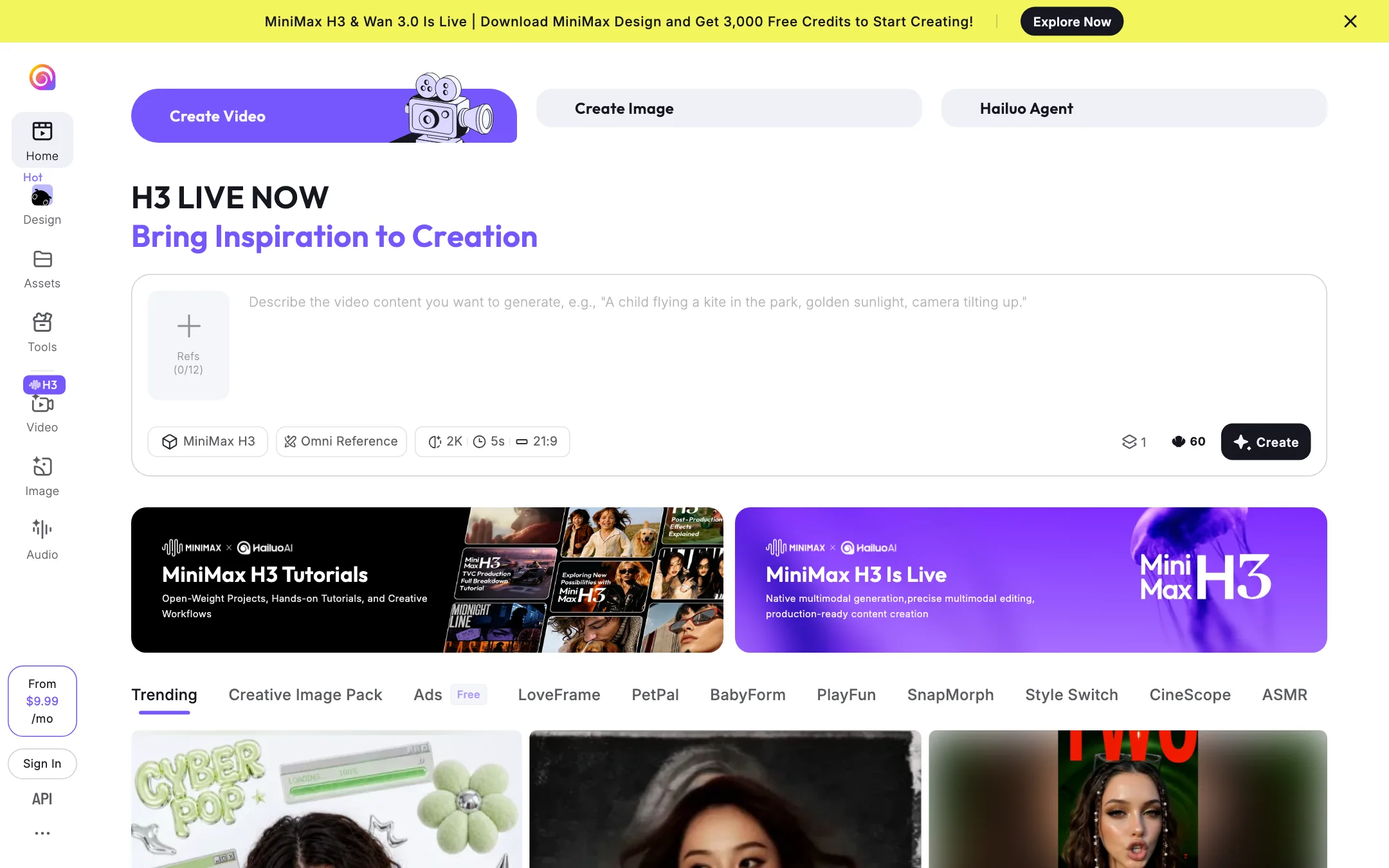
Hailuo’s homepage is the generator. A prompt box sits at the top with a model picker, a reference slot and settings.
Creating with H3
Type a prompt, such as the homepage’s own example of a child flying a kite at golden hour. Then pick your settings. When we loaded the homepage, the defaults read MiniMax H3, Omni Reference, 2K, 5 seconds and 21:9, with a slot for up to 12 references. You can attach images, video or audio as references and describe how they relate in plain language.
MiniMax’s launch example combined camera movement from one video, a character from one image and a vocal track from an audio file. Because H3 also edits, you can feed it an existing clip and describe the change rather than starting over.
Older models and Wan
Hailuo 2.3 and 2.3-Fast remain in the app. AI Academy reports they cost fewer credits than H3 for 1080p clips, which makes them useful for drafts. Hailuo also offers Wan 3.0, a model from another lab, inside the same app.
Hailuo Agent, image and audio
Hailuo Agent builds videos through conversation. The Image and Audio tabs generate stills and sound, so you can make a character image first and animate it after. MiniMax also promotes a separate app, MiniMax Design, with a sign-up bonus of 3,000 free credits.
Templates
The Trending gallery holds one-tap effects with names like LoveFrame, PetPal, BabyForm, Style Switch, CineScope and ASMR. You upload a photo and get a styled clip. These are built for social posts, not production work.
Apps and API
Hailuo runs on the web and has iOS and Android apps. The App Store listing comes from a MiniMax company, and Hailuo has warned about fake copies, so download from links on its own site. Developers reach the same models through the MiniMax API platform.
Output quality
We have not run Hailuo ourselves for this review. What the sources say:
- MiniMax’s own claims. MiniMax reports strong instruction following, text and brand rendering, and video-to-video motion transfer in early testing. Those are vendor claims.
- Third-party rankings. Segmind reports that Artificial Analysis ranked H3 first for video editing and in the top three for text to video and image to video. Rankings move fast, so check the current leaderboard.
- 2K by default. H3 renders 2K natively and uses its own regeneration step rather than a separate upscaler, according to MiniMax. That is sharper than 1080p but below the native 4K that Kling offers.
- Open weights. MiniMax announced H3 as open source. That matters to developers and researchers more than to app users, but it means you can inspect and run the model outside Hailuo.
Pricing
This is the hardest part of Hailuo to pin down. The public homepage shows only “From $9.99/mo.” The full plan table appears after sign-in, and we do not sign in for reviews. The figures below come from AI Academy’s review, which read Hailuo’s pricing page on 10 October 2026. Third-party reports disagree with each other, so treat them as a guide.
| Plan | Regular price | Promo price | Credits a month |
|---|---|---|---|
| Standard | $14.99 | $7.99 | 1,000 |
| Pro | $54.99 | $24.99 | 4,500 |
| Master | $94.99 | $63.99 | 10,000 |
| Ultra | $124.99 | none listed | 12,000 |
| Max | $199.99 | none listed | 20,000 |
Note the gap: the homepage says $9.99, while the reported Standard price is $14.99 regular or $7.99 on promotion. The $9.99 figure may be a yearly-billed rate or a newer price. Check the modal when you sign up.
What AI Academy reports about the terms:
- Promo prices end. The lower prices revert to the regular price when the offer ends.
- Watermark-free downloads and full commercial rights come with paid plans.
- 10-second 1080p clips need Pro or higher on Hailuo 2.3.
- No refunds. Hailuo does not currently support them.
- Top-up credits expire on December 31 of the year after purchase.
- Failed generations do not cost credits.
What the credits buy
AI Academy reports these per-clip costs on Hailuo 2.3:
- 80 credits for a 6-second 1080p clip.
- 50 credits for the same clip on 2.3-Fast.
- 25 credits for a 6-second clip at 768p.
So Standard’s 1,000 credits buy about 12 six-second 1080p clips, 20 on Fast, or 40 at 768p. That is 72 seconds to 4 minutes of video a month. At the $14.99 regular price, a 1080p Hailuo 2.3 clip costs about $1.25.
For H3, the same review lists monthly allowances rather than per-clip costs: about 143 seconds at 768p on Standard, 643 on Pro, 1,500 on Master and 3,857 on Max. That is about 28 five-second H3 clips a month on Standard.
Hailuo’s own homepage gives one more clue. With the default settings of MiniMax H3, 2K, 5 seconds and one video, the prompt box showed a cost of 60 next to the Create button. If that is the credit cost, Standard’s 1,000 credits would buy about 16 five-second 2K clips, or 80 seconds a month.
API pricing
MiniMax publishes the API prices openly. H3 costs $0.08 a second at 768p and $0.13 a second at 2K. H3-Max costs $0.05 a second at 480p. A 10-second 2K clip costs $1.30, and the same clip at 768p costs $0.80. Upscaling a 768p clip to 2K costs $0.05 a second, so drafting at 768p and regenerating only the keepers saves money.
Pros and cons in practice
Hailuo’s appeal is value from a real model maker. H3 does a lot in one model, references and editing included, and MiniMax’s API prices are among the lowest we have seen for 2K video. The templates add an easy on-ramp for casual creators.
The downside is opacity. You cannot see the plan table or H3 clip costs without an account, outside reports disagree, and there are no refunds. That makes the free credits important: use them to see the real cost of the clips you make before you pay.
Affiliate program
Hailuo runs a public affiliate program. The page offers 10% commission rising to 30% on paid referrals, with no cap and a $10 minimum payout. Active partners get free Hailuo AI Pro and early access to new models, according to the page. Paid ads may not use Hailuo’s brand name or domain.
How Hailuo compares
Hailuo’s closest rivals are Kling, Runway, Vidu and PixVerse. Against Kling, Hailuo is cheaper on the API and has the open-weight H3, while Kling offers native 4K, 30-second clips and more control tools such as keyframes and Motion Control. Against Runway, Hailuo is far cheaper per second, but Runway’s editing suite, plugins and team features are deeper. Vidu is the closer match on price and reference-based consistency.
Verdict
Hailuo gives you a frontier-class model from a major lab, with 2K output, native audio, up to 12 references and editing, at prices that undercut most rivals. The API pricing is clear and low.
The consumer app is less clear. Start with the free credits, check the real H3 cost in the app, and remember that promo prices revert and refunds are not offered.