What Cliplama is
Cliplama is a text-to-video tool for faceless social channels. You describe a video in a sentence or paste your own script. You pick a voice style. Cliplama then builds a vertical video with AI images, GIFs, background music, transitions, narration and captions. When it is done, you can download it or schedule it to TikTok.
That is close to the whole product, and that simplicity is the main reason to use it. There are no templates to browse, no timeline to learn and no long settings panel. Its own tagline is “Create faceless videos that humans love to watch.”
Cliplama is a small operation. The terms of service name an individual as the company, support runs through a Gmail address, and the blog’s newest post is from September 2024. The site was up and the pricing was live when we checked on 2026-10-19, but you should expect a lean product rather than a fast-moving one.
Despite the name, Cliplama does not clip your existing videos. Like AiClips and AutoShorts, it generates new videos from text.
Who it is for
Cliplama fits you if:
- You want to test a faceless TikTok channel with as little setup as possible.
- You like the idea of describing a video in one line and getting something postable back.
- You want longer faceless videos as well as shorts. Cliplama makes videos up to six minutes.
- You prefer to buy credits once instead of subscribing.
Skip it if:
- You need YouTube Shorts or Instagram scheduling built in. Only TikTok works today.
- You want real control over scenes, footage or pacing. The editor only touches text and images.
- You want to repurpose your own recordings. Use a clipper instead.
- You want a vendor with a large team, live chat and a published refund policy.
How it works
Cliplama’s homepage sums up the flow: “Describe your video with text, select voice style and Cliplama will generate unique faceless video in seconds!”
In practice that breaks down into four steps:
- Describe the video. Write a short description of the topic, or paste a full script if you want control over the words.
- Pick a voice style. The Creator and Pro plans include ElevenLabs voices, which are among the more natural-sounding AI voices available. Free and Basic use Cliplama’s standard voices.
- Generate. Cliplama assembles images, GIFs, music, transitions and captions. Its FAQ says this usually takes one to two minutes.
- Edit lightly, then download or schedule. You can change text, text position and animations, and regenerate any image for 0.1 credit. Then download the file or schedule it.
Video lengths
Cliplama is one of the few faceless tools in this category that goes past one minute. Its credit system has three sizes:
- Short: up to 1 minute, 1 credit.
- Medium: 2 to 3 minutes, 2 credits.
- Long: 4 to 6 minutes, 3 credits.
That makes it usable for short YouTube videos as well as TikToks, though you will need to upload long-form videos to YouTube yourself.
Scheduling and automation
Cliplama can schedule any video up to a week ahead. Today that means TikTok only. YouTube is marked “coming soon” on both the homepage and the FAQ, and the site does not give a date.
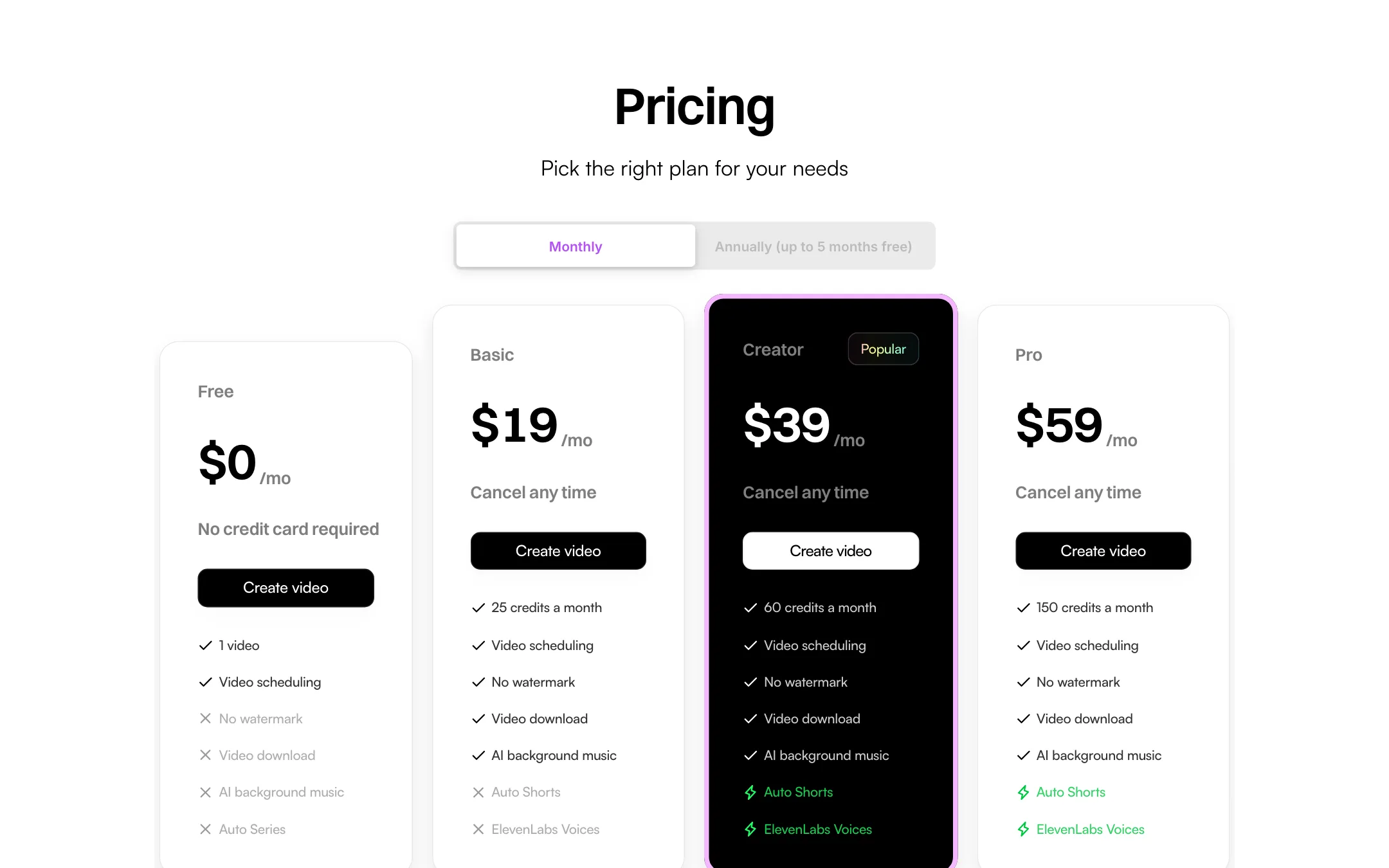
The pricing cards list Auto Shorts on Creator and Pro, and Auto Series as a feature the free plan does not get. Cliplama’s public pages do not explain either feature in detail. Based on the names and the homepage pitch, “build a faceless channel on autopilot,” they generate videos on a recurring basis. We could not confirm how they work without signing in, so test them before you rely on them. Note that Basic does not include Auto Shorts, so automation starts at $39 a month.
Output quality
We have not generated a Cliplama video, so we cannot rate the visuals or the scripts ourselves. Here is what you can judge from the product.
Visuals are AI images and GIFs, not footage. Cliplama builds scenes from generated images and GIFs with transitions between them. That is the standard faceless-channel look: fine for stories, facts and listicles, less convincing for anything that should look like real video.
Voices are a strength on the higher plans. ElevenLabs voices tend to sound more natural than the stock voices many cheaper tools use. Only Creator and Pro list them. Your free test video and Basic videos use the standard voices, so they may not sound like a Creator-plan video.
Captions are included. Every video gets burned-in captions, and you can edit the text, position and animation. That said, Cliplama is not a caption tool for your own footage, so we do not list it under captions and subtitles.
Control is limited. You can rewrite text and regenerate images. You cannot swap in your own clips, adjust timing on a timeline or change the structure of the video. If the first result is far off, your main option is to regenerate, which costs another credit.
Pricing
Cliplama sells subscriptions and one-time credit packs. Prices below were read from cliplama.com on 2026-10-19.
| Plan | Price | What you get |
|---|---|---|
| Free | Free | 1 watermarked video, scheduling, no download |
| Basic | $19/mo or $140/yr | 25 credits a month, download, AI music, no watermark |
| Creator | $39/mo or $360/yr | 60 credits a month, adds Auto Shorts and ElevenLabs voices |
| Pro | $59/mo or $540/yr | 150 credits a month, same features as Creator |
| Credit packs | $19, $39 or $59 | 15, 30 or 60 credits, one-time |
A few things worth noticing:
- The free plan is a preview, not a free tier. You get one video, watermarked, and the pricing card marks download, AI background music and Auto Series as not included. It shows you the format. It does not give you anything to post.
- Basic is missing two headline features. ElevenLabs voices and Auto Shorts start on Creator. If natural voices or automation are why you want Cliplama, the real starting price is $39 a month, or $30 a month billed yearly.
- Basic yearly is the cheapest way in. At $140 a year, Basic works out to about $11.67 a month, or about 47 cents per short video if you use all 25 credits. Creator yearly is $30 a month and Pro yearly is $45 a month.
- The yearly discount labels are inconsistent. The Basic card says “5 months free ($100 off),” but $140 against twelve months at $19 is $88 off. The price you pay is what counts.
- Subscriptions beat packs. A $19 pack buys 15 credits once. The same $19 on Basic buys 25 credits every month. Packs only make sense if you post rarely.
- No refund policy is published. The FAQ says you can cancel any time. We found no refund terms on the site.
Making credits last
- Test the format on the free video first. Use it to check pacing, captions and image style before you pay, keeping in mind the voice will differ on Creator and Pro.
- Write your own script. A tight script gives the generator less room to wander and means fewer regenerations.
- Regenerate images, not whole videos. Swapping one bad image costs 0.1 credit. A full regeneration costs 1 to 3.
- Pick Basic yearly only once you are sure. Without a published refund policy, start monthly and move to yearly once you know you will keep using it.
Cliplama compared with similar tools
Cliplama sits in a crowded corner. A few differences stand out from the public pricing pages, all checked on the same day:
- Against AiClips: AiClips starts at $9 a month for 15 clips and is built around recurring series with auto-posting to several platforms. Cliplama costs more per month but its credits also cover medium and long videos of up to six minutes, which AiClips does not offer.
- Against SendShort: SendShort is mainly a clipper for your own long videos, with faceless videos as a side feature. If you have footage of your own, SendShort or another clipper is the better fit. If you have nothing but ideas, Cliplama is simpler.
- Against general editors: CapCut and similar editors give you far more control and often cost less, but you build each video by hand. Cliplama trades that control for speed.
The short version: pick Cliplama for simplicity and longer faceless videos, and look elsewhere if you need multi-platform posting or deep editing.
Verdict
Cliplama is the simplest tool in this category. Type a description, pick a voice, and you get a narrated faceless video with captions and music in a couple of minutes, according to the vendor. The free preview video lets you check the format before paying, and Basic yearly is cheap, though the better voices and automation start on the $39 Creator plan.
The trade-offs are real. Scheduling is TikTok-only, editing is minimal, and the site shows signs of slow development, from the long-running “YouTube coming soon” to a blog that stopped in 2024. Use it to test a faceless idea cheaply. If the channel takes off, you will probably want a tool with more control and more posting destinations.