
What Vsub is
Vsub is a faceless video maker. You paste a script or upload a voiceover. Vsub splits it into scenes, narrates it and draws every frame in a chosen visual style. The result is an illustrated, narrated video you can post without showing your face.
The twist is the template. You can pick one of Vsub’s published styles, such as Stickman History or Paper Diorama. Or you can upload a video whose look you like and Vsub clones it into a reusable template. Every video on your channel then shares that look.
Around that core sits a set of short-form formats built for the faceless niche: Reddit stories, fake text conversations, would you rather, quizzes, Roblox rants and commentary. There is also video captioning, avatar videos, an API and an MCP server.
We have not used Vsub ourselves. This review is based on Vsub’s homepage, pricing pages, FAQ and affiliate terms. Claims about output are Vsub’s.
Who it is for
Vsub fits you if:
- You run, or plan to run, a faceless YouTube channel in history, finance, education or explainers.
- You want a consistent illustrated style across every upload without hiring an illustrator.
- You make long videos. Vsub supports scripts up to 50,000 characters and videos up to 60 minutes.
- You churn out Reddit story, fake text or quiz shorts and want them in the same tool.
- You want to generate videos from code or from an AI assistant.
Skip it if:
- You want to try before you pay. Vsub does not advertise a free plan.
- You need refunds as a safety net. Vsub offers none.
- You film yourself and need clips cut from long recordings. Vsub makes new videos from scripts.
- You want realistic, cinematic footage. Vsub’s strength is illustrated and stylized scenes.
How it works
Pick or clone a template
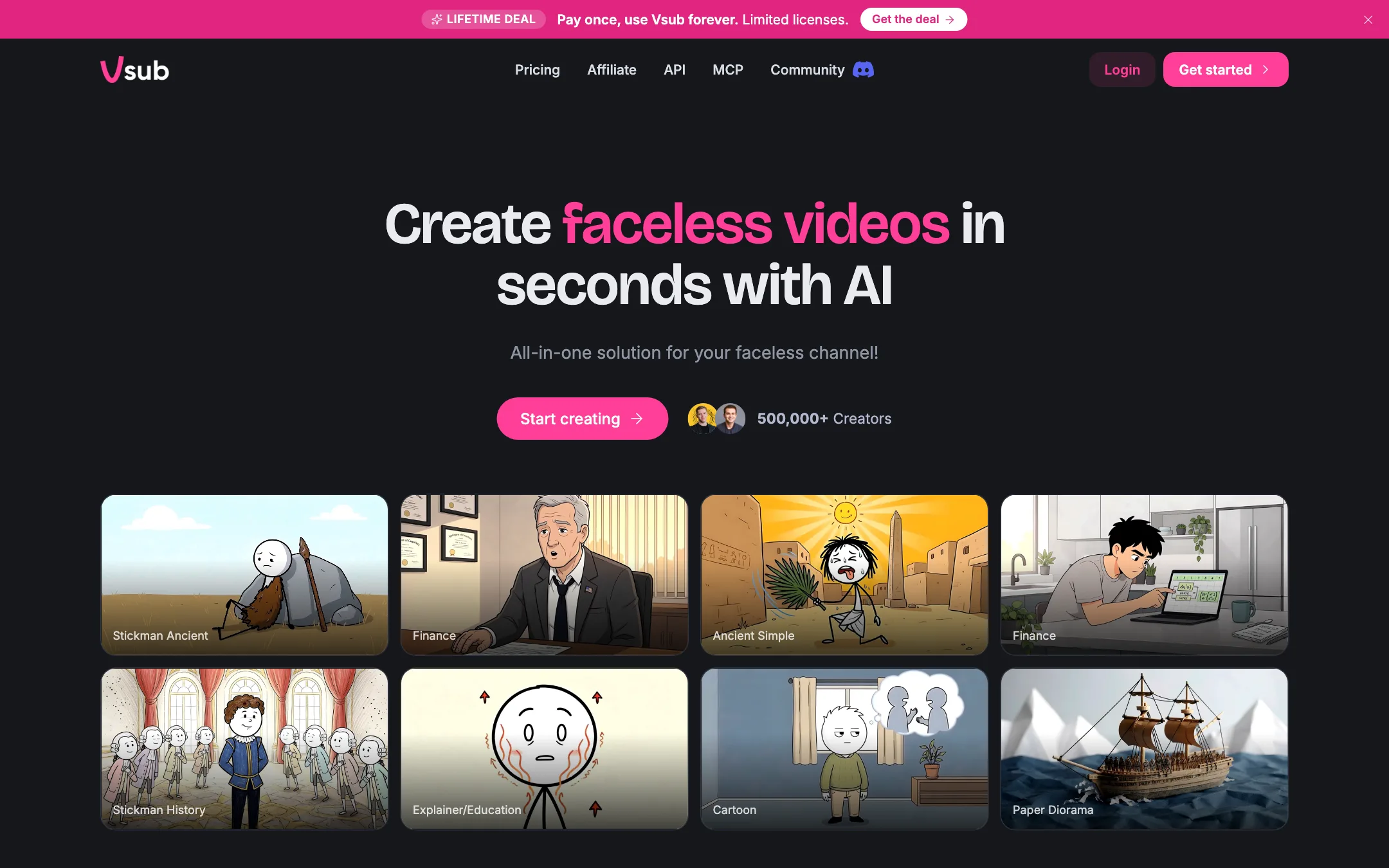
The homepage shows the published templates: Stickman Ancient, Finance, Ancient Simple, Stickman History, Explainer/Education, Cartoon and Paper Diorama, among others. Vsub says you can use any of them straight away. You do not need to build your own first.
Cloning is the feature that sets Vsub apart. You upload one reference video and Vsub draws your future videos the same way. Vsub’s guidance for a good reference:
- It should have spoken narration.
- It can be still images or moving footage. Explainers work best.
- It must run at least 30 seconds. Around three minutes gives the best result.
This is a practical idea. Faceless channels live or die on a recognizable look, and most AI tools give you a generic one.
Paste the narration
Next you paste your script. Vsub splits it into scenes and generates one image per scene. You choose a voice from ElevenLabs, AWS or Vsub’s own engine. If you prefer your own voice, upload a recording. Vsub transcribes it and uses your audio as the narration, with no AI voice over it.
Subtitles are generated automatically. Some images can be animated, which costs extra credits per second. Export runs at 1080p, 2K or 4K.
A typical long-form run
- Pick a published template or clone one from a reference video.
- Paste your script, up to 50,000 characters.
- Choose an AI voice, or upload your own narration.
- Let Vsub split the scenes, generate the images and narrate.
- Animate a handful of key images if your budget allows.
- Export at 1080p for YouTube.
Vsub says that if a video fails halfway, retry picks up from the step it stopped at. Voiceover, scenes and images already made are kept, and you are not charged for them again. That matters for long videos, where a failed render would otherwise burn thousands of credits.
Short-form formats
The short-form side is aimed squarely at viral faceless niches:
- Reddit stories: a story read by an AI voice over a gameplay backdrop.
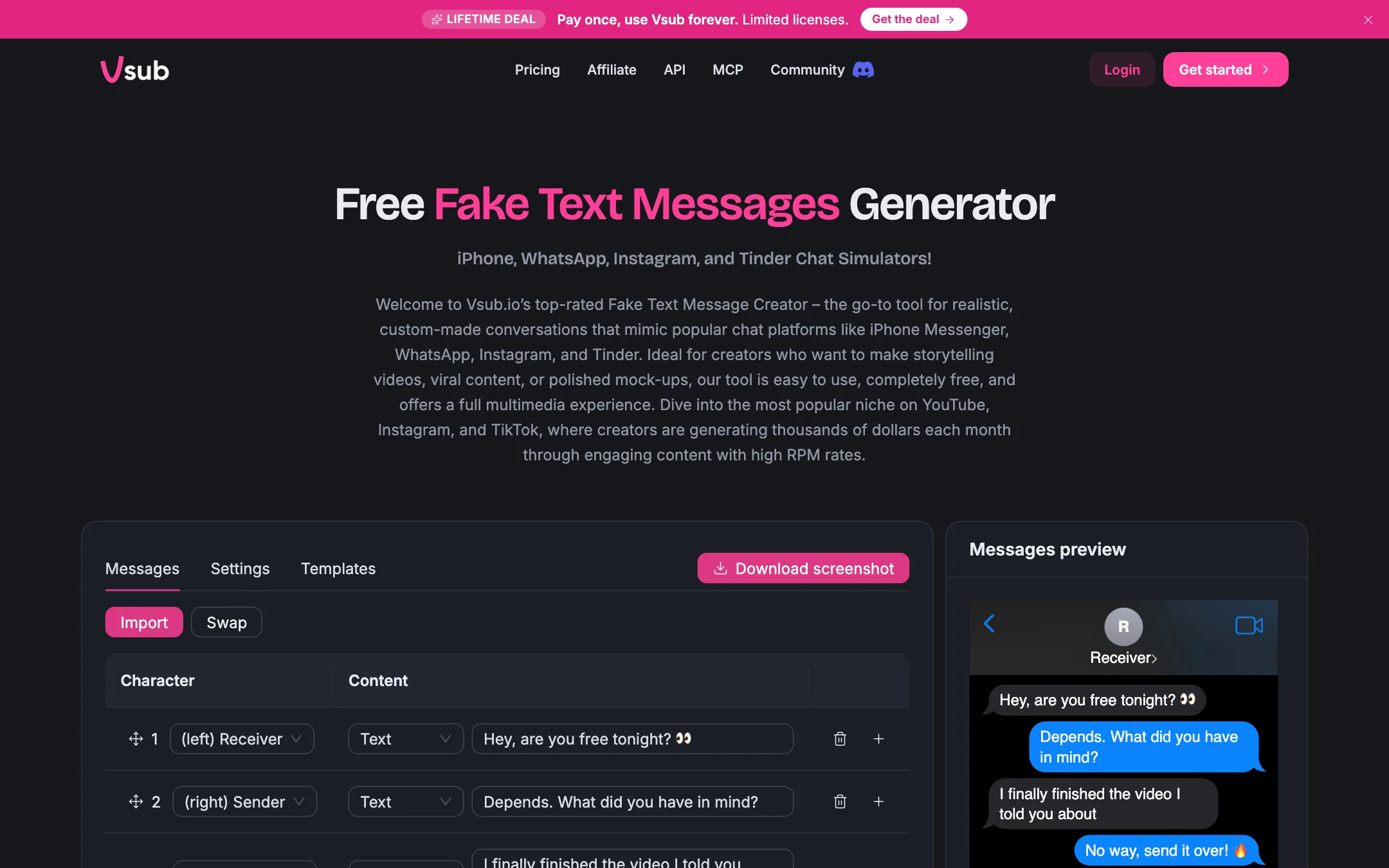
- Fake text videos: a chat conversation that plays out message by message.
- Would you rather: two options with AI images and a voiceover.
- Quiz videos: questions, countdowns and voiced reveals.
- Roblox rants and commentary.
- Video captioning for your own clips.
Vsub also offers free fake chat screenshot tools in its footer, styled as iPhone, WhatsApp, Instagram and Tinder conversations. Vsub markets them for storytelling videos, but also for “pranks” and “hyper-realistic” fakes. Use them for clearly fictional stories. Passing off an invented chat as a real one can mislead viewers and break platform rules.
Avatar videos
Vsub lists avatar videos with lip-sync at 720p. They cost credits per image and per second of animation. Vsub does not say much more about them on its public pages, so treat this as a side feature.
API and MCP
Developers can POST a script and a template to Vsub’s API and get a video back. There is also an MCP server for Claude, ChatGPT and Cursor, so you can ask your assistant for a video without opening the app. This is useful if you automate a channel end to end.
Output quality
We cannot judge output quality from public pages. What the pages tell you:
- The look comes from your template. Vsub’s results depend heavily on the reference video or published template you choose.
- Images, not clips. Long-form videos are built from one image per scene, with optional animation on some of them. Expect a moving storyboard, not continuous footage.
- Voices are third-party. ElevenLabs and AWS supply most voices. Vsub does not name the image model behind its AI images.
- Social proof is a claim. The homepage says 500,000+ creators. We could not verify it.
Common weak spots in this style of tool still apply. Images can repeat or drift off topic on long scripts. AI narration can sound flat. Animated stills can look cheap if you overdo them. Plan to review scenes before export.
Pricing
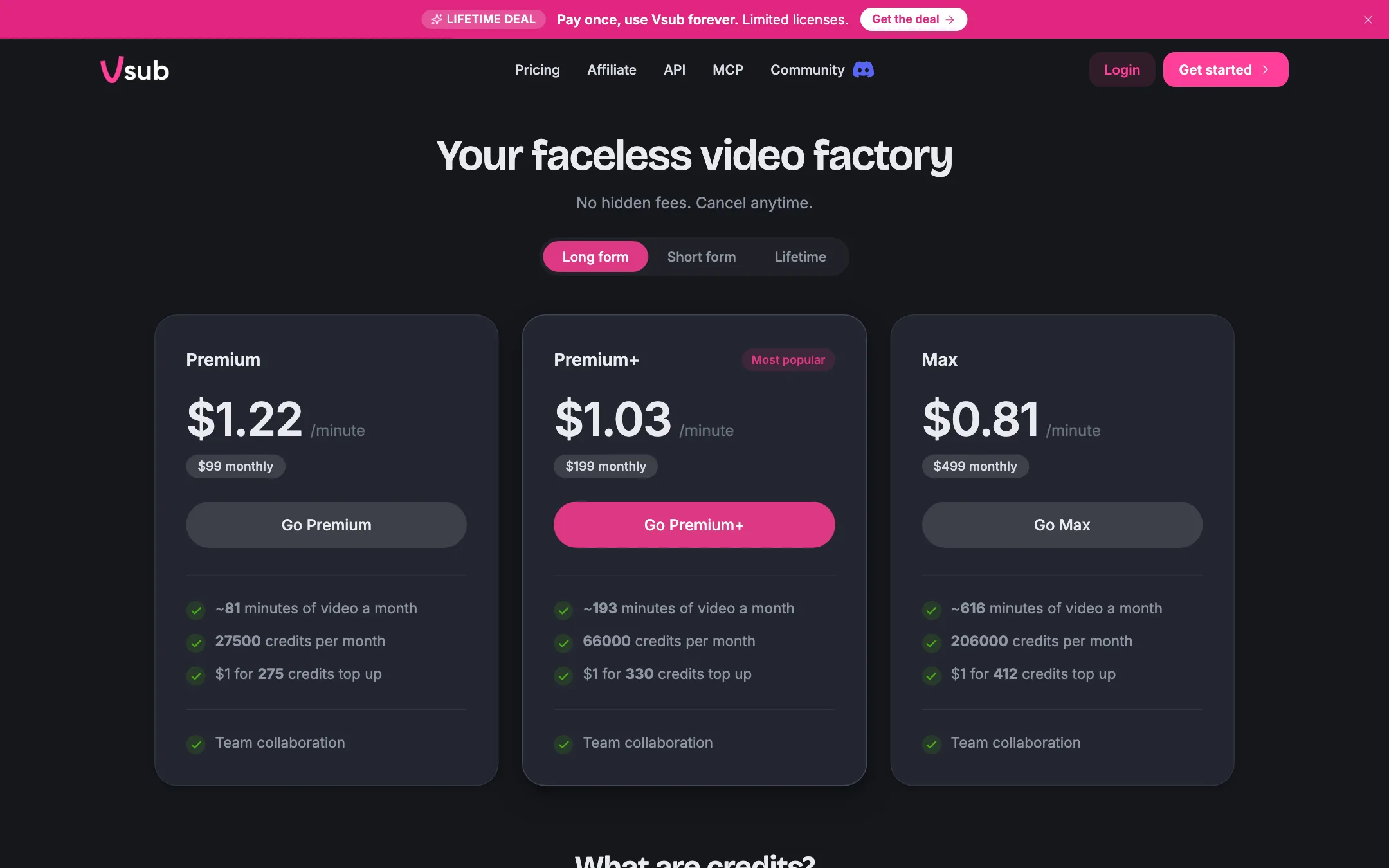
Vsub runs on credits. Each plan refills credits monthly. Credits do not roll over. You can also keep a separate cash balance in dollars, which does not reset and converts to credits at your plan’s top-up rate.
The pricing page has three tabs.
| Plan | Price | Credits a month |
|---|---|---|
| Starter (short form) | $29/mo | 6,500 |
| Pro (short form) | $49/mo | 11,500 |
| Premium | $99/mo | 27,500 |
| Premium+ (long form) | $199/mo | 66,000 |
| Max (long form) | $499/mo | 206,000 |
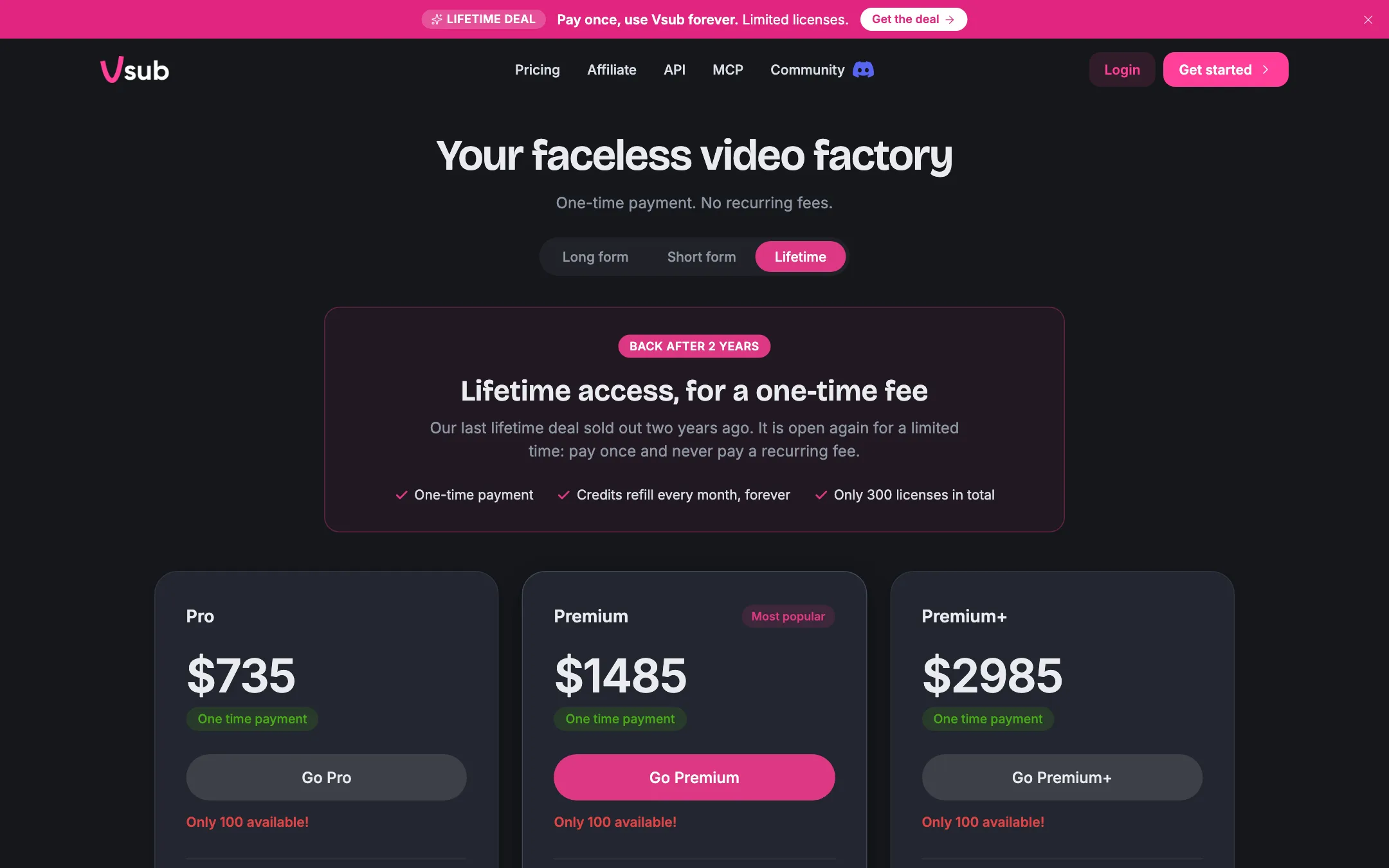
| Lifetime | $735 to $2,985 once | 11,500 to 66,000 |
What a video costs
Vsub publishes a per-service credit table, which is rarer than it should be:
- AI images: 250 credits per 20 images.
- Image animation and avatar lip-sync: 6 credits per second.
- ElevenLabs voice: 70 to 140 credits per 1,000 characters (about a minute).
- Vsub engine voice: 42 credits per 1,000 characters.
- Subtitles: 20 credits per video.
- Rendering: 10 credits per minute.
Vsub’s own example: a 10-minute landscape video with AI voiceover, captions, about 200 images and some animation costs 3,500 to 4,200 credits. On short form, Vsub estimates Pro covers about 60 one-minute Reddit story or quiz videos with an ElevenLabs voice, or 140 captioned videos.
Things to watch
- No free plan. We found no free tier or trial on the pricing pages.
- No refunds, ever. That includes the lifetime deal.
- Minute estimates are optimistic. The plan cards assume about 340 credits a minute. Vsub’s own 10-minute example works out to 350 to 420.
- Lifetime deal fine print. There are 300 licenses in total, and credits refill “for as long as vsub.io runs the service”. The lifetime table also lists a Starter column that is not sold as a lifetime plan. A one-time $735 for Pro equals 15 months of the $49 monthly short-form Pro.
Affiliate program
Vsub pays 30% of every payment a referred customer makes, for life, with 30-day attribution and a 14-day hold. Payouts go to PayPal on the 15th of the month once your cleared balance is over $50. The program is open to content creators only, bans Google Ads and bare coupon posting, and Vsub may ask for links to the content that drove your referrals.
How it compares
Most faceless short tools, such as AutoShorts or Faceless.video, aim at one-minute vertical clips with a stock or AI backdrop. Vsub covers that ground with its short-form formats, but its real focus is longer, illustrated videos with a fixed house style. If your channel publishes 8 to 15 minute explainers, that focus matters more than the size of a template gallery. If you only post Shorts, a cheaper tool with a free plan may serve you just as well.
Verdict
Vsub is a good fit for faceless channels that want a consistent illustrated style and long videos, not just one-minute shorts. Template cloning is a smart idea, and the published credit table lets you price a video before you render it.
The risks are financial. There is no advertised free plan, no refunds on anything, and credits reset every month. Start with the cheapest short-form plan for one month, run your actual script through your chosen template, and only then consider a bigger plan or the lifetime deal.