What Nullface AI is
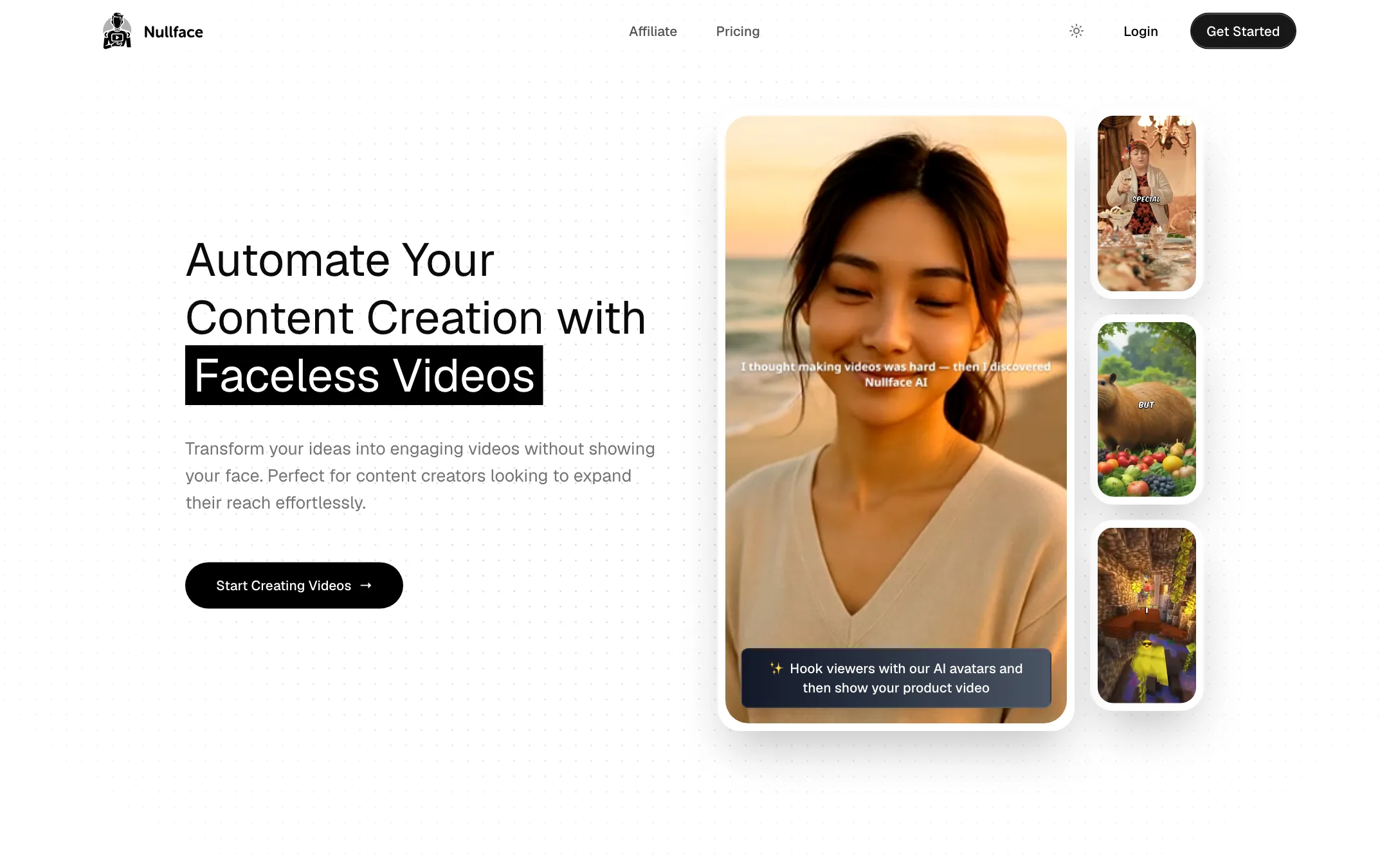
Nullface AI makes faceless short videos for TikTok and YouTube. You give it a prompt. It writes a story, generates background images to match, adds a voice, captions, a font and music, and can post the result to your channels on a schedule.
It is one of a crowded group of “faceless channel” tools. The pitch is the same across the group: build a channel without filming yourself or editing. Where Nullface tries to stand apart is format range. Its homepage lists seven video types, from Reddit stories and anime to meme hooks and an AI avatar hook followed by a product video.
It is a small product. Its own counters show about 5,000 videos created, 5,500 creators signed up and 423 automations running. That is not a bad thing on its own, but it tells you what kind of company you are buying from.
Who it is for
Nullface fits you if:
- You want to test a faceless TikTok or YouTube channel without writing scripts or editing.
- You want to run several small channels in different niches from one account.
- You make content in a language other than English. Nullface lists 57+ languages.
- You sell a product and want short avatar-hook videos that lead into a product clip.
Skip it if:
- You want to see output before you pay. There is no free plan.
- Instagram Reels is your main channel. Nullface only auto-posts to TikTok and YouTube.
- You want to post every day on a tight budget. The 43 monthly credits may not stretch that far.
- You need detailed control over each shot. This is a prompt-in, video-out tool.
How it works
Nullface’s homepage keeps the explanation short. Most of the detail comes from its FAQ and its comparison pages against rivals like Autoshorts AI. Nullface describes the workflow like this.
Pick a video type
You start by choosing a format. The homepage lists:
- Fun Fact and Philosophy, for narrated slideshow-style shorts.
- Reddit Story, the familiar narrated thread over background visuals.
- Anime, for stylized story videos.
- Meme Hook, a green-screen meme opener.
- Stock Video, built on stock footage instead of generated images.
- AI Hook Avatar + Product Video, where an AI presenter opens the video and your product footage follows.
The pricing page also mentions AI clip generation and AI music generation, so there are tools beyond the faceless templates.
Write a prompt
You type a prompt. Nullface turns it into a story or script, then generates background images that match it. If the images miss, you can add an image prompt to steer the visuals. Nullface’s FAQ says this is especially useful when your main prompt produces something like a quiz, where automatic images tend to drift.
You can pick a voice from a range of options and choose fonts for the captions.
Set up an automation
Automations are the core of the product. Nullface’s FAQ describes them as features that “generate videos daily based on your subscription plan.” Each automation has its own prompt, image prompt, voice, font and music, and links to a pair of social accounts.
Per Nullface’s comparison pages, each automation can run one of two ways:
- Set and forget. Videos generate and post to TikTok and YouTube without you checking them.
- Review queue. Drafts wait for you to edit or approve before they go live. You get three regenerations a day when a draft misses.
Posting runs “once or twice daily depending on plan.” That wording is odd, because there is only one plan on the pricing page. Treat posting frequency as something to confirm inside the app.
Download or post
Nullface says you keep per-video privacy settings, custom captions and raw downloads. So you can also use it as a generator and post by hand, or run its output through your own editor.
Output quality
We have not tested Nullface hands-on, so we cannot judge its output. Here is what the public pages show and what to watch for.
What Nullface claims:
- AI background images instead of stock footage. Its comparison pages argue this keeps visuals tied to your script, unlike rivals that reuse the same stock clips.
- “Real engagement” and “real views.” The homepage says you can post directly and “get real views, better than our competitor.” No figures or case studies back this up on the site.
What we could not verify:
- Which models it uses. Nullface does not say which AI models write the scripts, generate the images, voice the narration or make the music. That makes it hard to compare quality against tools that name their models.
- Sample output. The public pages show format names but no gallery of finished videos to judge.
- Testimonials. The homepage quotes are one-liners like “Nullface AI is best!” They do not tell you much.
General risks with this whole category apply here too. Fully automated faceless channels can drift into repetitive, low-effort content, and platforms have tightened rules on mass-produced videos. YouTube in particular has policies against repetitive or inauthentic content in its Partner Program. Use the review queue, at least at first, and treat set-and-forget mode as something you earn after a few weeks of checking drafts.
Pricing
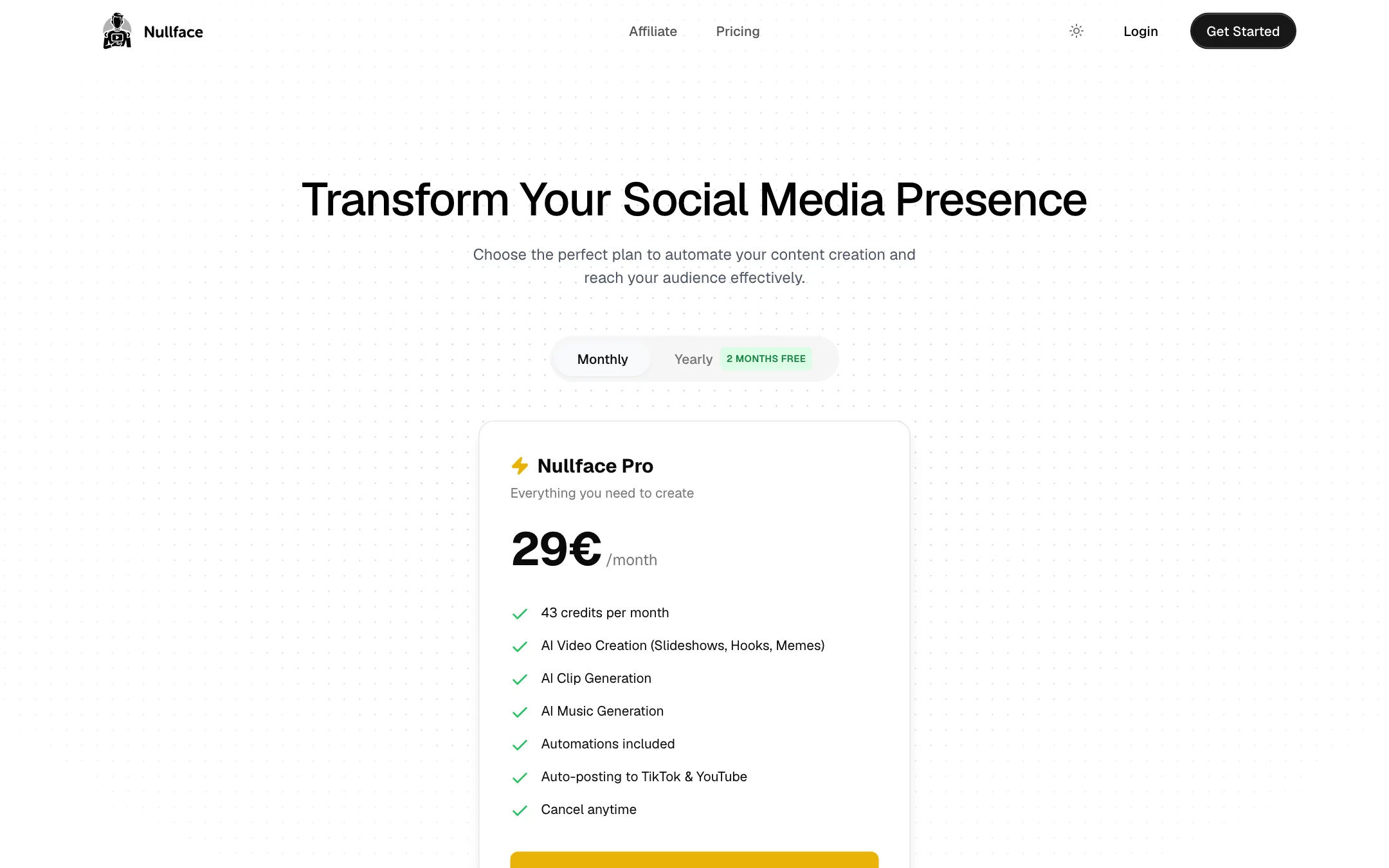
Nullface has one plan.
| Plan | Price | What you get |
|---|---|---|
| Nullface Pro (monthly) | 29 EUR/mo | 43 credits a month, video creation, clips, music, automations, auto-posting |
| Nullface Pro (yearly) | 290 EUR/yr | Same plan, two months free |
A few things the pricing page does not make clear:
- No dollar price. Nullface shows euros only. We found no USD price on its site, so we list the starting price as unknown in dollars. US buyers pay whatever their card converts 29 EUR to, plus any foreign transaction fee.
- 43 credits is not much. The credits cover “videos, clips, and music.” Nullface does not publish what one video costs. If one video is one credit, 43 credits covers a month of once-a-day posting with a little left over. If a video costs more, or you also generate music and clips, it will not.
- No free plan or trial. You pay before you see a single video. Check the cost per video in the app as soon as you sign up, and cancel early if the math does not work.
- The affiliate calculator disagrees. Nullface’s affiliate page shows $440 a month for 100 referrals at 20%. That works out to $22 a month per customer, not 29 EUR. It is probably a stale figure from an older price, but it is a sign the site is not kept fully in sync.
Refunds
The terms of service do not mention refunds at all. They cover ownership, content rules, liability and termination, and they are governed by the laws of Indonesia. The pricing page says “cancel anytime.” If refunds matter to you, email [email protected] before you pay and get the answer in writing.
Affiliate program
Nullface runs an affiliate program through Lemon Squeezy. It pays 20% of every recurring payment from customers you refer, paid at the start of each month for the previous month. The page does not state a cookie length or a cap on how many months it pays.
Nullface vs other faceless tools
Nullface publishes comparison pages against Autoshorts AI, Copycopter AI, Crayo AI, Faceless.video, AiReelGenerator and ReelFarm. Read them as marketing, but they do show where Nullface thinks it wins:
- Multiple automations. Nullface says Autoshorts AI limits you to one content series per account, while Nullface lets you run several, each with its own accounts.
- More formats. Most rivals focus on one style, like stock-footage explainers. Nullface lists slideshows, hooks, memes, Reddit stories, anime, quizzes and avatar-plus-product videos.
- More languages. It claims 58 languages against Autoshorts AI’s 19. Its own homepage says 57+, a small mismatch.
- Annual plan. Nullface notes that Autoshorts AI is monthly only.
Its own comparison also admits one weakness. Autoshorts AI posts to Instagram Reels as well, and Nullface suggests it may be the simpler pick if Reels is your main channel.
If you want to compare before you pay, Autoshorts and Faceless.video both cover the same job, and ShortsFaceless is another option built around the same idea.
Verdict
Nullface AI does what most faceless-channel tools do, with a wider spread of formats and a review queue that lets you check drafts before they post. One plan with everything included keeps things simple, and running several automations from one account suits people testing more than one niche.
The weak spots are real, though. There is no free plan, prices are only in euros, and 43 credits a month may not cover daily posting once you know the cost per video. The company is small, the testimonials are thin, and the terms say nothing about refunds. If you want to try it, pay monthly, check the credit cost of a video on day one, and keep the review queue on until you trust the output.