
What Inksprout is
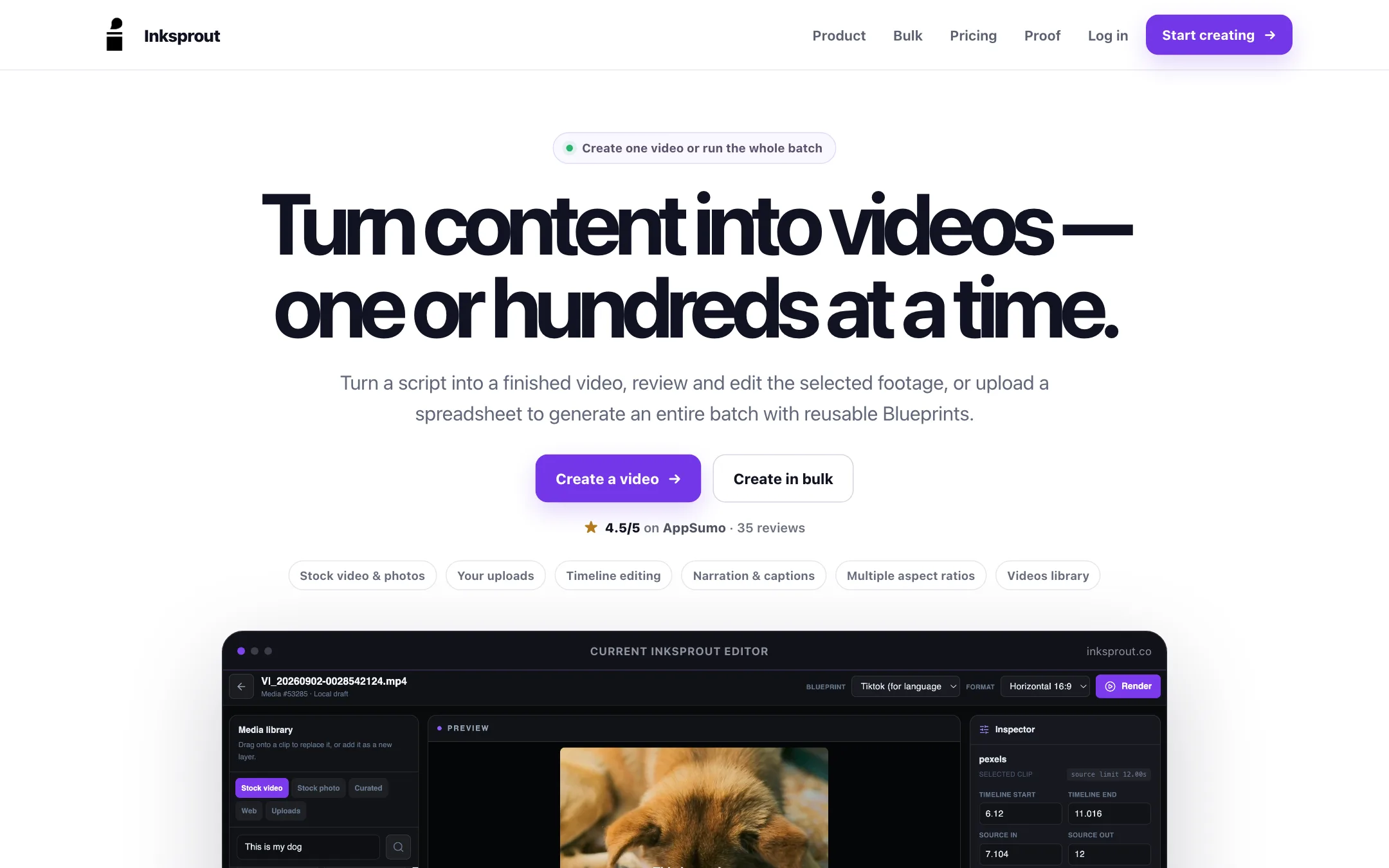
Inksprout turns written content into videos. You paste a script or a URL, and it builds a first cut with stock footage, an AI narration track and captions. You can render that straight away, or open it on a timeline and fix it first.
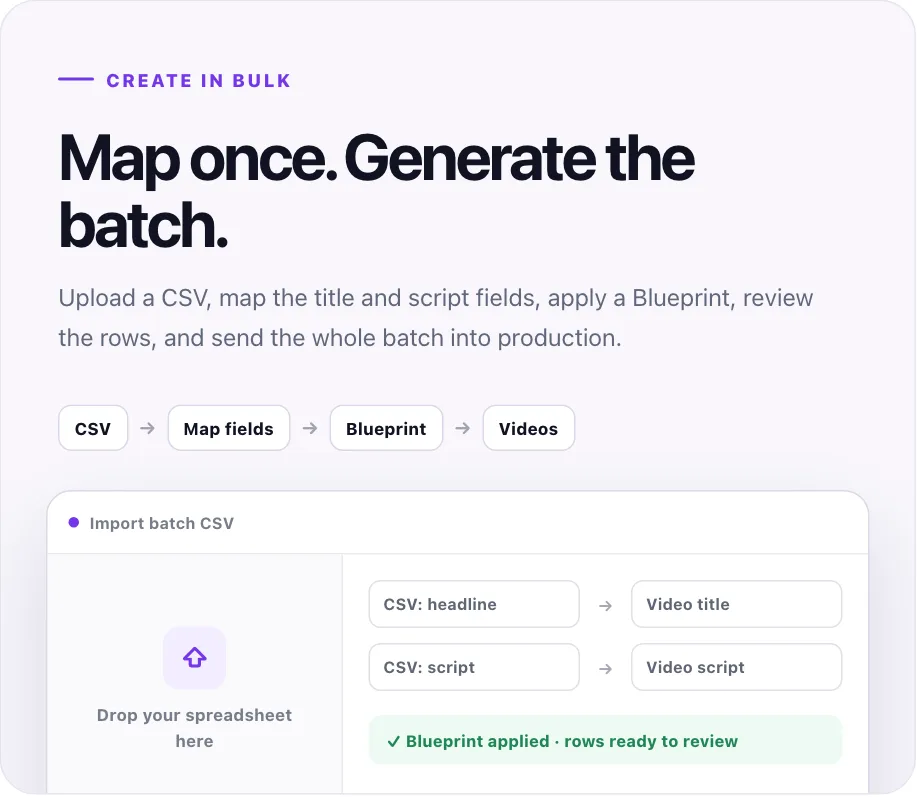
The other half of the product is batch work. Upload a spreadsheet, map its columns, apply a saved style, and Inksprout makes one video per row. That is the part that sets it apart from most script-to-video tools.
Inksprout is not an AI video generator in the sense of Veo or Kling. It does not invent new footage from a prompt. It picks stock clips and photos that match your words, then assembles them. That makes it fast and cheap to run, and it also sets a ceiling on how original the visuals can look.
The product has been around for a while. Its site shows AppSumo and G2 reviews from 2022, and it is open about the fact that some screenshots and sample videos come from earlier versions. The current pitch is narrower and clearer than the old one: content in, finished video out, one at a time or in bulk.
Who it is for
Inksprout fits you if:
- You run a faceless channel on YouTube Shorts, TikTok or Reels and post the same kind of video every day.
- You have a list of facts, tips, quotes or product blurbs in a spreadsheet and want a video for each one.
- You write blog posts or newsletters and want a quick narrated video version of each.
- You care more about volume and consistency than about striking, one-off visuals.
Skip it if:
- You want cinematic, generated scenes. Inksprout works from stock footage, so a text-to-video model will give you more distinctive shots.
- You need a talking avatar or your own face on camera. Inksprout does not list avatars.
- You make one carefully edited video a month. A general editor will give you more control for the same money.
- You re-render a lot. Every new version costs render minutes again.
How it works
The homepage describes a four-step loop. Add your content, let Inksprout build the first cut, review or automate, then render. Both single videos and batches go through the same system.
Making one video
- Paste a script, or a URL for Inksprout to pull text from.
- Pick a Blueprint, which holds your caption, voice, music and format settings.
- Choose whether to generate automatically or review the clips first.
- If you review, swap any stock clip you do not like before rendering.
- Render, then find the finished video in your Videos library.
The review-first option matters more than it sounds. Inksprout bills by finished output. If you check the footage before the first render, you avoid paying for a version you will throw away.
Making a batch
Bulk mode is the feature most of the site is built around. You upload a CSV and map its columns to video fields. The examples show a “headline” column mapped to the video title and a “script” column mapped to the video script. You apply a Blueprint, review the rows, and send the whole batch to render.
This suits anyone who already plans content in a spreadsheet. A list of 30 travel facts or 50 product tips becomes 30 or 50 videos with the same look, voice and caption style. Inksprout shows a set of four 9:16 sample videos from one earlier batch on its homepage, on topics like aging, Japan travel, AI art and startup facts.
The editor
Inksprout says the first cut is a starting point, not the end. The timeline editor lets you:
- Replace any shot with another stock clip or your own upload.
- Drag and trim clips on the timeline.
- Search stock video and photos without leaving the editor.
- Change the aspect ratio.
- Rewrite the words, which updates both narration and captions.
That last point is useful. Because the script drives the voice and the captions, you fix a mistake once instead of in three places.
Blueprints
A Blueprint is a saved production style. Per Inksprout, it can hold:
- Captions: position, size, color, outline, background and words per frame.
- Voice: narration voice, style and volume.
- Audio: background music and its level against the voice.
- Format: 9:16, 4:5, 1:1 or 16:9.
- Visual style: an aesthetic preset for the footage.
- Branding: a logo, a cover title template and a tagline.
The same Blueprint drives single videos, bulk runs and the editor. If you run several channels, one Blueprint per channel keeps each series looking like itself.
Output quality
We have not rendered videos with Inksprout, so judge the quality from the samples on its site and your own free-plan test.
What the site shows:
- Stock-footage explainers. The sample outputs are vertical videos with narration and captions over matched stock clips. This is the classic faceless-channel format.
- Clear captions. Caption styling is detailed, down to words per frame, which matters for short-form retention.
- Historical results. Inksprout shows a TikTok analytics screenshot with 44K views over a year and a YouTube Studio screenshot with 20.1% of Shorts views from search. It labels both as historical third-party results, not a promise.
What to watch for:
- Stock footage limits. Matching clips to words works well for common topics. For niche or abstract subjects, expect generic shots and plan to swap some by hand.
- Repetition across a batch. Many videos on similar topics may pull similar clips. Review a few rows before you render the full batch.
- Voice quality. The current site does not name a voice engine. An earlier Blueprint screen it shows lists Microsoft as the voice vendor, with neural voices like en-US-DavisNeural. Listen to the voices on the free plan before you commit a channel to one.
One more caution. Inksprout is upfront that its reviews are from 2022 and describe earlier versions. That disclosure helps, but it also means there is little recent public feedback on the current product. Your own test is the best evidence you will get.
Pricing
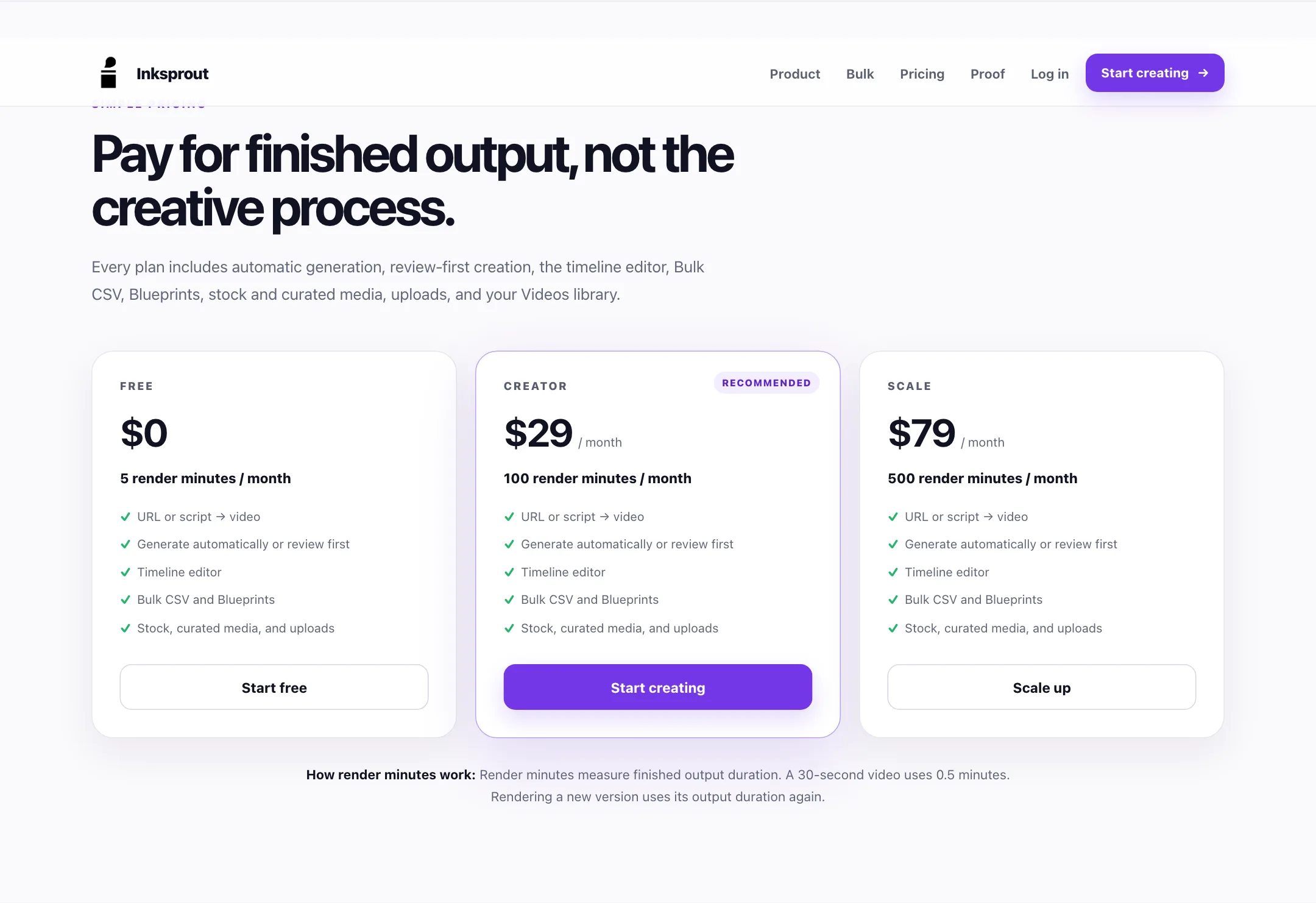
Inksprout charges for finished output, not for features. Every plan includes automatic generation, review-first creation, the timeline editor, Bulk CSV, Blueprints, stock and curated media, uploads and the Videos library.
| Plan | Price | Render minutes |
|---|---|---|
| Free | $0 | 5 a month |
| Creator | $29/mo | 100 a month |
| Scale | $79/mo | 500 a month |
How render minutes work, per the pricing section:
- You pay for output length. A 30-second video uses 0.5 minutes.
- Re-renders count again. If you render a new version, its full length comes off your balance.
- Editing is free. Reviewing clips, rewriting script and changing settings do not use minutes. Only rendering does.
What that means in practice
- Free: about ten 30-second Shorts a month, if you render each one once. Enough to test the workflow and a Blueprint.
- Creator: about 200 30-second videos a month. That covers a daily posting schedule across several channels.
- Scale: about 1,000 30-second videos. This is for agencies or people running many faceless channels.
How to make your minutes go further
- Turn on review-first. Check the footage before the first render so you are not paying for versions you scrap.
- Test a Blueprint on one row. Render a single video from your CSV, fix the style, then run the batch.
- Keep scripts tight. A shorter script means a shorter video and fewer minutes.
- Fix words before rendering. The script drives both narration and captions, so proofread it once up front.
The pricing section shows monthly prices only. We did not see a yearly discount, rollover of unused minutes or top-up packs mentioned.
Inksprout vs other script-to-video tools
Inksprout sits in a crowded group. The main differences:
- Against Pictory and Lumen5: all three build videos from text with stock footage. Inksprout puts CSV batch generation at the center and keeps every feature on every plan, including free.
- Against Fliki: Fliki leans on a large voice library and more media options. Inksprout leans on batch production and Blueprints.
- Against generative tools like PixVerse: those create new footage from prompts. Inksprout assembles existing stock clips. Pick based on whether you need original visuals or reliable volume.
One AppSumo reviewer from 2022 put it plainly: less flexible than InVideo or Steve.ai, but quicker to a usable result. That review predates the current product, so treat it as context, not a verdict.
Verdict
Inksprout does one thing with focus. It turns scripts and spreadsheet rows into narrated, captioned stock-footage videos, and it makes batches as easy as single videos. Having Bulk CSV and Blueprints on the free plan is generous.
The weak spots are clear. It is not a generative video tool, the free 5 minutes go quickly, re-renders cost minutes again, and most of the public proof comes from older versions. Use the free plan to render one video from your own script and one small batch. If the footage matches your topics and the voices sound right, Creator at $29 a month is fair value for a daily posting schedule.