What Boolvideo is
Boolvideo is a web app that turns words into videos. You give it an idea, a script, a blog post, a product link or a pile of your own images and clips. It writes or reads the script, picks a visual for each scene, adds an AI voiceover, captions and music, and hands you a video you can fix in a timeline editor.
It comes from Boolv Tech, which says it was founded in 2022 and raised a $10 million seed round. It lists offices in Wyoming and Hong Kong and claims 50,000+ brands and content agencies as users.
The important thing to understand: Boolvideo is mostly an assembler, not a video model. In its fast modes, the visuals come from stock libraries or your own uploads. That puts it next to Pictory, Lumen5 and InVideo, not next to Runway or Kling.
Who it is for
Boolvideo fits you if:
- You run a small business or online store and want product or promo videos without filming.
- You already have brand photos and clips and want them used instead of generic stock.
- You manage social accounts and need a steady stream of short voiceover videos.
- You want a low monthly price and do not need cinematic AI footage.
Skip it if:
- You want generated, photoreal AI scenes as the main output. Use a text-to-video model instead.
- You need a talking avatar presenter. Boolvideo does not list avatars.
- You want a tool with a long public track record and detailed docs. Boolvideo is small, and its own pages contradict each other in places.
How it works
Everything starts in the workspace. It offers these modes:
- Script to Video (Fast): paste a script, get a voiceover video built from stock media.
- Idea to Video: type a prompt, and AI writes the script and builds the video.
- AI Script Video: every scene is generated by AI. Boolvideo says it takes longer but matches your script more closely and looks better. It does not say which model runs it.
- Product to Showcase Video: turn product URLs or images into a music-driven ad.
- Product to Voice-over Video: the same, with an AI-written voiceover script.
- Visuals to Video: a music-led video from your uploaded images and clips.
- Timeline Video Editor: a multi-track editor for building or fixing videos by hand.
The marketing pages also list Blog to Video, Templates to Video and Start from Scratch.
A typical Idea to Video run
The Idea to Video screen is simple. You get:
- A prompt box, with a model picker for the script writer.
- A duration setting, defaulting to one minute.
- An aspect ratio, defaulting to 9:16 portrait.
- A language setting. Boolvideo says it supports 70+ languages.
- A Media Library option that, per the screen, filters your materials to match the aspect ratio.
Hit Generate and Boolvideo writes the script, matches scenes and adds a voiceover. Its homepage says you can edit before you generate and export.
Your own media first
This is Boolvideo’s best idea. Most script-to-video tools pull from a stock library and hope for the best. Boolvideo lets you upload your brand photos, product shots and footage. It then prioritises those when it matches scenes to your script, and falls back on stock for the gaps.
For a store owner with a folder of product photos, that is the difference between a generic video and one that actually shows the product. Brand kits (one on Standard, five on Pro) keep logos, colors and fonts consistent.
AI image tools
A separate AI Tools menu covers image prep: Animate Image with AI, AI Background Remover, Remove Object, AI Photo Enhancer and Video Background Remover. Standard gets limited access and Pro gets all of them. They are handy for cleaning up product shots before they go into a video.
Which AI writes your script?
Boolvideo’s pages do not agree:
- The pricing page says Standard uses GPT-4o for script writing and Pro adds DeepSeek-R1.
- The Idea to Video screen shows “DeepSeek V4 Flash” in its model picker.
- The built-in AI assistant says it is “Powered by GPT-4 and DALL-E 3.”
This probably reflects a product that changes models faster than it updates its copy. It does not stop the tool working. It does mean you should not buy Pro just for “DeepSeek-R1” without checking what the picker actually offers.
Pages that disagree on the free plan
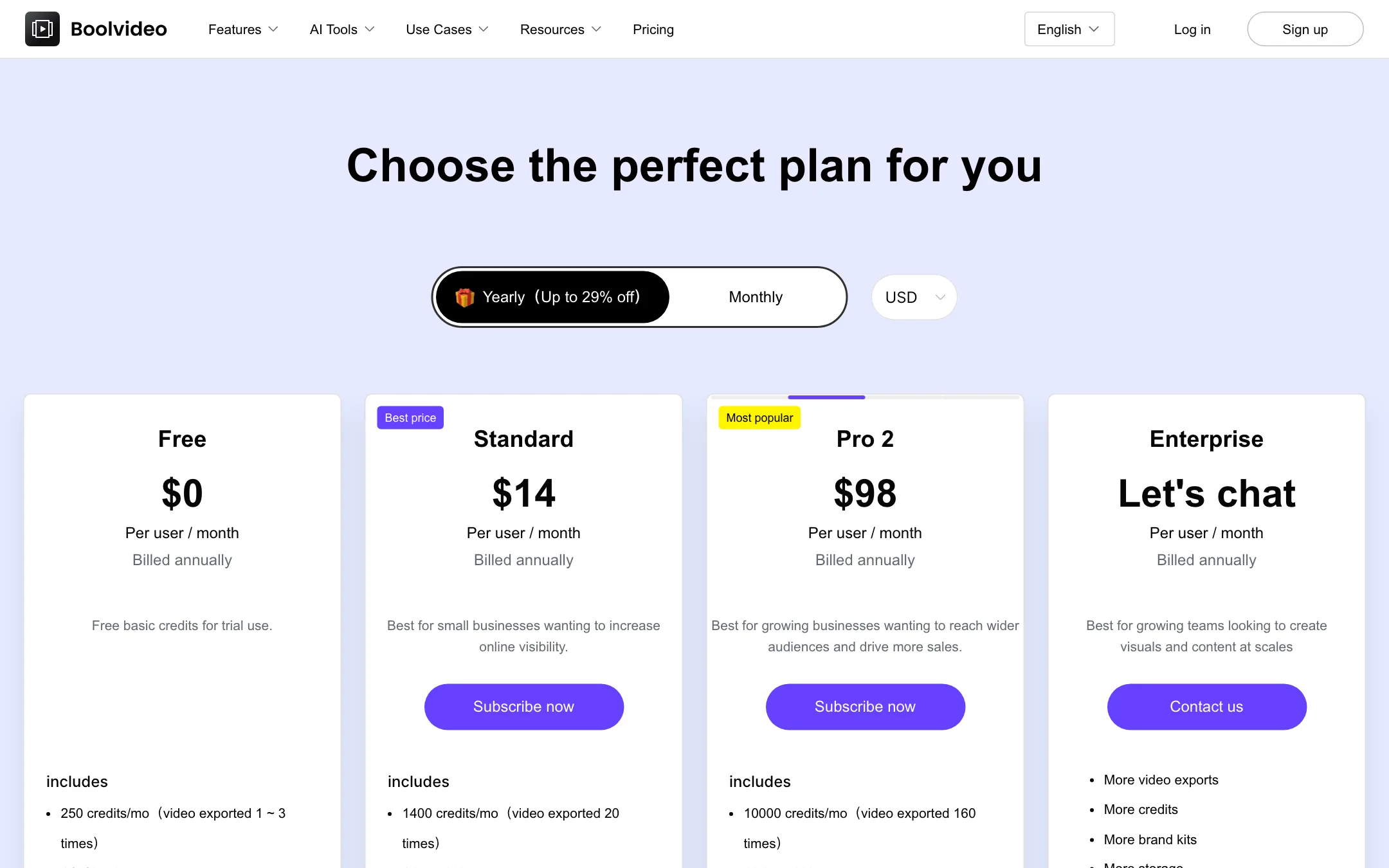
The pricing page says the Free plan gets 250 credits a month, enough for one to three exports. The homepage FAQ says you get 300 credits on signup, enough for three exports. One is a monthly allowance and the other sounds like a one-time grant. Check your balance after you sign up.
Pricing
Boolvideo runs on credits. Each plan grants a monthly allowance, and exports and AI features spend it. Yearly billing saves “up to 29%.”
| Plan | Price | What you get |
|---|---|---|
| Free | Free | 250 credits a month (1 to 3 exports), 1 GB storage |
| Standard | $14/mo yearly, $19 monthly | 1,400 credits (about 20 exports), 1 brand kit, 100+ templates |
| Pro | $49/mo yearly, $69 monthly | 5,000 credits (about 80 exports), 5 brand kits, all AI tools, 500+ templates |
| Pro 2 to Pro 4 | $98 to $196/mo yearly | 10,000 to 20,000 credits, 10 to 20 brand kits |
| Enterprise | Contact sales | Custom credits, storage, AI tools and libraries |
What to know before you pay:
- Export counts are estimates. Boolvideo’s own numbers work out to about 60 to 70 credits per export, but cost depends on length and features.
- Pro 2 to Pro 4 are just more of Pro. Pro 2 costs exactly twice Pro for twice the credits. There is no volume discount until Enterprise.
- Upgrades are prorated. The FAQ says you pay the difference for the rest of your cycle and get the extra credits right away.
- Cancelling keeps access to the end of the cycle, including unused credits, per the FAQ.
- Resolution depends on plan. The FAQ says exports are MP4 at 720p or 1080p by plan, without saying which plan gets which.
How to make your credits go further
- Upload your own media before your first project. Better matches mean fewer regenerations.
- Use Script to Video (Fast) for drafts and save AI Script Video for the pieces that need it.
- Keep videos short. A one-minute default is right for Reels and Shorts.
- Fix small problems in the timeline editor instead of regenerating. Edits are unlimited on paid plans.
Who it suits best
Boolvideo makes the most sense for three kinds of user:
- Online sellers. Paste a product link, add your own product photos and let Product to Voice-over Video build a short ad. Brand kits keep it consistent across listings.
- Bloggers and small publishers. Blog to Video turns an article into a narrated summary for YouTube Shorts or Reels. It is a cheap way to get more reach from posts you already wrote.
- Busy social media managers. Idea to Video and templates give you daily filler content without a shoot. The timeline editor handles last-minute fixes.
It makes less sense for filmmakers, for anyone who needs avatars, or for teams that want detailed documentation and a well-known vendor behind the tool.
Alternatives
- Pictory is the best-known script- and blog-to-video tool on stock footage, with more templates and documentation.
- Lumen5 focuses on turning blog posts into branded social videos for marketing teams.
- Fliki adds a large voice library and avatars if narration quality is your priority.
What we could not confirm
Some details are missing from Boolvideo’s public pages, so check them in the app before you pay:
- Which plan exports 1080p. The FAQ only says resolution depends on the plan.
- What a single export costs in credits. The plan cards give export estimates, not a price list per feature.
- Which model powers AI Script Video. Boolvideo does not name it, so you cannot compare it with tools that resell Veo, Kling or Seedance.
- Whether unused credits roll over. The pricing FAQ asks the question, but the answer did not load in our check.
None of these is a deal breaker at $14 a month. They are worth a support email if you plan to buy a yearly Pro tier.
Verdict
Boolvideo is a solid, low-cost option for turning scripts, blog posts and product pages into voiceover videos. Matching your own media first is a genuinely useful twist on the stock-footage formula, and Standard at $14 a month billed yearly is cheap.
Go in with the right expectations. It is an assembler of stock and uploaded footage, not a generative video model, and its pages disagree on the free allowance and the AI behind the scripts. Use the free credits on one real product or blog post. If the matched visuals look like your brand, it is worth the price.