
What Arcads is
Arcads is an AI ad studio. You write a script, pick an AI actor, and get back a video that looks like a creator talking to their phone camera. That style of ad is usually called UGC, for user-generated content, and it is a staple on TikTok, Reels and Meta ads.
The actor library is the core. Arcads says it has 1,000+ AI actors in everyday settings like cars, kitchens and bedrooms. You can make them hold your product, show your app on their phone or wear your clothes.
Around that core, Arcads has grown into a full ad workspace. It now bundles third-party video models like Seedance, Veo 3.1 and Kling, image models like Nano Banana and GPT Image, editing tools, an AI agent called Mark and a batch canvas called Workflows. Everything runs on one credit balance.
Who it is for
Arcads fits you if:
- You run paid social for a D2C brand, a mobile app or a SaaS product and need lots of ad variations.
- You test hooks constantly and want to swap actors, scripts and languages without booking creators.
- You run an agency and make ads for several brands at once.
- You want talking ads, product clips and static images in one tool instead of four.
Skip it if:
- You want a presenter for training or corporate video. Arcads is tuned for direct-response ads. Tools like Synthesia or HeyGen are built for that job.
- You want to know the price before you sign up. Arcads does not publish one.
- You make one or two videos a month. The plan structure and auto-billing trial are built for volume.
- You dislike the idea of synthetic “real customer” ads. Many viewers cannot tell these actors are AI, and you need to follow each ad platform’s disclosure rules.
How it works
This is not a hands-on test. The workflow below comes from Arcads’ website and help center.
A typical talking-actor ad
- Start the trial. You need a card, but Arcads says it is not charged during the 72 hours.
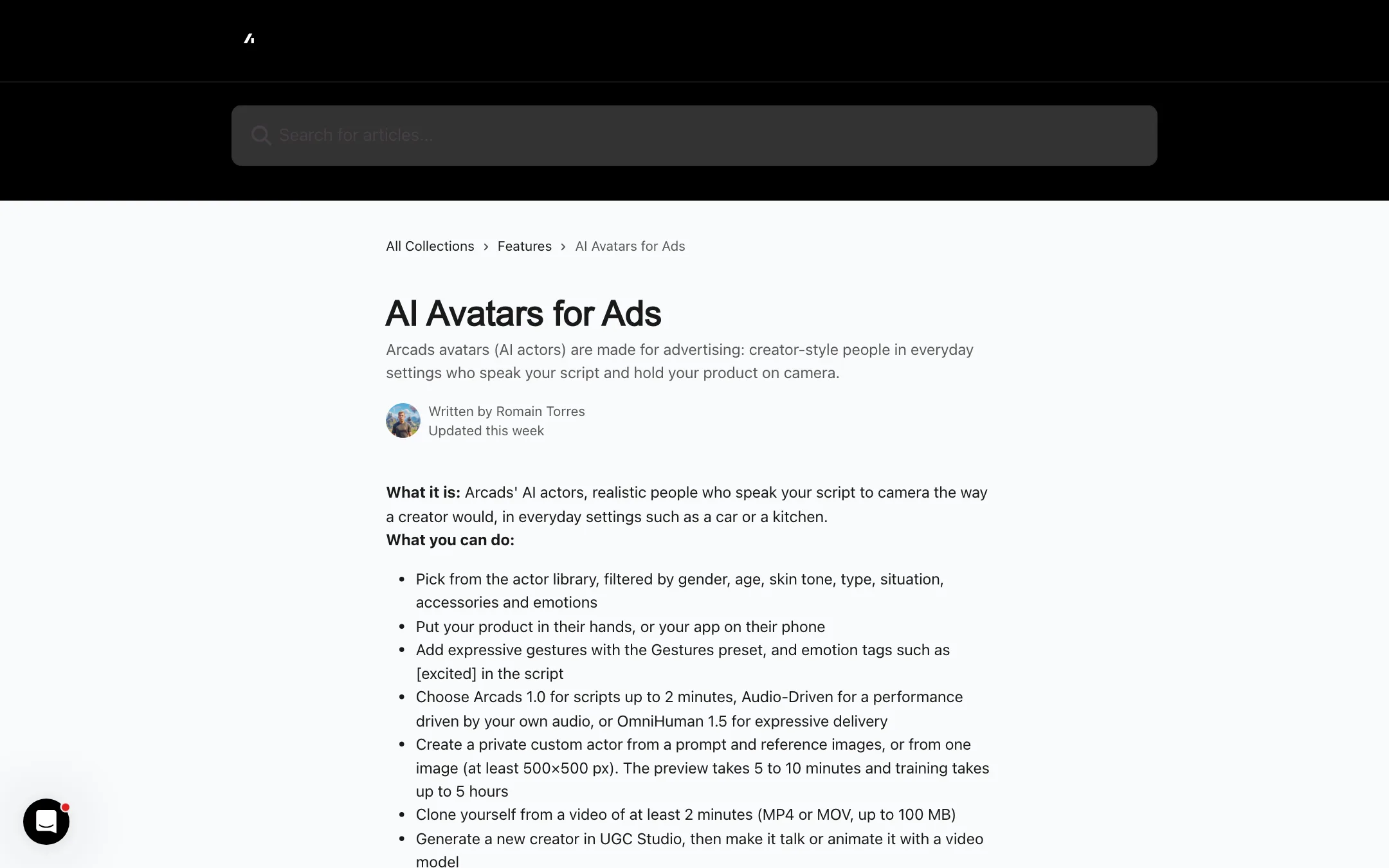
- Pick an actor. Filter the library by gender, age, skin tone, setting, accessories and emotion.
- Write or paste your script. Add emotion tags like [excited] where you want a change in delivery.
- Pick a model. Arcads 1.0 handles scripts up to 2 minutes. Audio-Driven follows your own recorded audio. OmniHuman 1.5 is pitched for more expressive delivery.
- Generate. The Generate button shows the credit cost first.
- Add captions, resize for each placement, translate, or extend the clip with the built-in tools.
Product and app presets
Arcads has presets aimed at specific ad formats:
- Unboxing POV turns a product photo into a first-person unboxing.
- Show Your App puts an app screenshot on an actor’s phone.
- Product showcase and fashion try-on for e-commerce.
- Gestures and camera movement to make a static actor feel less static.
Custom actors and clones
If the library does not fit your brand, you can create a private actor from a prompt and reference images, or from one image of at least 500 by 500 pixels. Arcads says the preview takes 5 to 10 minutes and full training up to 5 hours. You can also clone yourself from a video at least 2 minutes long.
Custom actors cost 1,600 credits once and are included on Pro and above. You must confirm you have rights and consent for the face you upload.
There are also Replace Actor and Animate Actor tools that put a different avatar into an existing video. Use them on footage you own.
Workflows, Mark and the API
- Workflows is an infinite canvas where you chain tools into a batch. Arcads’ example is one script across 10 actors in 2 languages in a single run. It is on Creator and above.
- Mark is an AI agent. You brief it in plain language and it builds the ads.
- API and MCP. Pro and above get a public API. The MCP server lets you drive Arcads from Claude or ChatGPT.
Output quality
We have not generated an Arcads ad, so here is what Arcads claims and what to watch for.
What Arcads says:
- Realistic actors. It calls its library “the most realistic and captivating AI actors.” The homepage shows ad results from apps like Glam and MellowFlow with view and revenue figures. Those are Arcads’ own case examples, not independent tests.
- Consent. Library actors are real people who agreed to the use of their likeness and are paid, per the help center.
- Model choice. You can pick Seedance 2.5 (the default), Veo 3.1, Kling 3.0, MiniMax, Wan, Grok Video and more for B-roll and product clips.
What to take from that:
- Arcads is partly a wrapper. The talking actors run on Arcads 1.0 plus OmniHuman, which is a ByteDance model. Most of the video and image generation runs on third-party models. You are paying for the actor library, presets, workflow tools and one bill, not one in-house model.
- Quality depends on the model you pick. A Seedance clip and a Veo clip will look different. Test the same prompt on two models before you scale a campaign.
- AI actors have tells. Every talking-head model can slip on hands, product grip and fast speech. Watch for these before you spend ad budget.
Contradictions to check
- Language count. The homepage says translation in more than 30 languages. The avatars article says talking actors speak 74 languages. The “What is Arcads” article says Translate Video covers 176 language and accent options.
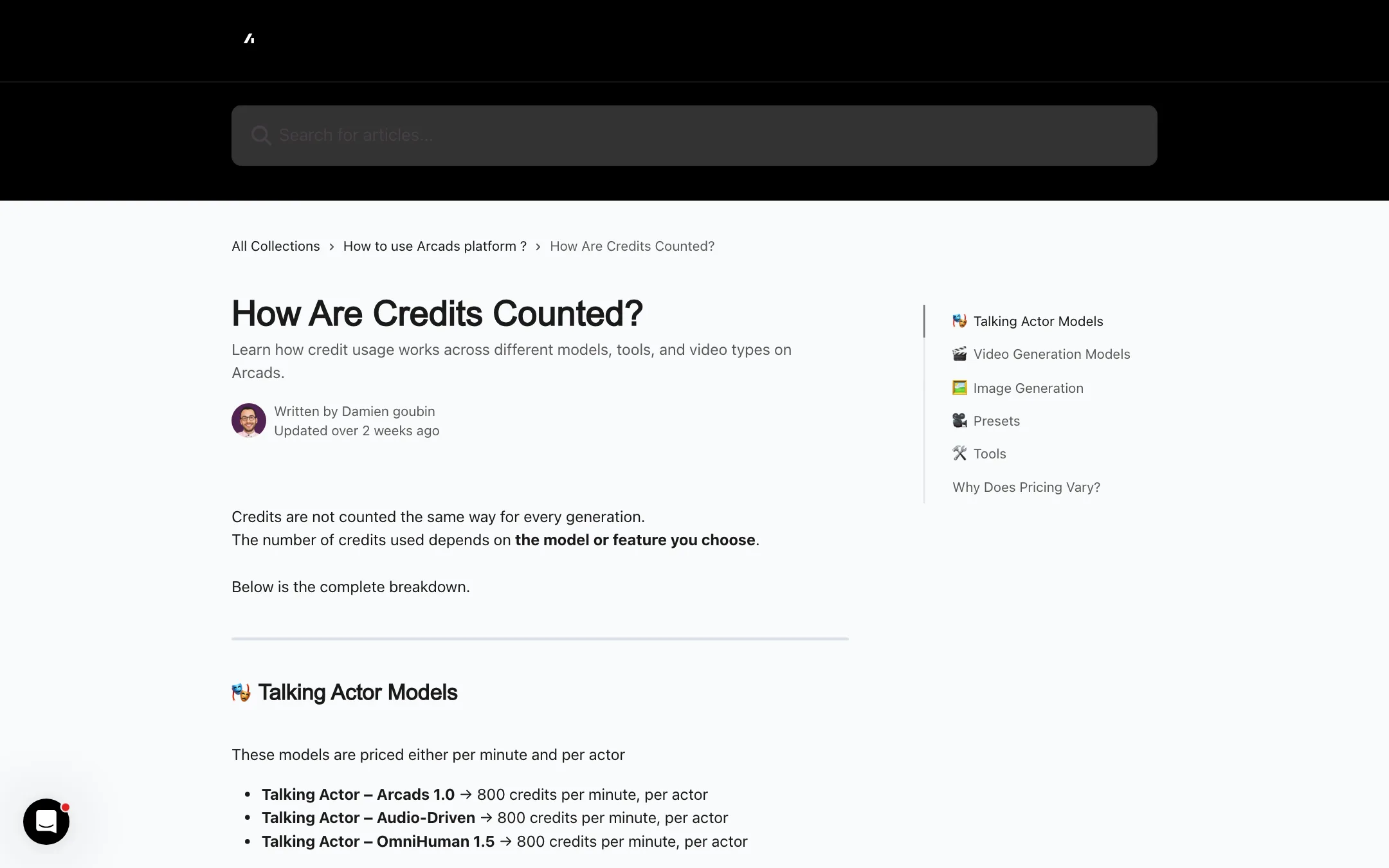
- Credit costs. The pricing article lists Replace Actor and Animate Actor at 500 credits and Translate Video at 240 per started 30 seconds. The credits article lists both actor tools at 800 and Translate Video at a flat 240.
- Affiliate terms. The affiliate page’s meta description says “lifetime recurring,” but the page body says 25% for the first 12 months.
- “Free trial.” The homepage says “Free trial available.” The help center says it needs a card and rolls into a paid plan.
Arcads also warns that it tests new pricing from time to time, so your account may see different rates. Trust the Generate button over any article.
Pricing
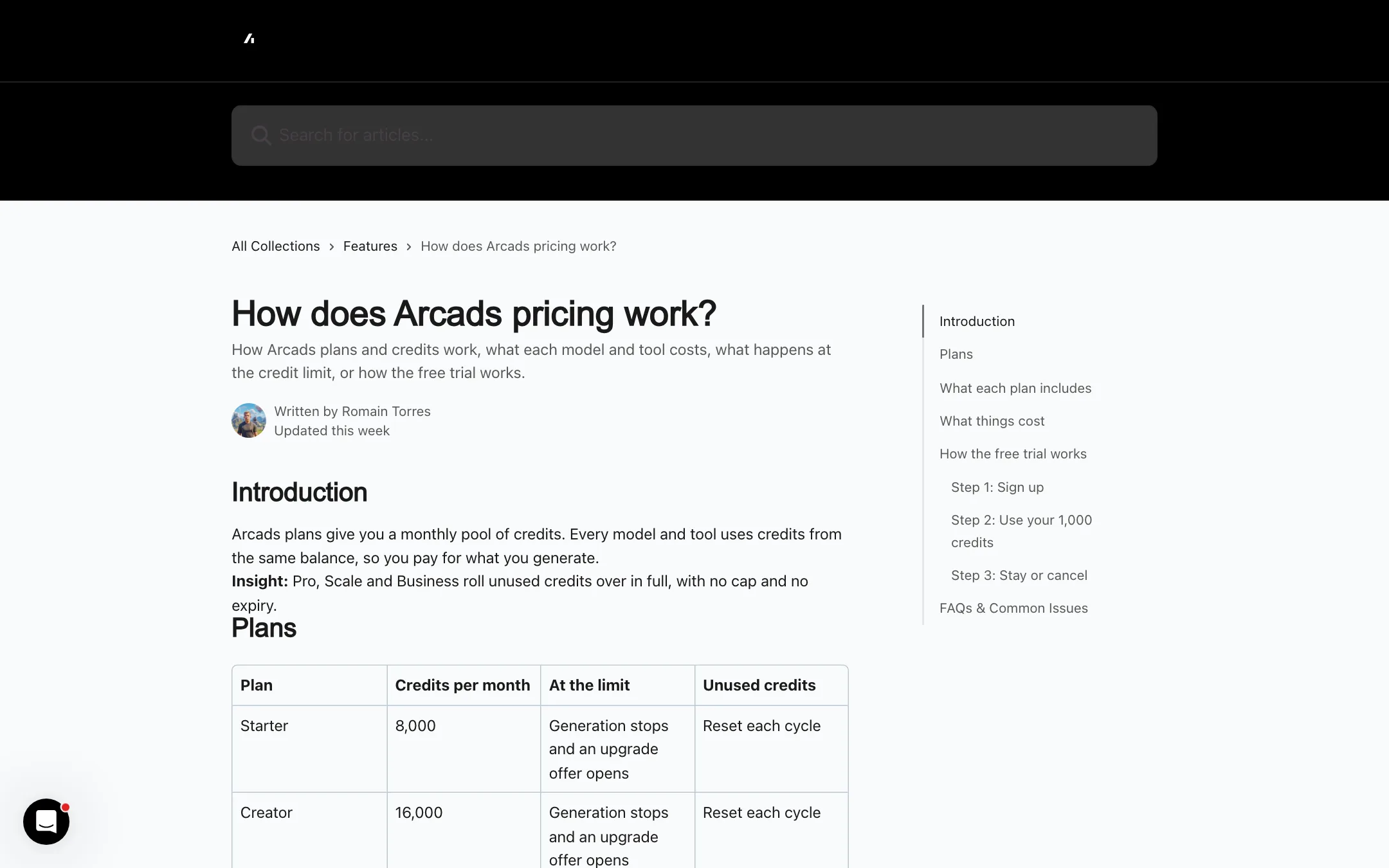
Arcads sells credits in monthly plans. Every model and tool draws from one balance.
| Plan | Credits a month | At the limit | Unused credits |
|---|---|---|---|
| Starter | 8,000 | Generation stops | Reset |
| Creator | 16,000 | Generation stops | Reset |
| Pro | 48,000 | Overage billed | Roll over |
| Scale | 96,000 | Overage billed | Roll over |
| Business | 192,000 | Overage billed | Roll over |
| Enterprise | Custom | Custom | Custom |
The help center gives these standard costs:
- Talking actor (Arcads 1.0, Audio-Driven, OmniHuman 1.5): 800 credits per started minute, per actor. Two actors in a 1 minute 45 second video costs 3,200 credits.
- Veo 3.1: 800 credits per 8-second clip.
- Seedance 2.5: 210 or 520 credits for 5 seconds at 720p or 1080p.
- Kling 3.0 Pro: 240 or 400 credits for 5 or 10 seconds.
- Images: 100 free a day on paid plans, then about 8 to 32 credits each.
- Custom actor: 1,600 credits, once.
- Trim, stitch, resize, text overlay, change voice: free.
A few things the pricing does not make obvious:
- No dollar figures. We could not find USD prices on any public Arcads page. You see them only after signing up with a card.
- The trial auto-bills. After 72 hours, Starter monthly starts. Arcads sends a reminder 24 hours before. Cancelling during the trial ends access at once.
- Starter math. At 800 credits per talking-actor minute, 8,000 credits is about 10 one-minute talking ads, and fewer if you use two actors or add B-roll.
- Lower plans lose credits. Starter and Creator credits reset each cycle and generation stops at the limit. Pro and above roll credits over with no cap or expiry.
- Upgrades reset your billing date. An upgrade charges the new plan right away.
- Cancelling loses credits. Unused credits go when the cycle ends.
How to keep costs down
- Turn on “Confirm before generating” in Settings so every job asks first.
- Set a spending limit. Daily, weekly or monthly caps stop overage on Pro and above.
- Keep scripts short. Talking-actor time is rounded up to the minute, so a 61-second script costs as much as two minutes.
- Use one actor per video unless the ad needs a conversation. Credits are charged per actor.
- Use the free tools. Trim, stitch, resize and voice changes cost nothing.
Verdict
Arcads is a strong fit if you run paid social and need to test many talking ads fast. The actor library, product and app presets and Workflows are all aimed at that job, and having Seedance, Veo and Kling in the same balance saves juggling subscriptions.
The pricing is the weak spot. You cannot see a dollar figure before you enter a card, the trial converts to a paid plan on its own, and the help center disagrees with itself on what some tools cost. Set a calendar reminder for the trial, turn on spending limits, and check the in-app price against your monthly ad testing volume before you stay.

