What Adori AI is
Adori AI turns writing into narrated video. You give it an idea, a script, a blog URL, a PDF, an audio file or a podcast. It writes a script, splits it into scenes, adds visuals, a voiceover and synced captions, and hands you an editable video.
It started as a blog-to-video product. You can still see that in the testimonials, which talk about repurposing blog posts for YouTube. The current pitch is wider. Adori now sells idea-to-video, 20 visual styles, consistent characters, motion graphics, 75 languages and talking avatar ads.
Adori does not run its own image or video model. Its pricing page lists Nano Banana Pro for images and Veo 3, Runway, Grok and Hailuo for video clips. The homepage adds Kling, Seedream, Flux, Ideogram and ElevenLabs logos. Adori’s value is the pipeline around those models: script writing, style, character consistency and editing.
It is a small player. The homepage claims 7,000+ users and 49,000+ videos. That is modest next to the bigger text-to-video tools, but it is an established product with documentation and a working free plan.
Who it is for
Adori fits you if:
- You have a back catalogue of blog posts or articles and want them on YouTube.
- You make explainer, history, bedtime story or moral story videos with narration over illustrated scenes.
- You publish in Indian languages or other non-English languages and want the script written in that language from the start.
- You want one consistent illustrated look, like watercolour or claymation, across a whole video.
Skip it if:
- You want cinematic, full-motion AI footage in every scene on a small budget. Real video clips are capped at 10 a month on the $45 plan.
- You need long videos. Script limits stop at 5 minutes.
- You want a presenter-led corporate video with a big stock avatar library. Adori’s avatars are a newer add-on, and dedicated avatar tools go much deeper.
How it works
Adori’s flow is short. You pick an input, pick a style and a language, and generate. The app builds a scene list. Each scene has narration text and a piece of media. You review it in a scene-based editor with a live preview, swap media on any scene, and export or publish.
Inputs
Adori accepts:
- An idea. One to five sentences describing the subject.
- A script. Pasted and used word for word.
- A blog URL or pasted text. Adori reads the article and writes a script from it.
- A PDF. Useful for reports and lessons.
- Audio or a podcast. Adori turns the recording into a visual video. The Free plan takes podcasts up to 10 minutes, Premium up to 2 hours.
Writing a good prompt
Adori’s own guide to prompts is one of the better ones in this category. Its main point is simple. Put the story in the prompt and leave the look to the settings.
Adori’s advice, in short:
- State a narrow subject, not a category. “Why Parkinson’s Law means work expands to fill the time you give it” beats “productivity.”
- Say what happens: a beginning, middle and end.
- Say who it is for in one line.
- Name anything that must appear, such as a product, a figure or a place.
It also tells you what to leave out. Style words like “cinematic,” aspect ratios, language and length all belong in settings. Asking for “a 45 second video” rarely works, Adori says, because length follows how much narration there is. If you want it shorter, give it less to say.
Past about 150 words, Adori suggests you paste a script instead, so it is used verbatim.
Styles and characters
You pick one of 20 styles, and Adori applies it to every scene. The list includes Cinematic, Dark Stage 3D, 3D Cartoon, Ink Cartoon, Watercolour, Claymation, Anime Cel, Comic Book, Whiteboard Doodle, Stick Figure, Isometric, Blueprint and Neon Cyberpunk. Each comes with suggested uses, such as Watercolour for bedtime stories or Isometric for SaaS explainers. You can also upload a picture of the look you want.
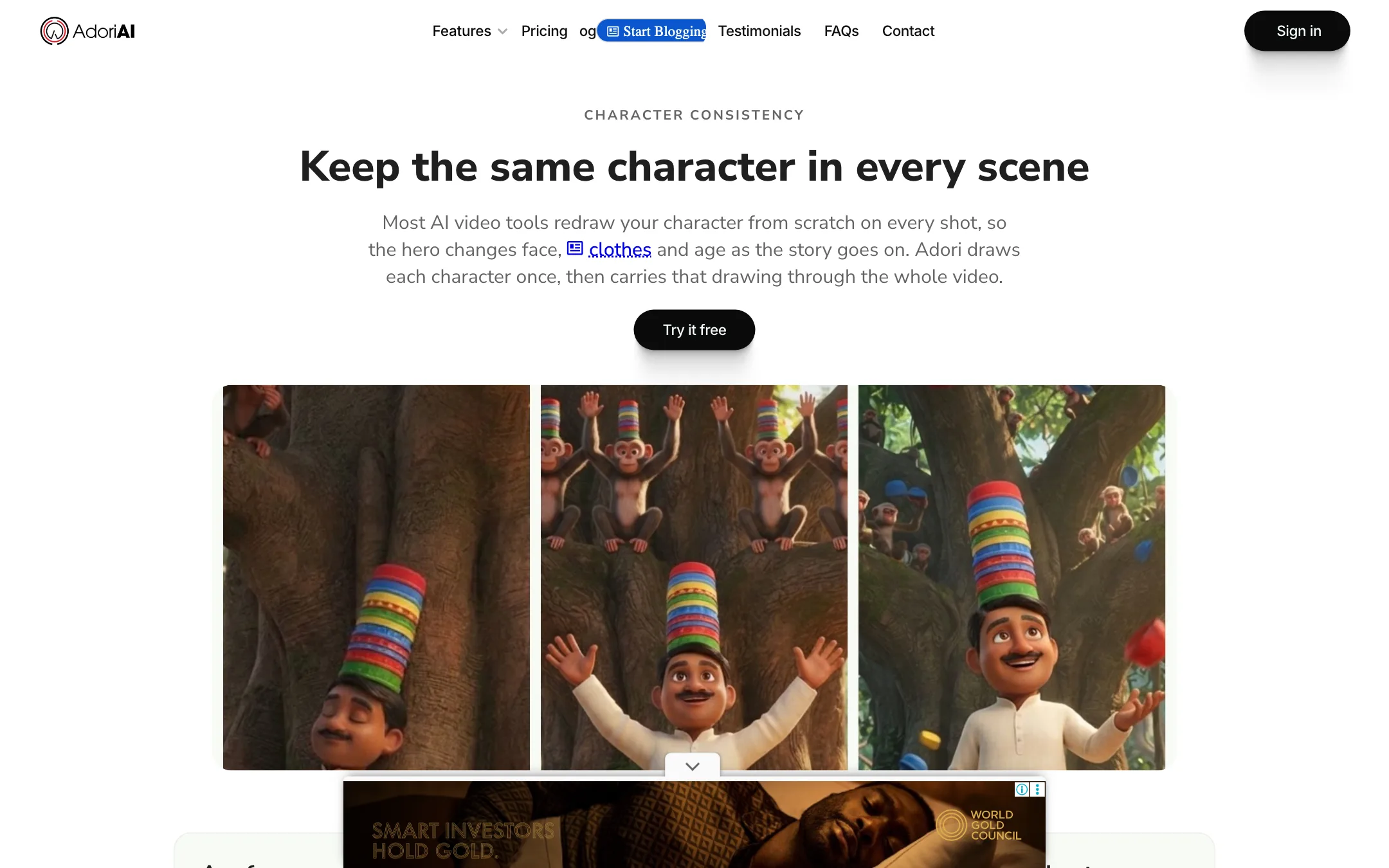
Character consistency is Adori’s most interesting idea. According to Adori, before any scene is generated it draws a reference sheet for each named character in your script, with front, side and three-quarter views. Every scene image and every video clip is then generated with that sheet attached. Adori says it handles up to three named characters per project and charges one credit per sheet.
This targets a real problem. Most scene-by-scene AI video tools redraw the hero from scratch every shot. We have not tested how well Adori’s approach holds up over a long video.
Motion graphics and brand kit
Adori also builds animated charts, funnels, timelines, stat reveals and quote cards, timed to the narration. You can paste your own numbers or give it a document with data in it. If a chart is wrong, Adori says you can describe the fix and it rebuilds just that graphic.
The brand kit takes a PNG or JPG logo, your colours and a call to action. Adori composes a closing scene in the video’s style and drops your real logo file into it, rather than asking an image model to draw your wordmark. That is a small, sensible detail. Adori says the end card is not charged separately.
Talking avatars
The newest feature is a talking avatar generator for ads, product demos and UGC-style social clips. Adori lists 50+ avatars in professional, casual and cartoon looks, plus a custom avatar builder from a description or a photo. You write the lines or paste a product brief and let it write a short script. It outputs landscape or portrait video.
This is why Adori is cross-listed under avatars. Treat it as an extra, not the core product.
Publishing
Adori connects to YouTube and publishes from the app, with suggested SEO fields. Its documentation covers channel setup, two-step verification and permissions, which tells you how central YouTube is to the product.
Output quality
We have not made videos with Adori, so this section reports what Adori claims and what its pages show.
Adori says each AI video scene is a real eight-second generated clip rather than a still image with a slow zoom. That is the right standard. Many blog-to-video tools pass off panning photos as video.
The catch is availability. On Free and Basic you get zero AI video clips. Those plans build videos from AI images, stock footage and photos. Adori advertises access to 100 million stock photos, videos and music tracks. Only Premium includes generated clips, 10 a month. Adori’s clips page says they render at 720p, even on a plan that otherwise exports 1080p.
Voice quality depends on the voice engine. Adori says it offers 40+ voices, and the homepage shows an ElevenLabs logo. The pricing page lists “Pro voices” on every plan and a limit on voice regenerations per project, from 3 on Free to 20 on Premium.
Pricing
| Plan | Price | Key limits |
|---|---|---|
| Free | $0 | 1 project, 1-minute script, 20 AI images, no AI clips, 720p |
| Basic | $15/mo | 10 projects, 3-minute script, 100 AI images, no AI clips, 720p |
| Premium | $45/mo | 20 projects, 5-minute script, 200 AI images, 10 AI clips, 1080p, 5 seats |
| Enterprise | Contact sales | Advanced voice cloning, custom setup |
Adori says yearly billing saves 20%, but the page we saw shows monthly prices only.
Things to know before you pay:
- Projects are counted, not minutes. Basic gives you 10 projects a month. If you plan to convert a large blog archive, that runs out fast.
- Two pricing languages. The pricing page counts AI images and AI videos per plan. The feature pages talk in credits: five credits per generated clip, one per character sheet, and one credit worth ten cents in the US or eight rupees in India. Adori does not explain how the two systems relate. Expect to find the real credit balance only after you sign up.
- Voice regenerations are capped. Re-recording a scene’s narration counts against a per-project limit.
- Ads on the sales pages. The pricing page and blog posts include third-party ad text like “Buy Sales Leads” and “Compare TVs” mixed into the copy. It does not affect the app, but it makes the site look less polished than the product description suggests.
The homepage FAQ also promises 24/7 support by live chat, email and phone. The pricing page lists chat support only. Assume chat is what you will get.
Adori does not publish an affiliate program. Its /affiliate URL returns a 404.
Verdict
Adori AI is a sensible pick if you have writing and want it on YouTube as narrated, illustrated video. The prompt advice is good, the 20 styles give you a consistent look, and character reference sheets and a real-logo end card show that someone has thought about the common failures of AI video.
The limits are the problem. The free plan is a taste. Basic at $15 gets you 10 short projects at 720p with no generated clips. Premium at $45 is where Adori matches its homepage, and even then you get 10 clips a month. Try the free plan with one blog post, check the scene list and the voice, then decide whether Basic’s image-based videos are enough for you.