What Vrew is
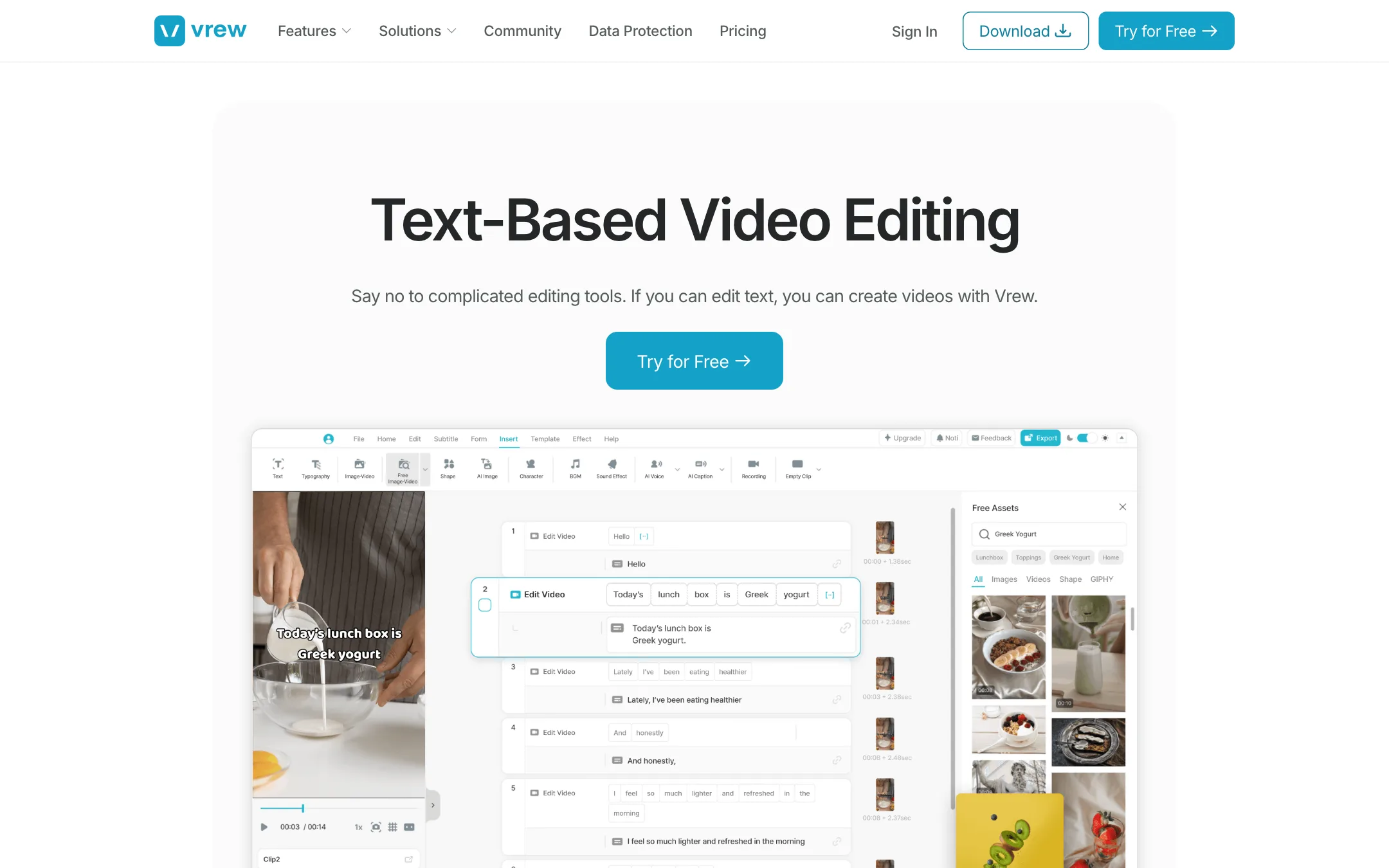
Vrew is an AI video editor from VoyagerX that turns your footage into a transcript. You edit the words, and the video follows. Delete a sentence and the clip is gone. Move a paragraph and the footage moves with it.
That idea is not new. What Vrew adds is a low price, a real free plan and a long list of AI extras in the same app. It removes silences in one pass, captions your video automatically, generates voice-overs from 600+ AI voices, and can build a whole video from a script.
Vrew runs mainly as a desktop app for Mac, Windows and Linux. The latest version was 4.7.2 when we checked. A browser version opens from the Try for Free button if you would rather not install anything first.
Who it is for
Vrew fits you if:
- You record talking-head videos, lectures, interviews or podcasts and spend hours cutting out mistakes and pauses.
- You want captions on every video without typing them.
- You find a timeline editor slow or confusing and would rather read than scrub.
- You make explainer or training videos and do not want to record your own voice.
- You want a desktop editor that works on Linux, which most AI editors skip.
Skip it if:
- Your videos are mostly music, b-roll or action with little speech. Text-based editing only helps when there is dialogue to edit.
- You want cinematic AI-generated footage. Vrew’s text-to-video is built for explainers, not for competing with dedicated video models.
- You need detailed motion graphics, multicam or color work. A full editor like DaVinci Resolve or Premiere Pro is still the tool for that.
How it works
Vrew’s own walkthrough is three steps. You upload a video, Vrew transcribes it into text, and you edit the text and export.
Text-based editing
Vrew splits your footage into word-based blocks. You read through, select what you want gone and delete it. You can also cut, copy and move text, and the video and audio follow. Vrew pitches it as editing “by seeing, not just listening.” Instead of replaying a section at 1.5x speed, you skim the words.
This works best for long recordings. Vrew names interviews, explainers and educational content as the main uses. On a 40-minute interview, finding the good answers by reading is far quicker than scrubbing.
Silence remover
Click Remove Silences under the Edit or Home tab. Vrew finds every pause, and you choose how short to make them. You can set a minimum length so only long pauses get trimmed, and apply it to the whole video or just some clips. Vrew says it can also detect non-speech parts such as applause or laughter. If you overdo it, you can undo back to the original.
Speech editor
This is the feature that sets Vrew apart from cheaper caption tools. Select a word in the transcript, click AI Edit, type the new word and press Enter. Vrew says it regenerates that piece of audio in your original voice and blends it into the recording.
Vrew suggests it for fixing a mispronounced word, changing a date or price in a finished video, or swapping terms for different clients. It is only on Standard and Business, so the cheapest paid plan does not include it.
Generative AI tools
Vrew bundles a set of generative tools:
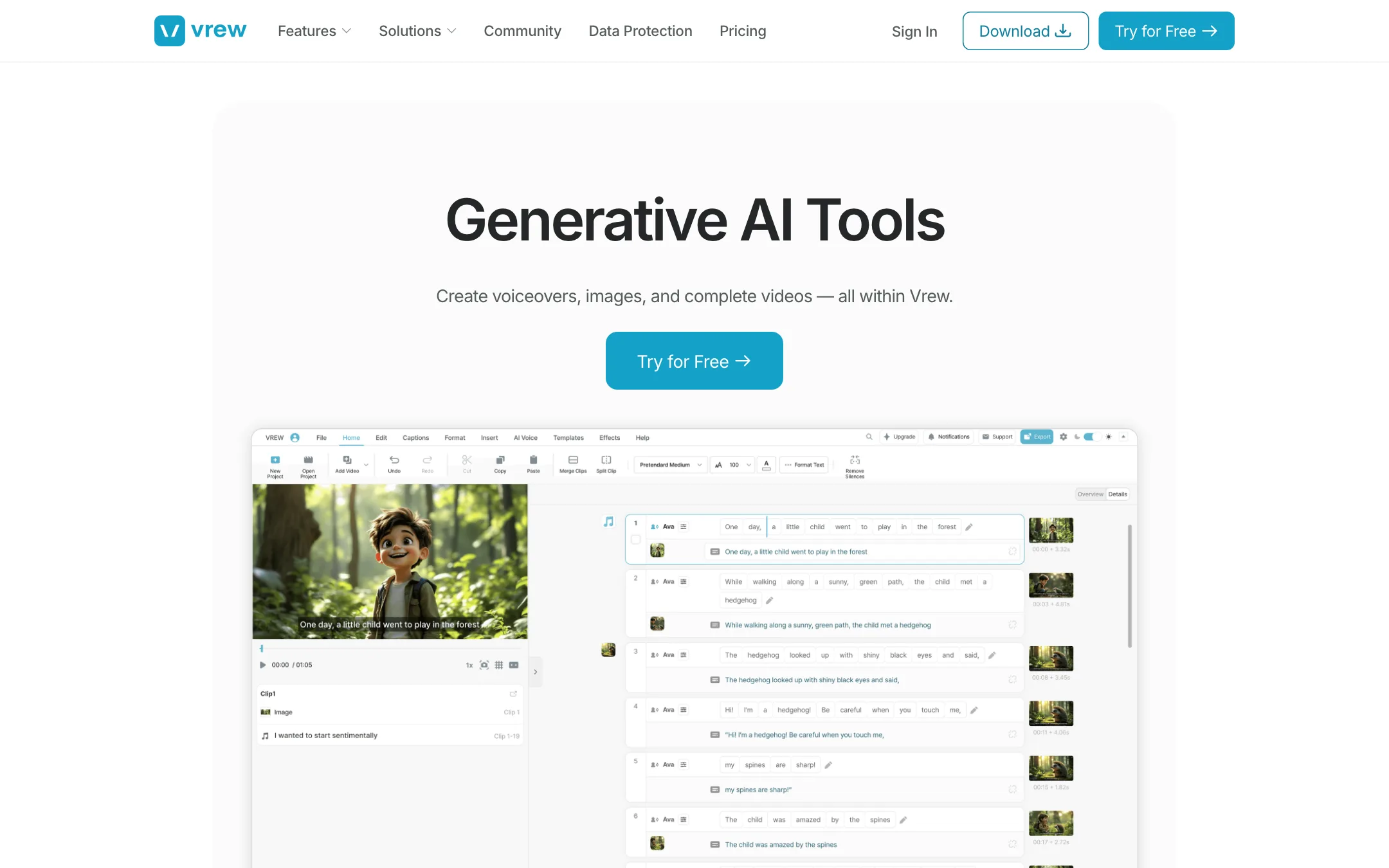
- Video from text. Enter a script or a few keywords and Vrew builds a video with visuals, narration and sound. Free allows scripts up to 3,000 characters, Light and up allow 10,000.
- AI voiceover. Pick from 600+ voices in multiple languages. Voice cloning is on every plan, from one voice on Free to six on Business.
- AI images and AI video. Generate visuals that match a scene. Free users can use them in a project but cannot download them.
- AI scriptwriter. Draft a script with instructions on tone and style. Standard adds a Pro version.
- AI characters. Avatars counted per plan in the credit table.
- Noise removal and translation. Clean up hiss and hum, and translate captions.
- Vrew Agent. Listed on every plan. Vrew’s pages we read do not describe what it does in detail.
Vrew does not say which models power its image and video generation on the pages we checked. Treat these as handy extras for explainers rather than a reason to choose Vrew on their own.
Other tools
Every plan also gets free stock images and video, background music, templates, sound effects, screen recording, aspect ratio changes, video from presentation slides, auto scene detection, stylized text, filters and import from mobile.
Output quality
We have not tested Vrew hands-on, so quality claims here are Vrew’s own. A few points shape what to expect:
- Transcription drives everything. If the transcript is wrong, your cuts are in the wrong place. Vrew says it generates accurate, synced captions in about 15 seconds. Clear audio and one speaker at a time will give you the best results with any transcription tool.
- Regenerated speech can sound different. Vrew says the speech editor matches tone, pacing and delivery. With any voice regeneration, check edited words closely, especially at the start and end of a sentence.
- Silence removal can make speech feel rushed. Cutting every pause leaves no room to breathe. Vrew’s minimum pause setting exists for this reason, so use it.
- Generated visuals are explainer-grade. Vrew’s text-to-video is built to illustrate narration, not to produce cinematic shots. Its sample is a short illustrated story.
Pricing
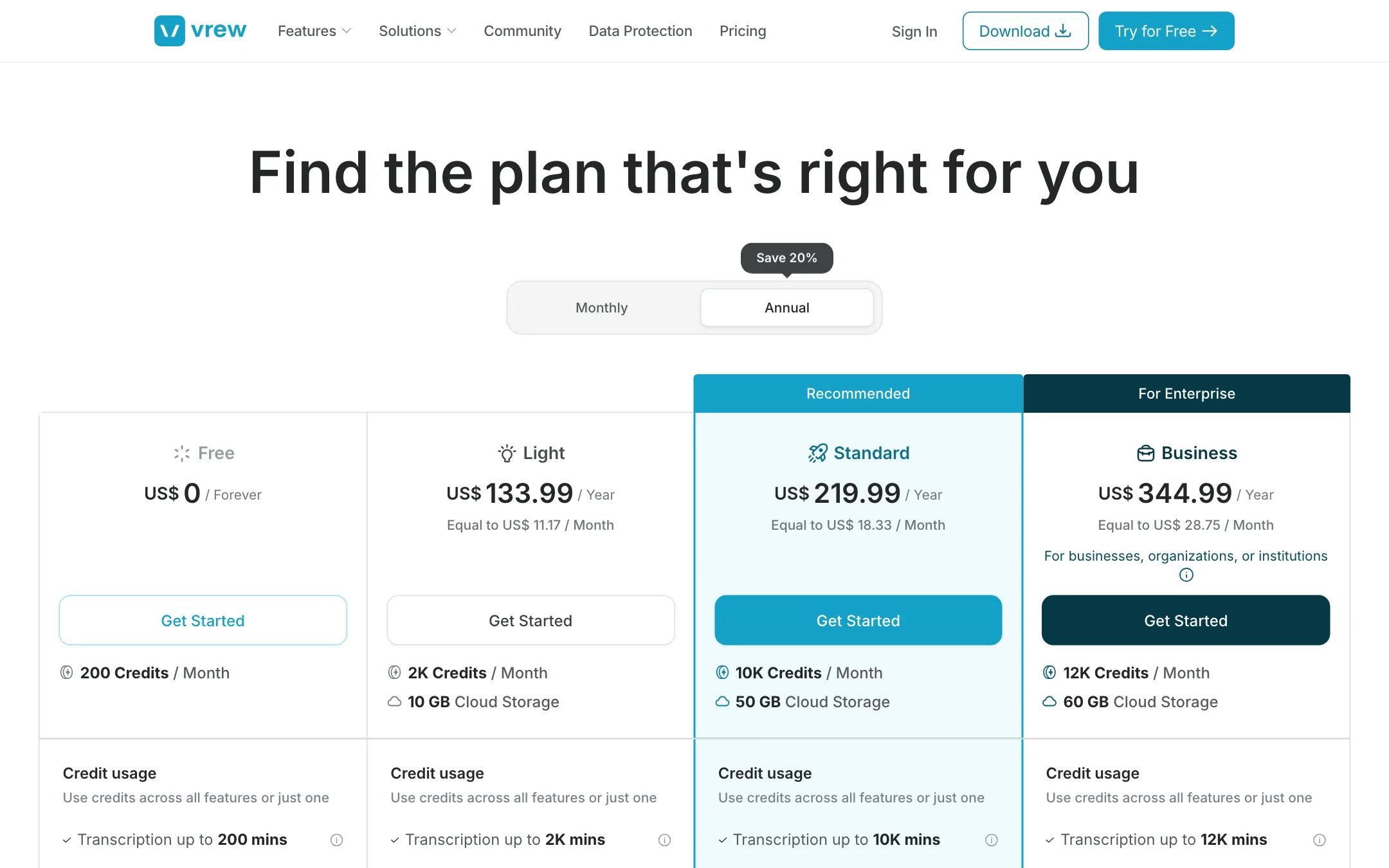
Vrew uses one pool of monthly credits. You can spend them across every AI feature or on just one. The pricing page is unusually clear about what the credits buy.
| Plan | Price | Credits | What 1 plan’s credits buy (one feature only) |
|---|---|---|---|
| Free | Free | 200 a month | 200 min transcription, 20K characters of AI voice, 200 images or 20 AI videos |
| Light | $11.17/mo yearly, $13.99 monthly | 2,000 | 2,000 min transcription, 200K characters of voice, 200 AI videos |
| Standard | $18.33/mo yearly, $22.99 monthly | 10,000 | 10,000 min transcription, 1M characters of voice, 1,000 AI videos |
| Business | $28.75/mo yearly, $35.99 monthly | 12,000 | 12,000 min transcription, 1.2M characters of voice, 1,200 AI videos |
The rates are consistent across plans. One credit buys a minute of transcription or noise removal, 100 characters of AI voice, 300 characters of translation or one AI image. An AI video costs ten credits.
Things the pricing page does not make obvious:
- The “$8.75” price does not exist on the page. The pricing page’s own meta description says plans start at $8.75 a month. The cheapest plan shown is Light at $11.17 a month billed yearly. Go by the plan cards.
- Free is watermarked. Watermark-free export is listed as a Light feature. Free users also cannot download AI images or videos.
- Credits do not roll over. They renew each month on your payment date and unused ones vanish. A yearly plan pays them out monthly too, not all at once.
- Light lacks the speech editor. If fixing misspoken words is why you want Vrew, Standard is the real starting plan.
- Business is barely bigger than Standard. It adds 2,000 credits, 10 GB of storage and one more cloned voice for about $10 more a month. It is aimed at organisations that need invoicing and payment links.
- Prices include VAT. What you see is the final total. Schools get 20% off.
Refunds
Vrew’s refund policy is detailed. You can get a full refund within 14 days only if you have not used voice analysis, AI voice or translation. After that, refunds are partial: Vrew subtracts the days or months you used and then takes a 10% cancellation fee. Yearly plans refunded after 15 days are charged in whole months used, rounded up. You lose paid status as soon as the refund goes through.
Privacy and data
Vrew leans hard on privacy. VoyagerX holds ISO/IEC 27001 and 27701 certification from SGS. The data protection page says your creative content is never used to train AI models, “not now, and not in the future,” and is not analysed for product development unless you opt in. Data is encrypted in transit and at rest, and staff cannot open your files without your permission. If you edit client interviews or internal training videos, that is a point in Vrew’s favour.
Things to watch
- It is desktop-first. The full experience is the downloaded app. The browser version is handy for a test, but plan on installing it.
- AI extras are thinly documented. Vrew Agent and the image and video generators get one line each on the pages we read, with no model names.
- There is no affiliate program. The /affiliate page said “This Page does not exist” when we checked.
Verdict
Vrew is a strong, low-cost pick if most of your videos are people talking. Editing by transcript, one-click silence removal and automatic captions cover the slowest parts of that work, and the Free plan lets you try all of it before you pay. The credit table is one of the clearest we have seen.
Know the trade-offs before you subscribe. Free exports are watermarked, the speech editor needs Standard, and the generative tools are extras rather than a reason to buy. If you just need clean cuts and captions, Light at $11.17 a month yearly is enough. If you want to fix flubbed words without re-recording, budget for Standard.
