What Videomagic is
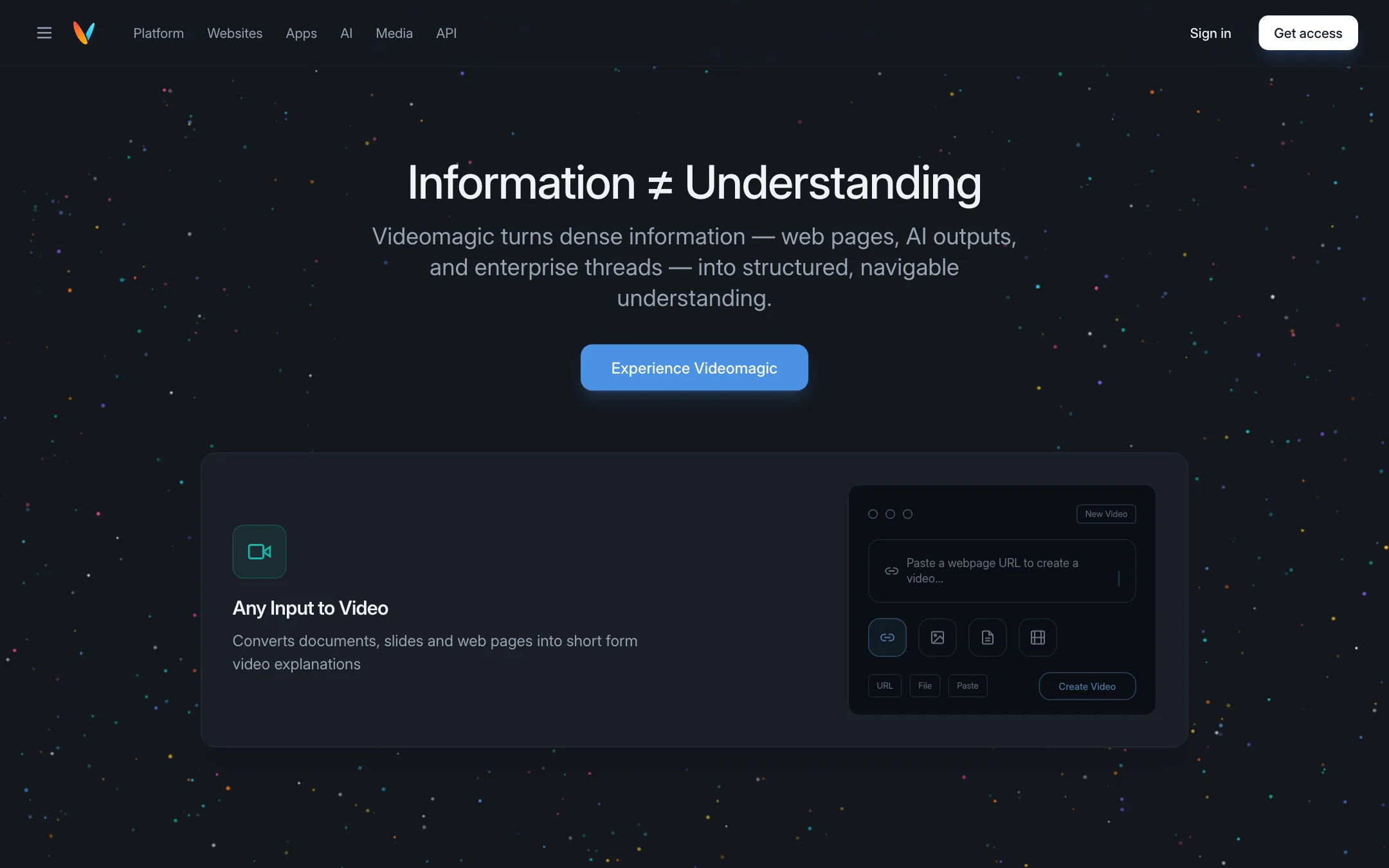
Videomagic turns information into short explainer videos. You give it a web page URL, a document, a slide deck or a block of text. It returns a narrated video split into chapters. Then you can ask questions about the source in a chat next to the video.
Its tagline is “Information ≠ Understanding.” The pitch is that people skim dense pages and miss the point, and a short video explains it better.
This puts Videomagic in a different place from most tools on our text-to-video list. PixVerse, Kling and Veo generate scenes from a creative prompt. Videomagic starts from content you already have and explains it. If you want a dragon flying over a city, this is the wrong tool. If you want a two-minute summary of a product page or a quarterly report, it is aimed squarely at you.
Videomagic used to market itself mainly as a URL-to-video tool for product and e-commerce videos. Its FAQ still describes that flow: pick a template, give it a product or business URL, and it handles storyboarding and effects. The newer site leans harder into AI explanations, enterprise use and media search.
Who it is for
Videomagic fits you if:
- You have written material to explain: product pages, help articles, reports, slide decks or policies.
- You run a store or a SaaS site and want short explainer videos without filming.
- You train staff or students and want a summary video with a Q&A layer.
- You are an enterprise in a regulated field that needs processing inside your own cloud.
Skip it if:
- You want creative or cinematic AI clips. Use a model-based generator.
- You want to try it free. There is no free plan, and the trial needs a card.
- You make high volume social content. Per-minute pricing gets expensive fast.
How it works
Creating a video
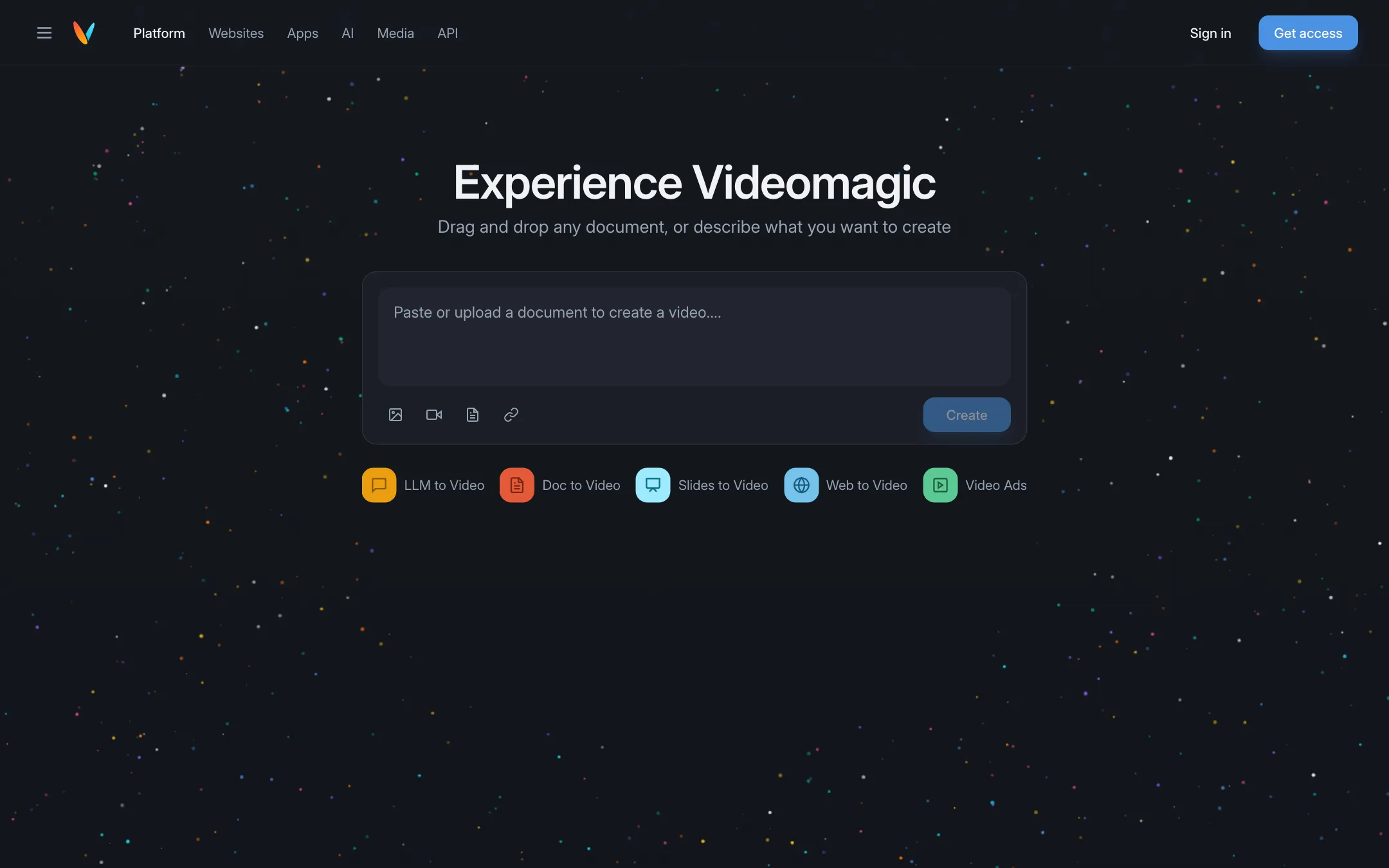
The Experience Videomagic page has one box: “Drag and drop any document, or describe what you want to create.” Under it sit five modes:
- LLM to Video: turn an AI answer into a video.
- Doc to Video: upload a document such as a PDF.
- Slides to Video: convert a presentation.
- Web to Video: paste a URL.
- Video Ads: make a short ad from your content.
Icons in the box let you attach an image, a video, a document or a link. Then you press Create. We did not create a video, because it needs an account. Videomagic’s own demo shows the result as a narrated video of a couple of minutes with chapters such as Intro, Key Points, Deep Dive and Summary.
Ask why
The feature that sets Videomagic apart is the chat next to each video. Videomagic calls it Ask Why. You type a question about the source, and the answer cites where it came from. Its demo uses a quarterly report: you ask why margins fell, and the reply points to the right page of the PDF.
This is a smart idea for explainers. A video on its own can gloss over details. A grounded chat lets the viewer check the facts. We have not tested how well the grounding works in practice.
The Chrome extension
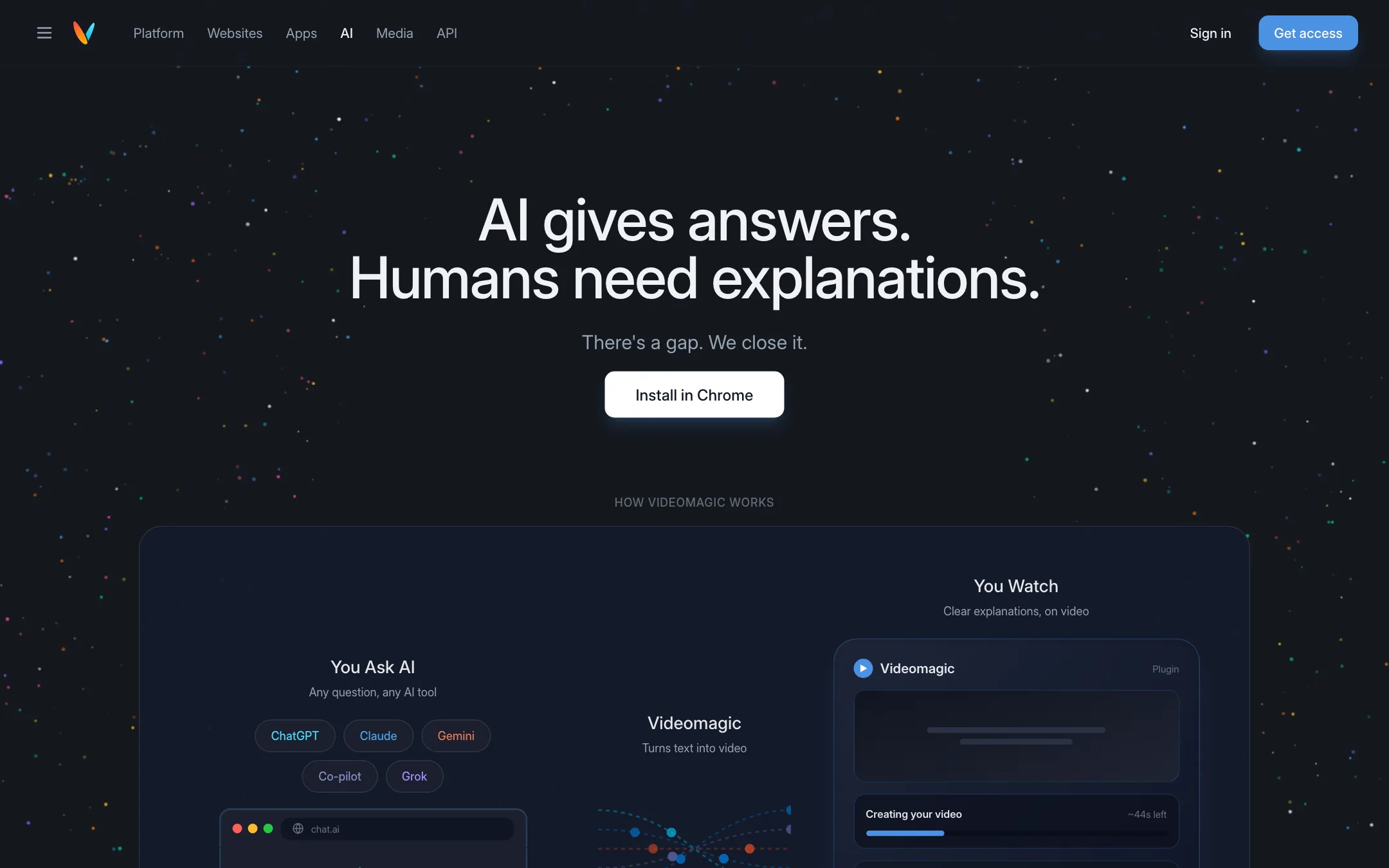
The AI page promotes a Chrome extension. You ask any AI assistant a question, such as ChatGPT, Claude, Gemini, Copilot or Grok. The extension then turns the answer into a video. Its demo shows length options from 30 seconds to 5 minutes and an estimated time left while the video is made.
Websites, apps and media
Videomagic also sells beyond the self-serve app:
- Websites: embed short contextual videos and a chat assistant on your own site. It comes with analytics that show completion rates, replays and “top confusion points.” The page lists brands such as Marriott, iHerb and Life Time as examples. Pricing is by contact only.
- Apps: plugins for meetings, documents, presentations, email and cloud storage, with Word, PowerPoint, Teams and Outlook shown. Pricing for app plugins is listed as coming soon.
- Media (Vision): a separate engine that scans a video library, identifies scenes, characters and story structure, and lets you search it in plain language. It is aimed at media companies and sold by demo.
- API: an enterprise “Understanding Layer” for finance, healthcare and insurance, which can run inside the customer’s own AWS or GCP account. Videomagic lists purpose binding, retention rules, audit trails and deletion certificates.
Most solo creators will only ever touch the web app and maybe the extension.
Output quality
We have not made a video with Videomagic, so we cannot judge the output from our own tests. The public site shows interface mockups rather than finished sample videos, and the examples gallery appeared empty when we checked. That makes it hard to judge quality before you pay.
What Videomagic says it does:
- Replaces dense text, logs and data dumps with “visual, narrated understanding.”
- Grounds every explanation in the original source, with links back to it.
- Handles storyboarding and effects automatically from a URL.
What its case study claims: an e-commerce partner called shop360 used Videomagic videos in a Facebook and Instagram A/B test. Videomagic reports a 124% higher click-through rate and 23% lower cost per result than a conventional product listing for non-branded ads. These are Videomagic’s own numbers from its own case study.
To get the most out of the trial, test with material you know well. Pick one product page, one long document and one slide deck. Watch each video, then ask the chat two or three questions you already know the answers to. That tells you quickly whether the narration is accurate and whether the grounding holds up.
Expect this kind of tool to produce clean, presentational explainers: stock-style visuals, on-screen text and narration. It is not built to produce photoreal scenes. Use the 15-day trial to run your own pages and documents through it, and cancel before day 15 if it is not right.
Pricing
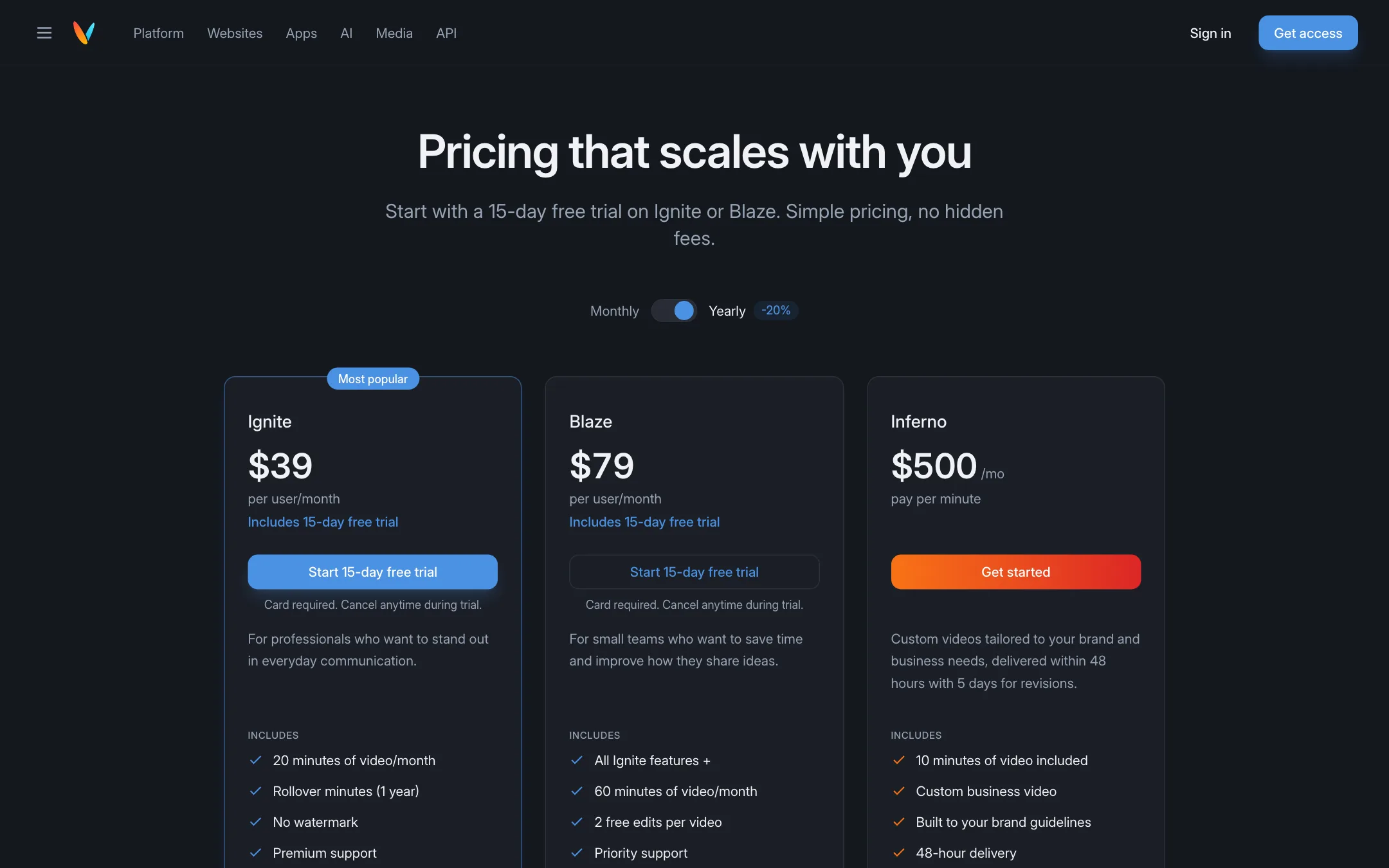
Videomagic charges by minutes of finished video, not by credits. Prices below were checked on 2026-10-19. The pricing page defaults to yearly billing, which shows the lower prices.
| Plan | Price | What you get |
|---|---|---|
| Ignite | $39/mo yearly, $49 monthly | 20 minutes a month, rollover, 1 free edit per video |
| Blaze | $79/mo yearly, $99 monthly | 60 minutes a month, rollover, 2 free edits, priority support |
| Inferno | $500/mo, monthly only | 10 minutes of custom brand video, 48-hour delivery |
Extra minutes cost $3 on Ignite, $2 on Blaze and $50 on Inferno.
Some quick math on what that means:
- Ignite works out to about $1.95 to $2.45 per minute of video, depending on billing.
- Blaze works out to about $1.32 to $1.65 per minute.
- Inferno is a done-for-you service at $50 a minute. It is a custom video built to your brand guidelines with a 5-day revision period, not self-serve generation.
Things to know before you pay
- No free plan. The 15-day trial on Ignite and Blaze needs a card. Videomagic says you will not be charged if you cancel before the trial ends.
- Minutes roll over on Ignite and Blaze for up to one year. Inferno minutes expire at the end of each cycle.
- Each video uses minutes based on its length and complexity, per the FAQ. A two-minute explainer will not necessarily cost exactly two minutes.
- One user per seat. Ignite and Blaze are priced per user. Inferno includes unlimited users.
- Free downgrades are gone. You can upgrade any time with a prorated charge. To stop paying, you deactivate the subscription.
- Feature lists differ slightly. The FAQ says Blaze includes API access. The comparison table puts API access with the higher tier. Confirm with support if the API matters to you.
How it compares
Next to a clip generator like PixVerse, Videomagic is a different kind of tool. PixVerse sells cheap credits for short creative clips. Videomagic sells minutes of explainer video built from your own material, at a higher price per minute.
A fairer comparison is with other “document to video” and “URL to video” tools, and with avatar explainer tools such as Synthesia or Steve AI. Pick Videomagic if the grounded Q&A chat and the website embed matter to you. Pick an avatar tool if you want a presenter on screen.
Verdict
Videomagic is a niche tool with a clear idea. Turn content you already have into a short explainer, then let viewers ask questions grounded in the source. For marketers, educators and teams with a lot of written material, that is genuinely useful.
It is not a text-to-video generator in the cinematic sense, and it is not cheap. There is no free plan, the trial needs a card, and there are few public samples to judge output before you pay. Run the trial on two or three of your own pages. If the explainers save you real time, Ignite on yearly billing is the sensible start.