
What VideoGen is
VideoGen is a browser-based AI video platform. You start with an idea, a script, a slide deck, a voiceover or a brief, and it builds an editable video with visuals, narration and captions. Its tagline is “Generate videos at scale. Stay in control.”
The focus is work video: product ads, explainers, UGC-style ads, training, tutorials, presentations and social clips. VideoGen says it is trusted by over 5 million creators and teams, and quotes Y Combinator CEO Garry Tan on its homepage.
For most of its life VideoGen has been a wrapper. Its pricing page says you can “use every major AI model,” and its model pages list Seedance, Kling, Veo, Sora, Hailuo, Wan and PixVerse for video, Nano Banana Pro, Flux and GPT Image 2 for images, and ElevenLabs for voice. In October 2026 it announced its own VideoGen Model 1, which it says can make finished multi-shot videos up to ten minutes long. Model 1 is in a limited partner rollout, so for now the platform runs on third-party models.
Who it is for
VideoGen fits you if:
- You make explainers, product demos or training videos from scripts or slides.
- You need many related videos, such as a training series or a batch of ad variants, kept consistent.
- You want an editor after the AI does its first pass.
- You localise into other languages.
- You build automations. API and MCP access come with every paid plan.
Skip it if:
- You mainly want cinematic generative footage. At Pro’s credit levels you get about 4 minutes of generated video a month.
- You want a free plan for ongoing use. The free tier is one video.
- You only need clips from existing long videos. A dedicated clipper does that better.
How it works
VideoGen is built around workflows. Its help center lists them:
- Script to video turns an idea or a written script into a narrated video with supporting visuals.
- Storyboard to video lets you plan every scene before building the video. VideoGen recommends this one for marketing videos.
- Slides to video turns a presentation, or an AI-generated deck, into a narrated video.
- Voiceover to video adds visuals and captions to narration you already have.
- Creative brief to video starts from a detailed brief and picks the workflow for you.
- Record captures your screen, camera or both.
- Prompt to video clip generates one short clip from a prompt and optional reference images.
- Video editor and Remix template start from a blank project or a ready-made one.
Most workflows end in the editor, where you refine the result.
A typical script-to-video run
Based on VideoGen’s pages, a run looks like this:
- Pick Script to video and paste your script, or type a short idea and let the AI write it.
- Choose a voice. VideoGen lists 200+ voices in 50+ languages. You can also record your own, and it trims pauses and filler words.
- Let the agent build scenes with visuals, captions and optional avatars.
- Edit in the browser. AI remix actions make one-click changes to a scene.
- Translate if you need other languages, then export.
Agents and scale
VideoGen’s pitch is that its agents “coordinate multiple related videos from a single brief.” The idea is to keep a training series or a set of ad variants consistent through shared context and assets. Teams get workspaces with centralised billing and a shared credit pool.
Integrations
VideoGen connects to more tools than most rivals. Its integrations page lists Adobe Premiere Pro, Slack (mention @VideoGen in a channel), Zapier, Make, ChatGPT, Claude via an MCP connector, and Cursor. There is a public API with text-to-video and image-to-video endpoints.
Output quality
We have not run VideoGen ourselves. What its pages show:
- Generated clips come from other models. VideoGen says requests are routed “to a pool of current AI models based on internal evals, compliance requirements, and your intent.” Results will vary with the model picked.
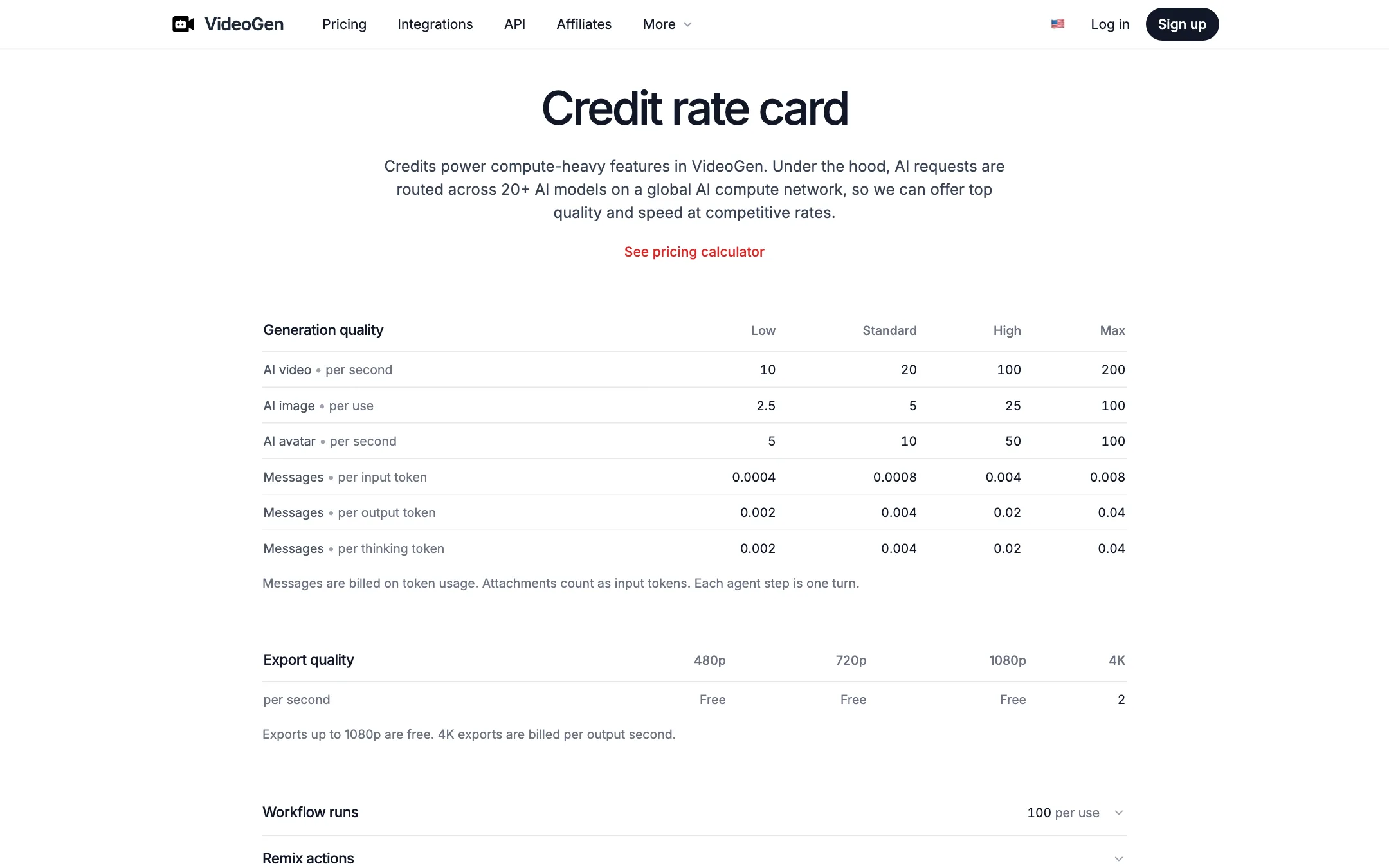
- Quality tiers change the model and the cost. The rate card has Low, Standard, High and Max tiers. Max quality, with models like Seedance 2.5, needs Advanced or Ultra.
- Exports go up to 4K. Up to 1080p is free; 4K costs extra credits per second.
- Model 1 claims are early. VideoGen says Model 1 costs “50%+ less” than comparable models, “based on internal validation,” and that independent benchmarks are still underway.
Some of VideoGen’s “model” pages, such as HeyGen and VEED, are other video products rather than models. That is worth knowing if you are comparing what each plan actually unlocks.
Pricing
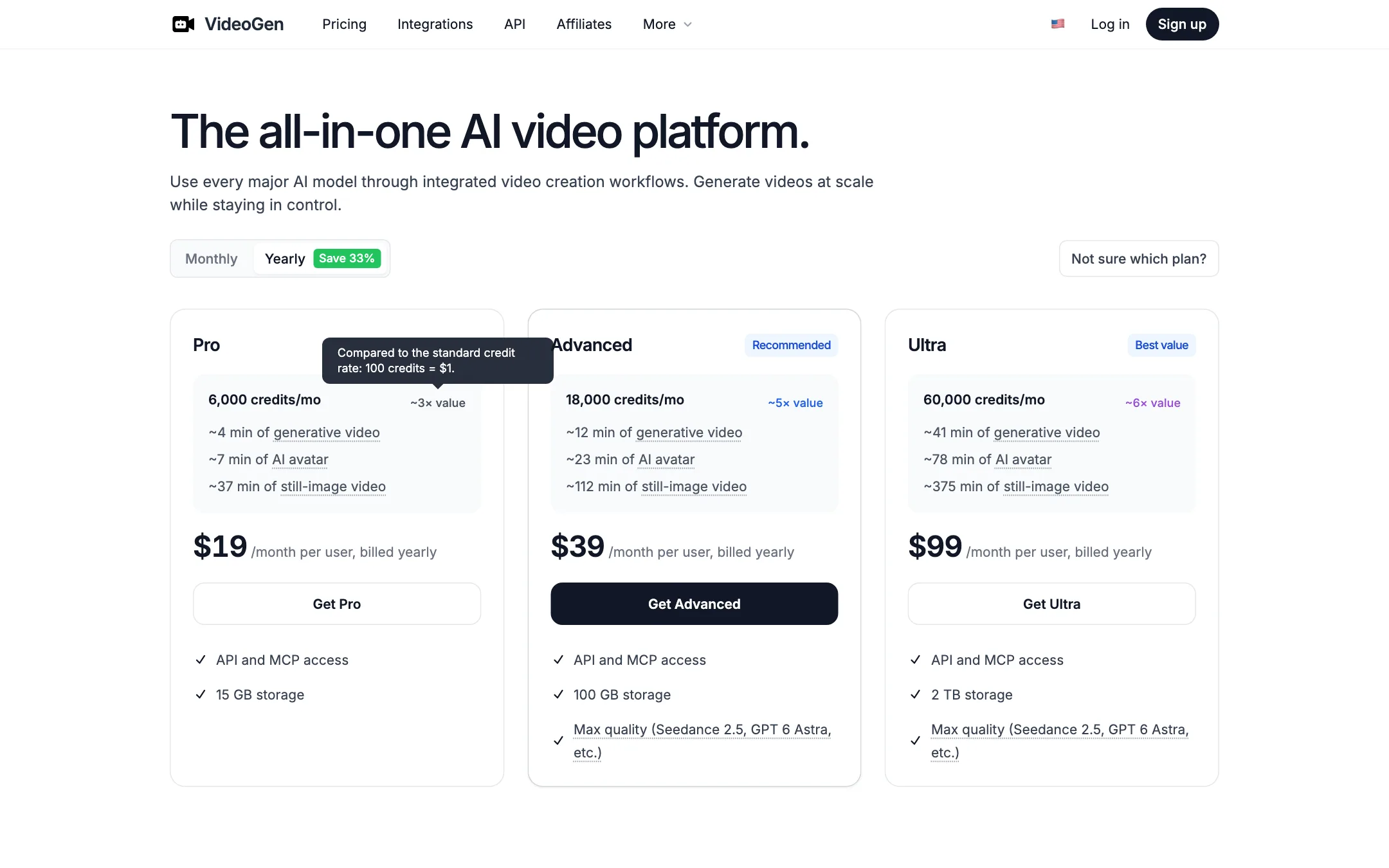
VideoGen prices per user, with a monthly credit allowance. Yearly billing saves 33%.
| Plan | Price | What you get |
|---|---|---|
| Free | Free | Your first video; no AI clips or avatars |
| Pro | $19/mo yearly, $29 monthly | 6,000 credits a month, API and MCP, 15 GB |
| Advanced | $39/mo yearly, $59 monthly | 18,000 credits, Max quality, 100 GB |
| Ultra | $99/mo yearly, $149 monthly | 60,000 credits, Max quality, 2 TB |
VideoGen’s estimates for Pro are about 4 minutes of generative video, 7 minutes of AI avatar or 37 minutes of still-image video a month. Advanced triples that. Ultra is ten times Pro.
The rate card
VideoGen publishes its credit costs, which few competitors do:
- AI video: 10, 20, 100 or 200 credits per second at Low, Standard, High and Max quality.
- AI avatar: 5, 10, 50 or 100 credits per second.
- AI image: 2.5, 5, 25 or 100 credits each.
- Agent messages are billed per token.
- Exports up to 1080p are free. 4K costs 2 credits per output second.
- Workflow runs cost 100 credits each.
Run the numbers before you choose a quality tier. A 10-second clip at High quality costs 1,000 credits, a sixth of Pro’s monthly allowance. Still-image videos with voiceover stretch credits much further than generated footage.
Extra credits
Extra credits cost $1 per 100. Packs run from 2,000 to 100,000 credits, and purchased credits roll over. Plan credits reset monthly. Team admins can turn on automatic top-ups. Flexible storage overage needs automatic top-ups on.
Picking a plan
VideoGen’s plans differ mainly in credits, storage and model quality. The workflows are the same across plans. A rough guide based on its own estimates:
- Pro suits one person making explainers, slide videos or voiceover videos with stock and still images. About 37 minutes of still-image video a month goes a long way. It is thin if you want generated clips, at about 4 minutes a month.
- Advanced is the plan to pick if you want Max-quality models such as Seedance 2.5 or need around 12 minutes of generated footage a month. VideoGen marks it as recommended.
- Ultra is for teams producing ad variants or training series at volume. 60,000 credits cover about 41 minutes of generated video or 375 minutes of still-image video.
Remember that the plans are priced per user. A team of three on Advanced pays three times the listed price, though credits sit in a shared team balance.
Tips to stretch credits
- Use still-image scenes where motion adds nothing. Talking points, diagrams and product stills cost far less than generated clips.
- Draft at Low or Standard quality. AI video costs 10 or 20 credits a second at those tiers, against 100 or 200 at High and Max. Move up a tier only for the final render.
- Keep agent conversations focused. Agent messages are billed by token, and each agent step counts as a turn. Clear briefs mean fewer back-and-forth steps.
- Export at 1080p. It is free. 4K costs 2 credits per second of output.
- Buy extra credits instead of upgrading when usage spikes. Purchased credits roll over; plan credits reset each month.
Who VideoGen competes with
VideoGen sits between two groups of tools. On one side are script-to-video editors such as Steve AI, Lumen5 and Visla, which build videos from text with stock media, voiceover and captions. On the other are model front ends that sell access to Seedance, Kling and Veo clips. VideoGen does both in one editor, and adds an API, MCP and integrations aimed at teams that automate video work. Its own site runs comparison pages against HeyGen, InVideo and Pictory, which tells you who it sees as its rivals.
Verdict
VideoGen is a solid choice if your videos start as scripts, slides or briefs and end as explainers, ads or training. The workflows cover most starting points, the editor gives you control after the AI’s first pass, and the public rate card makes costs easier to plan than most credit systems.
It is weaker if you want lots of generated footage. Pro’s credits cover only a few minutes of AI clips a month, and the best models start on Advanced. The free plan is a single video without AI clips or avatars. Start on monthly Pro, build one real project, and check the usage page before you commit to a year.
