

What Veo 4 is
veo4.dev is a web-based AI video generator. You type a prompt, optionally add a reference image, pick a model and get a clip back. It sells access to several big video models through one credit balance.
The name needs explaining first. Google makes the Veo video models. As of our check, Google had not released a “Veo 4.” veo4.dev is not Google. Its own FAQ and About page say so clearly: it is an independent site, and its “Veo 4” option runs on Google Veo 3.1 Fast. “Veo 4” is the site’s label for its flagship option, not a new model.
That honesty is a point in its favour. Plenty of sites in this space blur the line. veo4.dev states it on the homepage FAQ, the About page and the model page itself.
Besides Veo, the same generator runs Veo 3.1, Kling 3.0 and 2.5 Turbo Pro, Seedance 2.0, Hailuo 2.3, Wan 2.6 and 3.0, MiniMax H3 and Happy Horse 1.0. The About page says jobs go to each provider through a unified generation API, and the site stores the finished video for you. It also lists one person, Long Cheng, as the builder and editor of the site.
It is the third most-clicked text-to-video tool among our readers.
Who it is for
veo4.dev fits you if:
- You want Veo 3.1 Fast clips without a Google AI subscription.
- You like a plain form: prompt, image, resolution, aspect ratio, duration, go.
- You want to try Kling, Seedance or Hailuo from the same balance.
- You prefer a site that tells you which model actually renders your clip.
Skip it if:
- You want the newest Veo features the day they ship. Going direct to Google gets them first.
- You need longer clips at high resolution. Veo 4 tops out at 8 seconds, and the 30-second option is 480p.
- You want a safety net on refunds. The policy is close to no refunds at all.
- You need templates, effects or a story editor. This is a generator, not a studio.
How it works
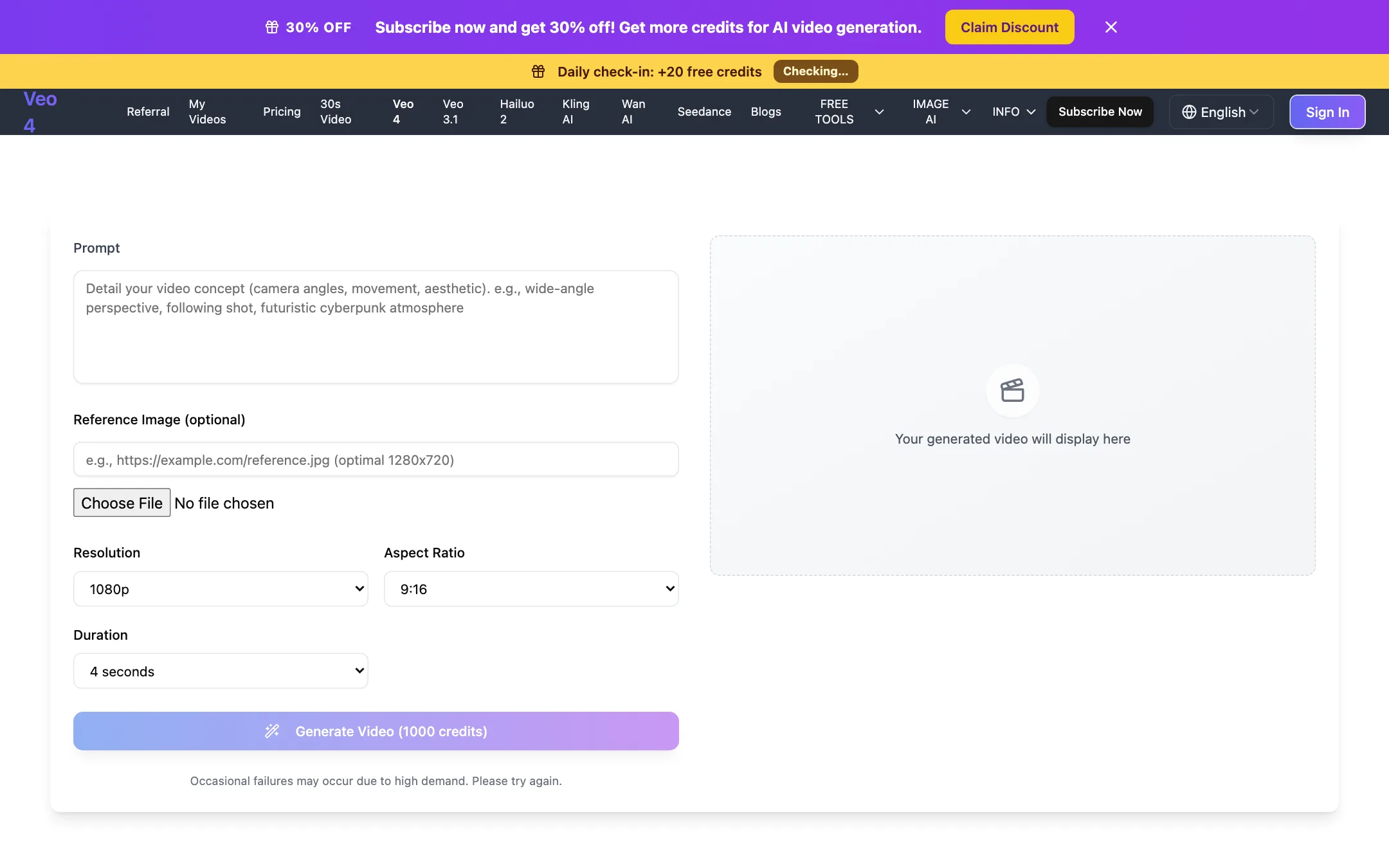
The Veo 4 page is a simple two-column layout. On the left:
- Prompt: describe camera angles, movement and look.
- Reference image (optional): paste a URL or upload a file.
- Resolution: 720p or 1080p.
- Aspect ratio: 9:16 or 16:9.
- Duration: 4, 6 or 8 seconds.
The Generate button shows the cost before you click. At the defaults of 1080p, 9:16 and 4 seconds, it read 1,000 credits. The finished video appears on the right and is saved to My Videos.
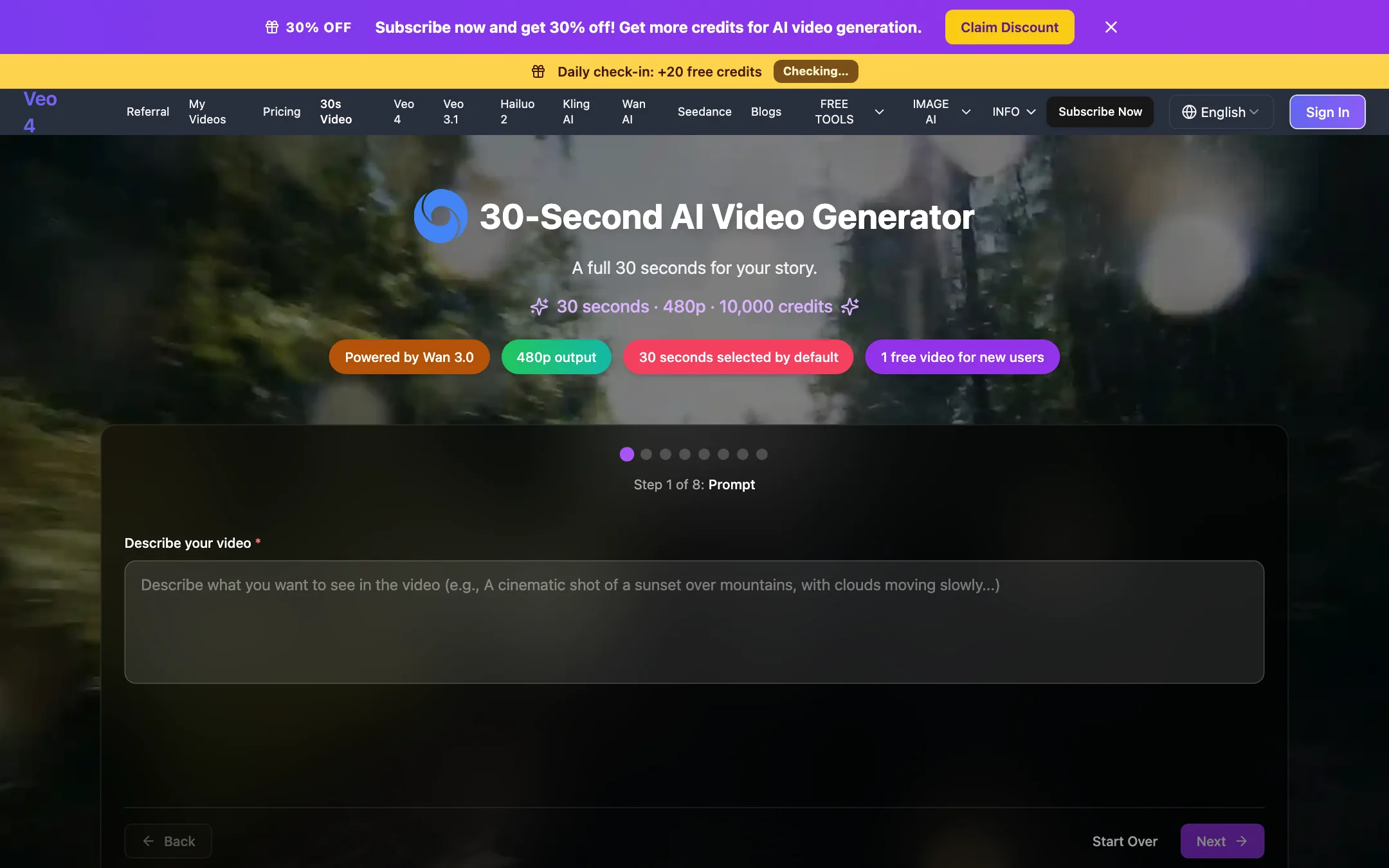
The homepage works differently. It runs an eight-step wizard that starts with “Describe your video” and walks you through the remaining settings one at a time. It is friendlier for first-timers and slower for repeat use.
A typical run
- Open the Veo 4 page (or another model from the top menu).
- Write the prompt like a shot description: subject, action, setting, camera move, light, sound.
- Add a reference image if you need a specific look or product.
- Pick 720p for drafts and 1080p for the keeper.
- Pick the shortest duration that works, since longer clips cost more.
- Generate. veo4.dev says jobs run in the background and usually finish within a few minutes.
- Download from My Videos.
veo4.dev’s model page suggests writing short exclusions into the prompt to avoid unwanted elements, and says the Veo 4 option accepts a negative prompt.
The 30-second page
A separate page makes 30-second videos with Wan 3.0. It is text-only (no reference image or audio controls), outputs 480p and costs exactly 10,000 credits per video. The page itself warns that generation can take several minutes and that “scenes may drift” over a long clip. That is an honest warning. Keep the subject and action simple if you try it.
Other tools
The site also has image tools: a Flux image generator and editor, multi-image editing, photo restoration, professional headshots and text removal. Images cost 300 credits each on paid plans.
Output quality
We did not generate test clips, so we cannot rate output quality first-hand. What we can say:
- The Veo 4 option is Google Veo 3.1 Fast. Its quality should match Veo 3.1 Fast elsewhere, assuming veo4.dev passes your settings through unchanged. Fast is Google’s cheaper, quicker tier, not its top-quality one.
- Native audio is part of the pitch. The model page lists integrated audio (dialogue and ambient sound) as a Veo 4 feature.
- Resolution tops out at 1080p. No 4K on any plan.
- Clip length is short. Four to eight seconds on Veo 4. Up to 15 seconds on other models according to the plan list, and 30 seconds only at 480p on Wan 3.0.
The site makes the usual marketing claims (“World’s best AI video generator”). The model facts it publishes are more useful than the adjectives.
veo4.dev or going direct
Because veo4.dev resells other companies’ models, the fair question is whether you should use it or go to the model maker. Here is how to think about it.
Reasons to use veo4.dev:
- One balance, many models. You can try Veo, Kling, Seedance and Hailuo on the same prompt without four accounts and four subscriptions.
- No Google account needed. Some people cannot or do not want to sign up for a Google AI plan.
- A simple, predictable interface. The cost is on the button, and every model uses the same form.
- Credits back on failures. You do not pay for jobs that error out.
Reasons to go direct:
- New features land there first. Model makers ship new modes, longer clips and higher resolutions in their own apps before resellers add them, if they ever do.
- Settings may be limited. veo4.dev exposes resolution, aspect ratio, duration and a reference image. Native apps often have more controls.
- Refund and support terms. veo4.dev’s refund policy is very narrow, and it is run by a small team.
- One less middleman. If the reseller changes prices or closes, your credits go with it.
If you are still choosing between models, a reseller like this is a cheap way to compare. Once you know which model suits your work, price out going direct.
Prompting tips for the Veo 4 option
The Veo 4 option is Google’s Veo 3.1 Fast, so Google-style prompting applies. veo4.dev’s own example prompts follow the same pattern:
- Name the camera. “Slow push-in,” “handheld following shot” and “gentle tracking movement” all appear in its examples.
- Describe the light. Warm incandescent, diffused rim light and lamplight show up in nearly every example prompt.
- Keep one subject and one action. Short clips do best with a single clear idea.
- Ask for sound. Veo 3.1 can add dialogue and ambient audio, so mention the sound you want.
- Write exclusions into the prompt. veo4.dev suggests short negative phrases to keep out unwanted elements.
Draft at 720p and 4 seconds, then render the keeper at 1080p.
Pricing
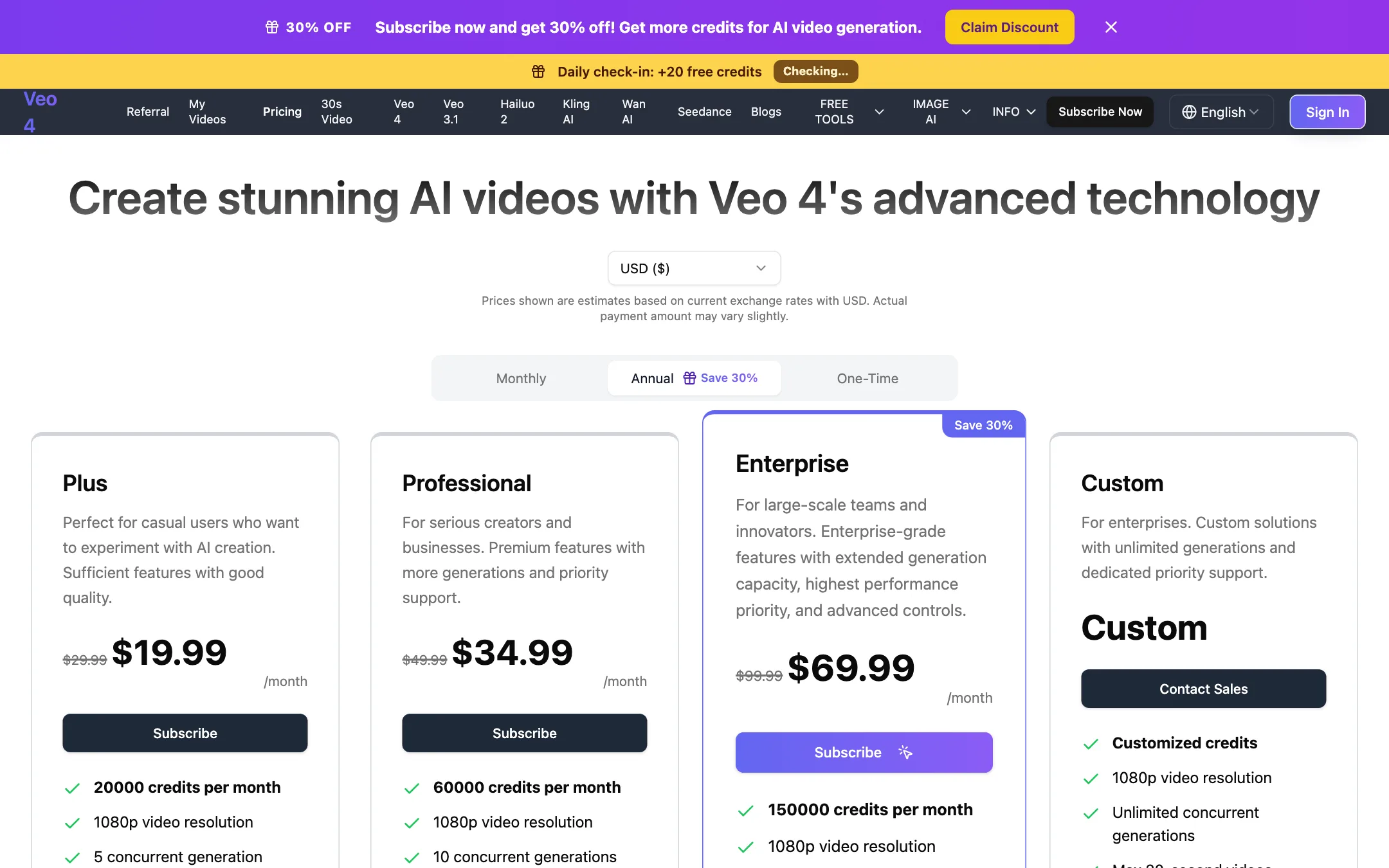
veo4.dev uses credits. Each plan gives a monthly allowance, and each generation costs credits based on model, length and resolution. The pricing page defaults to the annual view, where the struck-through prices are the monthly rates. Prices were checked on 2026-10-19.
| Plan | Price | Credits | Notable |
|---|---|---|---|
| Free | $0 | One 480p video, 20 credits per daily check-in | Seedance 1.5 Lite only |
| Plus | $19.99/mo yearly, $29.99 monthly | 20,000 a month | 5 concurrent, 1-year history |
| Professional | $34.99/mo yearly, $49.99 monthly | 60,000 a month | Faster queue, 24h email support |
| Enterprise | $69.99/mo yearly, $99.99 monthly | 150,000 a month | Fastest queue, 10 team members |
| Credits Pack | $39.99 one-time | 20,000 | 3 concurrent jobs |
A “30% off” banner ran across the site on our check. The monthly tab showed higher struck-through prices too ($49.99 for Plus), so read the actual checkout total.
What the credits buy
- Veo 4 at defaults (1080p, 4 seconds): 1,000 credits. Plus covers about 20 of those a month.
- 30-second Wan 3.0 video: 10,000 credits. That is half of a Plus month for one 480p clip.
- Images: 300 credits each.
- Daily check-in: 20 credits. Useful for images over time, not for video.
The credits pack costs more than a month of Plus on yearly billing for the same 20,000 credits. It only makes sense if you want no subscription at all.
Refunds
The refund policy covers two cases only: major software defects that stop the service from working as promised, and extended outages. It excludes change of mind, unhappy results, misunderstanding what the service does, and buying yearly instead of monthly by mistake. It also says AI API costs are non-refundable once used.
The fairer part: if a video fails, the credits go back to your balance automatically. The 30-second page repeats that failed generations get a full refund of their 10,000 credits.
Use the free video and the generator’s cost display to make sure the workflow suits you before you subscribe.
Verdict
veo4.dev is a straightforward reseller. The generator is simple, costs are shown up front, failed jobs are refunded, and the site is unusually upfront that “Veo 4” is Google’s Veo 3.1 Fast.
The name is still a marketing hook, and you should know what you are buying. If you want Veo 3.1 Fast and a handful of other models from one balance, without a Google account, it does that. If you want the best Veo quality, newer features, or any refund flexibility, look elsewhere.