What DeeVid AI is
DeeVid AI is an all-in-one AI creation studio. It does text-to-video, image-to-video, AI images, talking avatars, text-to-speech and music. All of it runs on one credit balance under one subscription.
It is a wrapper and studio, not a model maker. The homepage lists a long row of models it draws on: Veo 3.1, Sora 2, Kling, Runway, Hailuo, Luma, Pika, Vidu, Wan, Seedream and Nano Banana Pro among them. DeeVid’s pitch is that it picks the best-fit model for your task, so you do not have to.
That is convenient. It also means you give up some control. Inside the creator, models carry DeeVid’s own names, such as Fast V4.6, Quality V4.7 or Master V4.5. The page does not say which third-party model sits behind each label. Keep that in mind when you compare DeeVid to tools that show you the real model name.
DeeVid says it has 30 million creators and 100 million generations. We have not verified those numbers.
Who it is for
DeeVid fits you if:
- You post short videos often and want one place for clips, images, voiceover and music.
- You sell products online and want quick ad variations from a product photo.
- You want a cheap, watermark-free plan with commercial use and do not need 1080p on day one.
- You like to see a tool’s interface before signing up. DeeVid’s creation pages are public.
Skip it if:
- You want to know exactly which model renders each clip. Tools that name the model are a better fit.
- You need 1080p or 4K at the lowest price. Lite stops at 720p.
- You want a real free tier. DeeVid gives 20 credits once, not every day.
How it works
DeeVid has three layers. You can use any of them on its own.
The Creation Agent
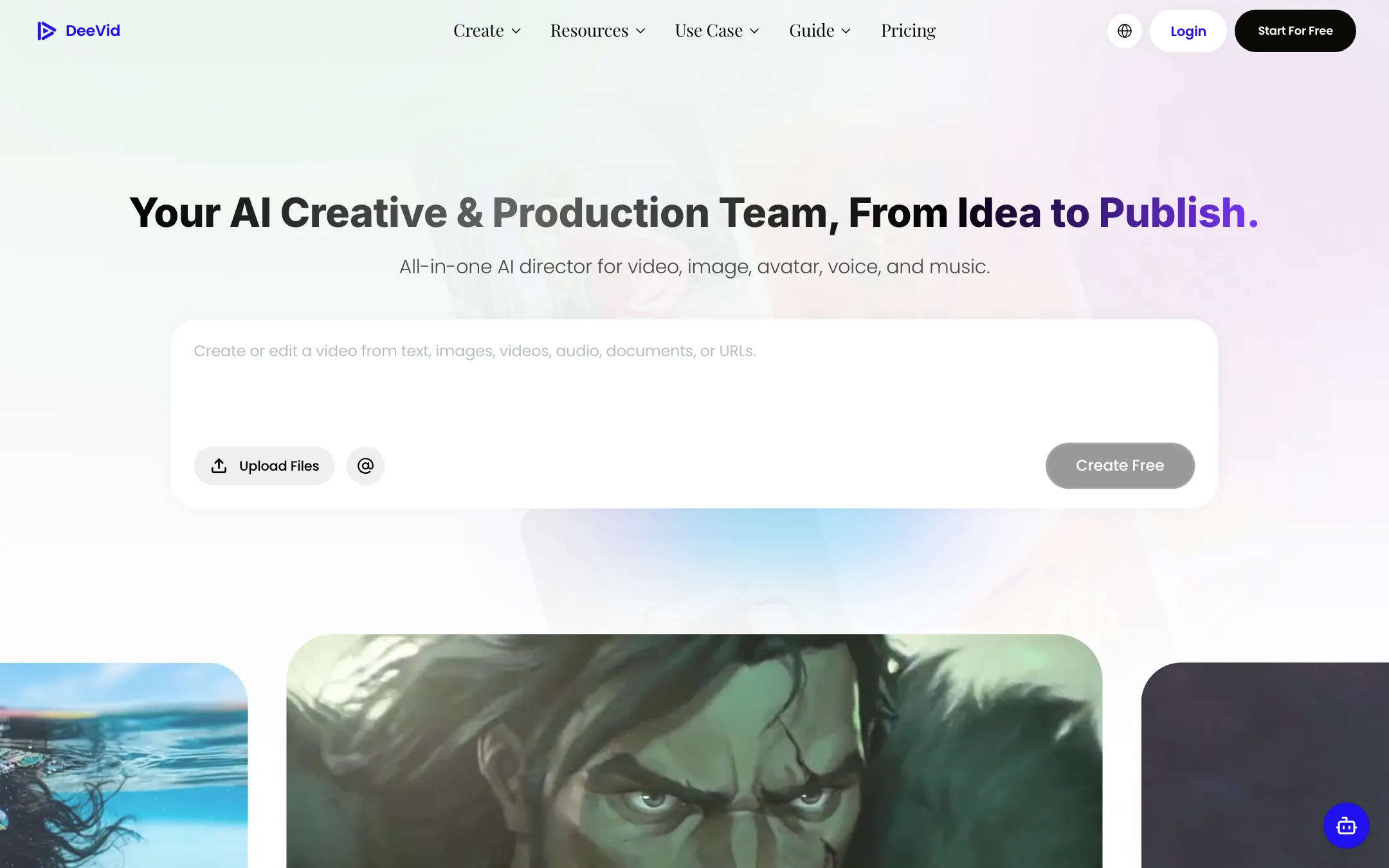
The big prompt box on the homepage feeds the Creation Agent. You can type a brief or attach images, video, audio, documents or a URL. DeeVid describes the agent as an AI director that plans, creates and iterates on its own, from idea to final cut. You can then refine the result in plain language.
We did not run the agent, because it needs an account. Treat it as a quick way to get a first draft, then check each shot.
Creation tools
The left sidebar lists single-purpose tools. These are the ones most people will use:
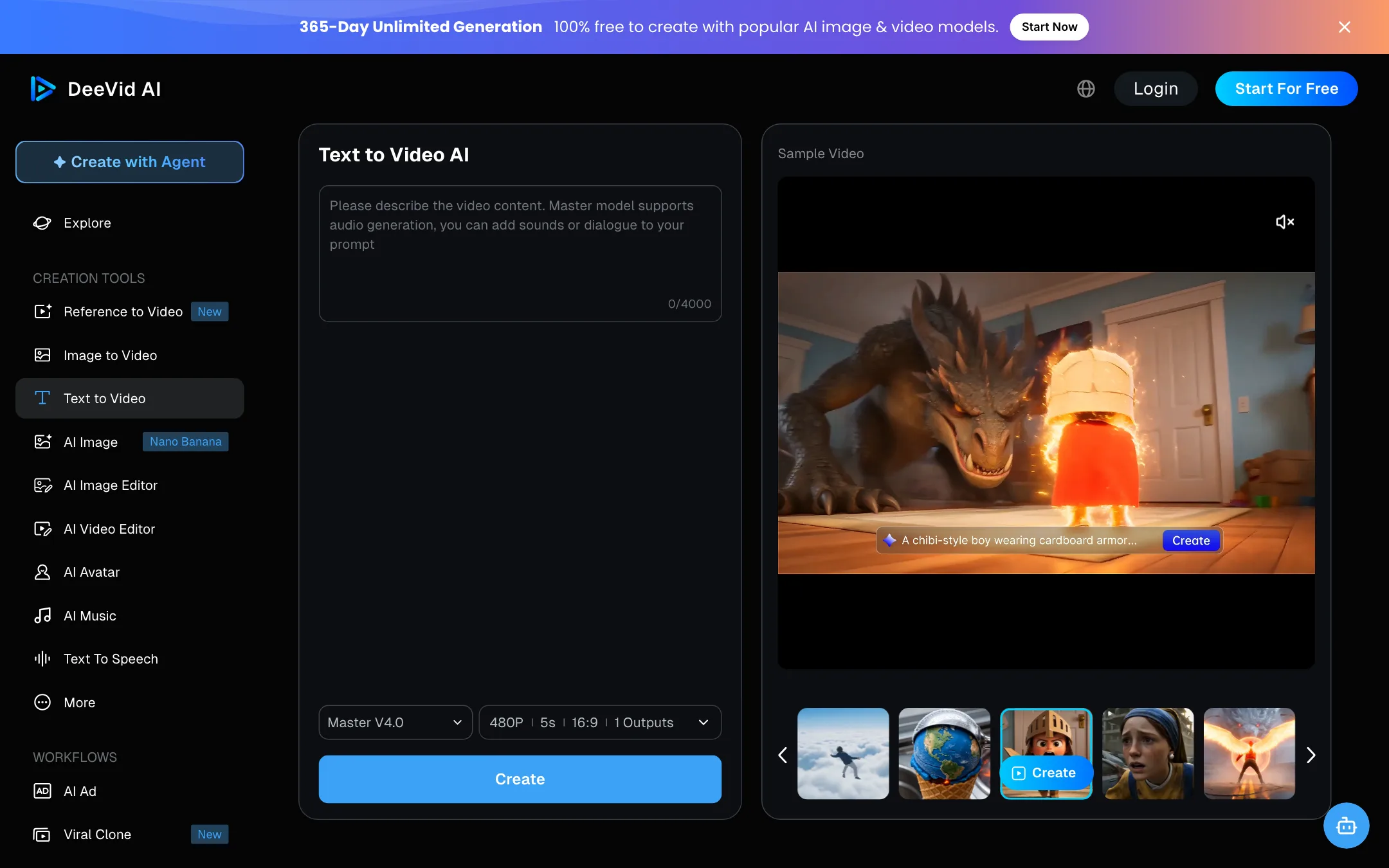
- Text to Video: a prompt box with up to 4,000 characters, a model picker, and settings for aspect ratio, resolution, length and number of outputs. The public page defaults to 480p, 5 seconds and one output.
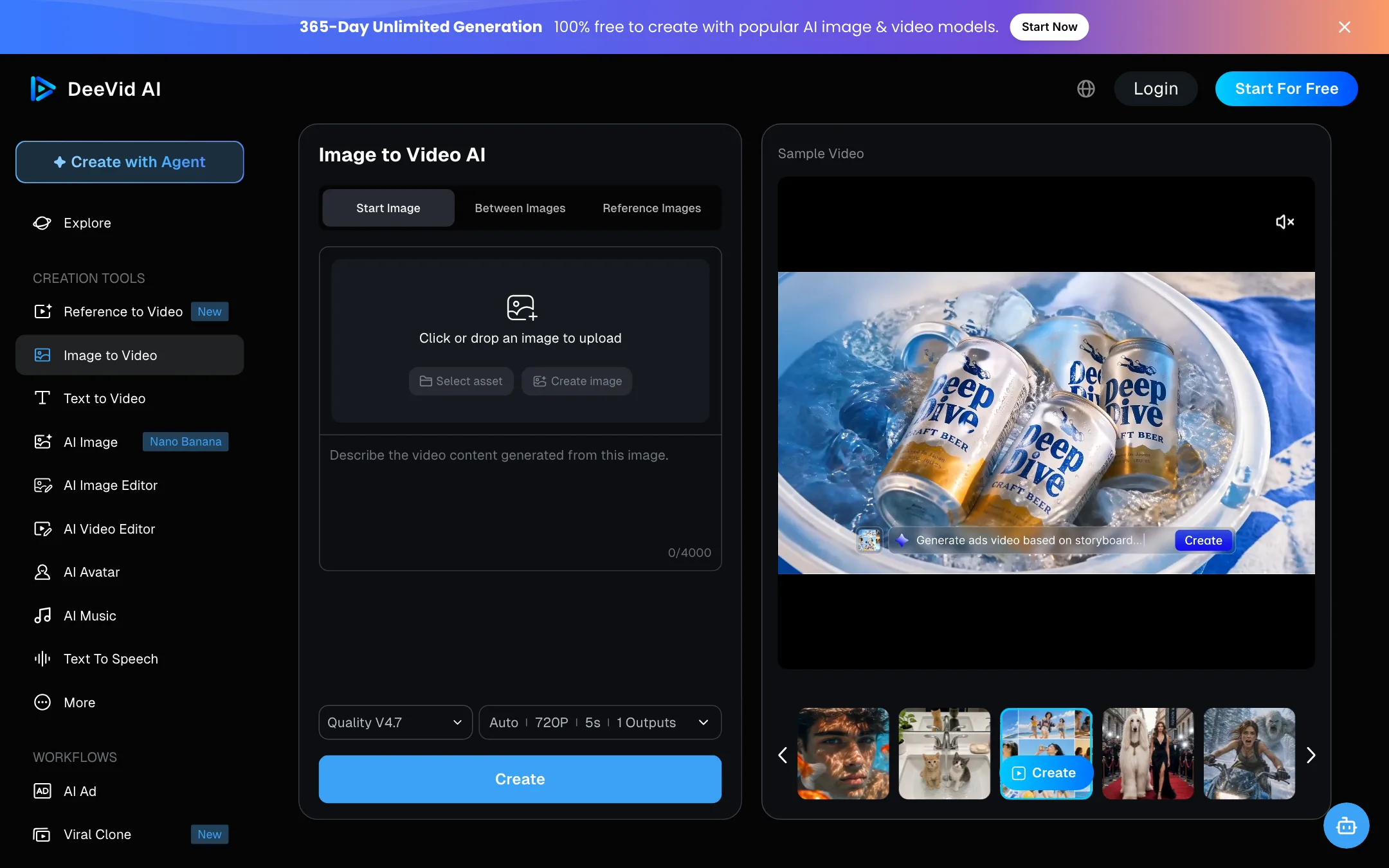
- Image to Video: three tabs. Start Image animates one picture. Between Images morphs from one frame to another. Reference Images keeps a person or product consistent.
- Reference to Video: newer, and aimed at consistent characters across scenes.
- AI Image, AI Image Editor and Nano Banana: image generation and editing.
- AI Video Editor: changes to an existing clip.
- AI Avatar, AI Music and Text to Speech: a talking presenter from one photo, a royalty-free soundtrack, and a voiceover.
Under Workflows there are two packaged flows:
- AI Ad turns a product into ad videos for different platforms.
- Viral Clone copies the structure of a trending video with your own content. One testimonial on the homepage says it is used for ad variants in several languages, combined with lip sync for dubs.
Canvas and Editor
DeeVid’s suggested path is Agent to Canvas to Editor. Canvas lets you drag, drop and place edits where you want them. The Editor is where you finish the cut. DeeVid also mentions saving characters to Assets so the same face shows up in every new scene.
A typical text-to-video run
- Open Text to Video and pick a model. Master models support audio, so you can add sound or dialogue to the prompt.
- Write the scene. DeeVid’s own sample prompt names the camera angle, setting, art style, lighting, dialogue, sound effects and music.
- Set aspect ratio, resolution and length. Start at 480p and 5 seconds while you test.
- Generate, then refine with the editor or rerun with a tweaked prompt.
- Download or share. Paid plans remove the watermark.
The model picker
This is the part of DeeVid you should understand before you pay.
The public text-to-video page lists these models, each with a short description:
- Fast V2.0: fastest and most efficient.
- Quality V2.0: better results and multi-camera switching.
- Master V2.0: lip sync, sound effects and multi-camera switching.
- Master V4.0: audio and “director-level storyboarding.”
- Quality V4.5: stronger reference consistency.
- Quality V4.6: cost-effective, with good text rendering.
- Master V4.5: DeeVid’s top model, with native 30-second video.
- Quality V4.7: native 30-second video at a lower price.
- Fast V4.6 and Fast V4.7: quick generation, with V4.7 adding 30-second clips.
- Quality V4.8: dynamic, natural-looking video up to 4K.
Two older options, Sora2 and Quality V1.0, are listed as no longer available.
None of these labels says which company trained the model. Since the homepage lists Veo, Kling, Runway, Hailuo and others, it is fair to assume the labels map to some of them. DeeVid does not publish the mapping. That matters for two reasons:
- Quality comparisons are harder. If you already know you like Kling or Veo, you cannot pick it by name.
- Behaviour can change. If a label points to a different model next month, your results may shift without warning.
The upside is simplicity. If you do not care whose model it is and just want a good clip, the labels tell you what each option is for.
Output quality
We have not generated video on DeeVid, so we cannot judge output quality from our own tests. Here is what the vendor says and what we can infer.
What DeeVid claims:
- Lifelike motion, smooth transitions and realistic movement from text prompts.
- Generation “within minutes” for most prompts.
- Native 30-second clips on its newer models and up to 4K on Quality V4.8.
- Cross-video character consistency on every paid plan.
The meta description also promises “no hallucinations” and that everything generated is ready to use. No current video model can guarantee that. Expect the usual issues with hands, fine text and complex motion, and plan to regenerate some shots.
The resolution you actually get depends on your plan. Lite outputs at 720p. Pro and Premium output at 1080p. The “unlimited” models on Pro and Premium are capped at 720p for video.
If quality is your top priority, run the same prompt through DeeVid and a model maker such as PixVerse, Kling or Veo before you commit. DeeVid’s sign-up credits are enough for a few test clips.
Pricing
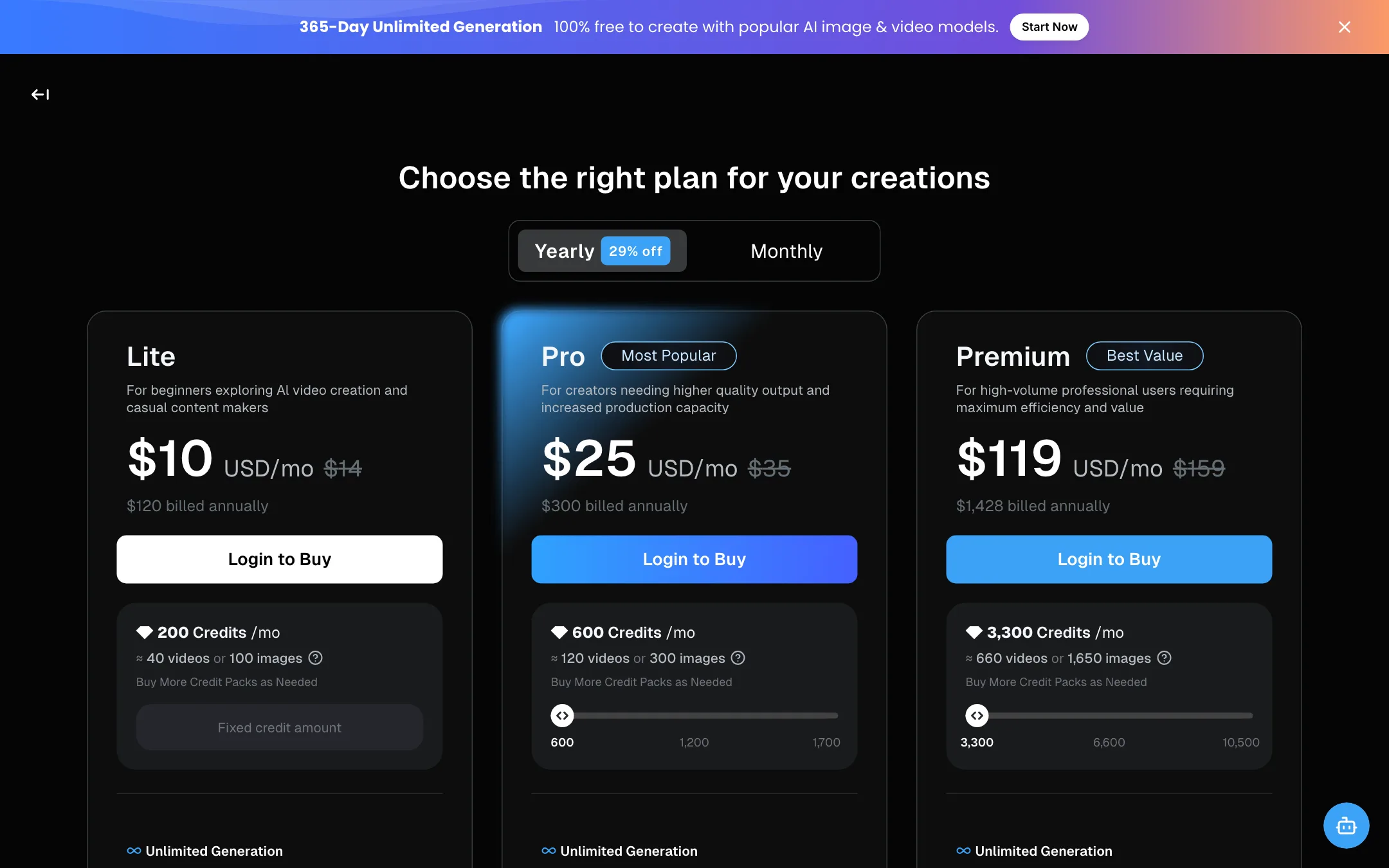
DeeVid uses credits. Every plan includes a monthly credit allowance, and you can buy credit packs on top. Prices below were checked on 2026-10-19.
| Plan | Price | What you get |
|---|---|---|
| Free | Free | 20 credits at sign-up, watermark |
| Lite | $10/mo yearly, $14 monthly | 200 credits a month, 720p, no watermark |
| Pro | $25/mo yearly, $35 monthly | 600 credits a month, 1080p, some unlimited models |
| Premium | $119/mo yearly, $159 monthly | 3,300 credits a month, 1080p, more unlimited models |
DeeVid’s own estimates put 200 credits at about 40 videos or 100 images. That works out to roughly 5 credits per video, likely at the default 480p and 5 seconds. Higher resolution, longer clips and premium models will cost more per clip. The estimate is DeeVid’s, not ours.
Every plan lists the same core features: top video models, image and text-to-video, 100+ templates and effects, cross-video character consistency, AI ads, avatars, music, fast generation mode, private creation, no watermark and full commercial use. Premium adds priority support.
Unlimited generation
The pricing page leads with a banner for “365-Day Unlimited Generation.” In the plan table, this is what each tier unlocks without spending credits:
- Lite: nothing unlimited.
- Pro: Nano Banana 2 and Quality 4.0 images at 2K, and Quality 4.0 video at 720p.
- Premium: everything in Pro, plus Nano Banana Pro and GPT Image 2 at 2K, and Master 4.0 video at 720p.
This is the strongest reason to pick Pro over Lite. If unlimited 720p video on one model covers your drafts, your 600 credits can go to final renders. DeeVid links to a separate unlimited generation policy. Read it for any fair-use limits before you build a workflow around it.
Things to know before you pay
- Free credits are one-time. Twenty credits at sign-up, and free videos are watermarked.
- All plans auto-renew. You can cancel from your account page, and the plan runs to the end of the billing cycle.
- Upgrades are immediate. Unused credits move to the new plan, with expiry aligned to the new subscription.
- Credit pack prices are behind login. The pricing page only shows pack sizes as a slider on Pro and Premium.
- There is a large gap between Pro and Premium. $25 to $119 a month billed yearly, with nothing in between.
Verdict
DeeVid is a capable, wide-ranging studio at a fair price. Lite at $10 a month billed yearly is one of the cheaper ways to get watermark-free AI video with commercial use. Pro is the better buy if you will use the unlimited 720p video model for drafts.
The weak spot is transparency. The model picker hides which model renders your clip, and some marketing lines promise more than any model can deliver. If you want to choose Kling or Veo by name, or you need 1080p at the lowest price, look elsewhere. If you want one subscription for clips, images, voice and music and do not mind DeeVid choosing the model, it is worth a test with the free credits.