CrePal vs Veo 4 (veo4.dev)
Two text to video tools side by side: pricing, free plans, features and who each one suits.
Some links on this page are affiliate links. If you buy through them we may earn a commission at no extra cost to you. Read our disclosure.

#1 of 77 in Text to video

A chat-driven AI video agent that plans, scripts and assembles multi-scene videos by routing each shot to models like Seedance, Veo and Runway
Best for: Creators and small marketing teams who want a full multi-scene video from one brief, and would rather give notes in chat than cut on a timeline.

#8 of 77 in Text to video
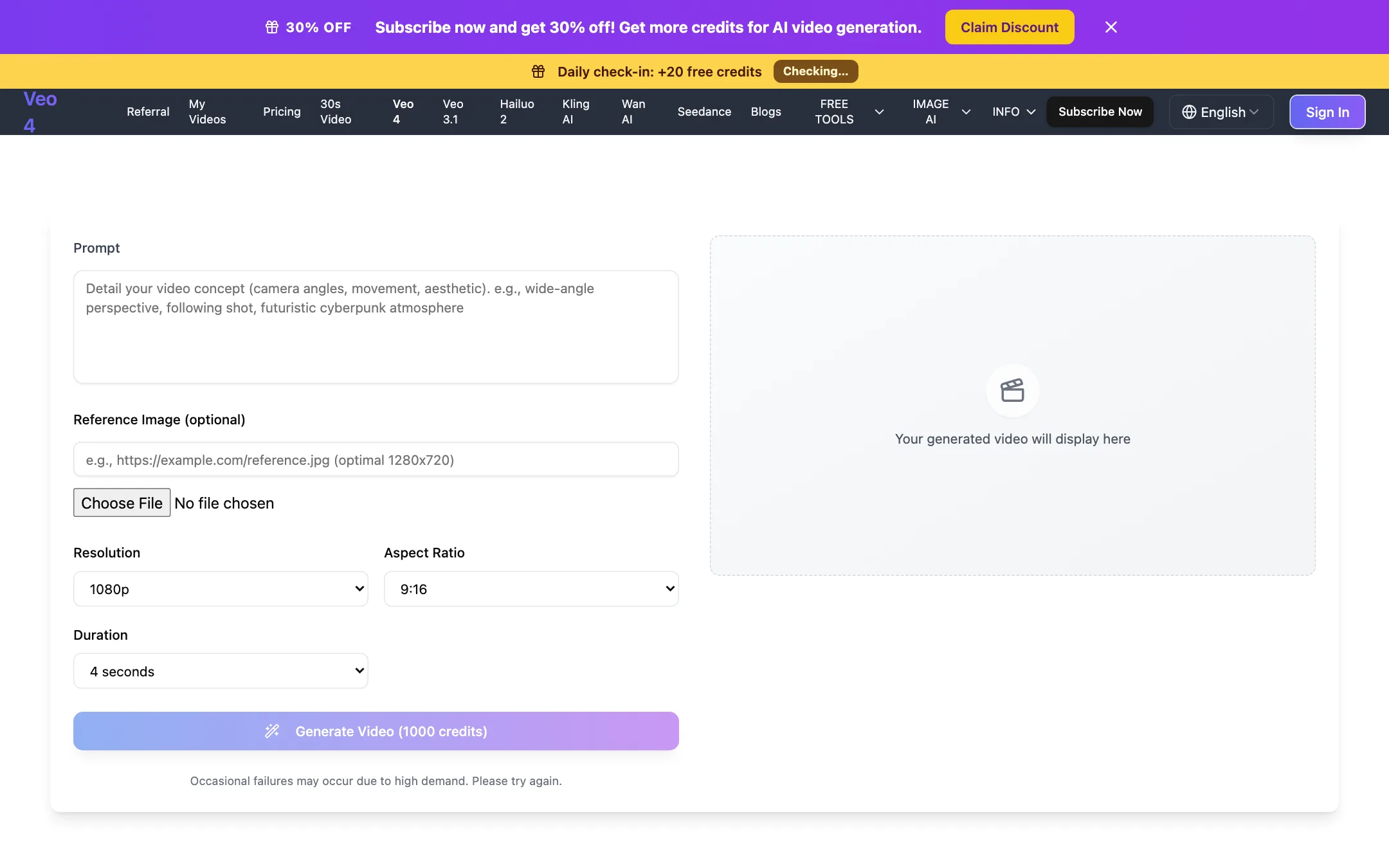
An independent web generator that sells Google Veo 3.1 Fast under a "Veo 4" label, plus Kling, Seedance, Hailuo and Wan
Best for: Budget-minded creators who want Veo 3.1 Fast and a few other big models in a simple browser form, and who understand they are buying through a reseller.
The short answer
More creators choose CrePal than Veo 4 (veo4.dev), and it ranks higher in our text to video list. Pick CrePal if you want creators and small marketing teams who want a full multi-scene video from one brief, and would rather give notes in chat than cut on a timeline. Pick Veo 4 (veo4.dev) if you want budget-minded creators who want veo 3.1 fast and a few other big models in a simple browser form, and who understand they are buying through a reseller.
CrePal: A genuine agent workflow rather than another single-model wrapper, with a sensible entry price and every model on the cheapest paid plan. The free plan's limits are unpublished, the pricing pages contradict each other, and you cannot see what a full video costs in credits until you are inside.
Veo 4 (veo4.dev): A simple, honest-about-itself reseller with a clean generator and fair credit refunds on failed jobs. The "Veo 4" name is a label for Google's Veo 3.1 Fast, not a new Google model, and refunds for anything else are close to impossible.
Specs side by side
| CrePal | Veo 4 (veo4.dev) | |
|---|---|---|
| Starting price | From $26/mo | From $19.99/mo |
| Free tier | ||
| Pricing | Free plan with limited credits and standard models. Paid plans from $26/mo billed yearly ($29 monthly). | One free 5-second 480p video for new users, plus 20 daily check-in credits. Paid plans from $19.99/mo billed yearly ($29.99 monthly). |
| Platforms | Web | Web |
| Best for | Creators and small marketing teams who want a full multi-scene video from one brief, and would rather give notes in chat than cut on a timeline. | Budget-minded creators who want Veo 3.1 Fast and a few other big models in a simple browser form, and who understand they are buying through a reseller. |
| Last checked | 2026-10-20 | 2026-10-19 |
Pricing
CrePal
Free plan with limited credits and standard models. Paid plans from $26/mo billed yearly ($29 monthly).
- FreeFree
- Plus$26/mo yearly · $29 monthly
- Pro$72/mo yearly · $80 monthly
- Max$180/mo yearly · $200 monthly
- TeamContact sales
- Credit packs$5 to $100
Veo 4 (veo4.dev)
One free 5-second 480p video for new users, plus 20 daily check-in credits. Paid plans from $19.99/mo billed yearly ($29.99 monthly).
- Free$0
- Plus$19.99/mo yearly · $29.99 monthly
- Professional$34.99/mo yearly · $49.99 monthly
- Enterprise$69.99/mo yearly · $99.99 monthly
- Credits Pack$39.99 one-time
- CustomContact sales
Key features
CrePal
- AI Director agent that turns a one-line idea into a script, scene plan, shots, voiceover, music and subtitles
- Two chat modes, AI Story Mode for hands-off runs and Director Mode for shot-level control
- Routes each scene to a different model, with Google Veo, Seedance, Runway, Pika and Suno named by CrePal
- Edit a finished video by describing changes in chat instead of using a timeline
- Agent Canvas (beta), a node-style workspace driven by the same agent
- Manual Create Video and Create Image screens with a model picker and reference uploads
- Mini apps for Ad Remix, AI talking avatars and PDF to video
- Preset library of ready-made multi-shot prompts for ads, documentaries and anime promos
- 16:9, 9:16 and 1:1 output, exported as MP4 with subtitles, voiceover and music
Veo 4 (veo4.dev)
- "Veo 4" option that runs Google Veo 3.1 Fast: 4, 6 or 8 second clips at 720p or 1080p
- Also runs Veo 3.1, Kling 3.0, Kling 2.5 Turbo Pro, Seedance 2.0, Hailuo 2.3, Wan 2.6 and 3.0, MiniMax H3 and Happy Horse 1.0
- Text-to-video and image-to-video with an optional reference image
- 30-second video page powered by Wan 3.0 at 480p
- Credit cost shown on the Generate button before you start
- Failed generations refund their credits automatically
- Image tools including Flux generator and editor, photo restore, headshots and text removal
- Site in 10 languages
Strengths and weaknesses
CrePal
- One brief can produce a complete multi-scene video, not just a five-second clip
- Every image and video model is unlocked on the cheapest paid plan
- You can approve or change the scene plan before credits go on generation
- Chat-based revisions suit people who have never used an editor
- Credits from failed generations are refunded automatically where possible, per the pricing page
- Credit packs are priced at a flat 100 credits per dollar
- The free plan's credit amount is not published anywhere we could find
- Pricing page says yearly saves up to 10%, the FAQ says 17%; the real figure is about 10%
- FAQ says commercial use is allowed on every plan including Free, while the terms bar commercial use of watermarked free outputs
- Credit cost per video depends on model, length and resolution, and is not listed before you sign in
- Free users cannot buy credit packs, only upgrade or earn invite credits
- Footer and blog lean on face swap, NSFW and "uncensored" search pages that sit oddly next to a brand-safe ad tool
Veo 4 (veo4.dev)
- Says plainly that "Veo 4" is Google's Veo 3.1 Fast, not a new Google model
- Credit cost is visible before you generate
- Failed jobs refund their credits
- One free video lets you see the workflow before paying
- Yearly plans are about 30% cheaper than monthly
- Credits pack for people who do not want a subscription
- The name invites confusion with Google's own Veo models
- The free video uses a small Lite model at 480p, not Veo
- A default Veo 4 clip costs 1,000 credits, so Plus covers roughly 20 clips a month
- Refunds only for major outages or defects, never for change of mind
- Small one-person operation, with limited public information about the company
Try CrePal
Free plan with limited credits and standard models. Paid plans from $26/mo billed yearly ($29 monthly).
Try Veo 4 (veo4.dev)
One free 5-second 480p video for new users, plus 20 daily check-in credits. Paid plans from $19.99/mo billed yearly ($29.99 monthly).