
What Promo.com is
Promo.com is a marketing video maker for businesses. It has been around for years, long before the current AI wave, and its core is still a template editor. You pick a ready-made ad or social video, swap in your media, text, logo and colors, and publish.
What sets it apart is the asset library. Promo bundles stock footage from Getty Images and iStock, a licensed music library, and what it calls “uncapped indemnification” from Getty Images against copyright claims. For a business running paid ads, that licensing is a big part of the value.
On top of the template editor sit two AI layers:
- PromoAI is a chat copilot. It generates batches of branded videos, fills a social calendar with a video for each day, and lets you edit by typing commands like changing clips, text or pacing.
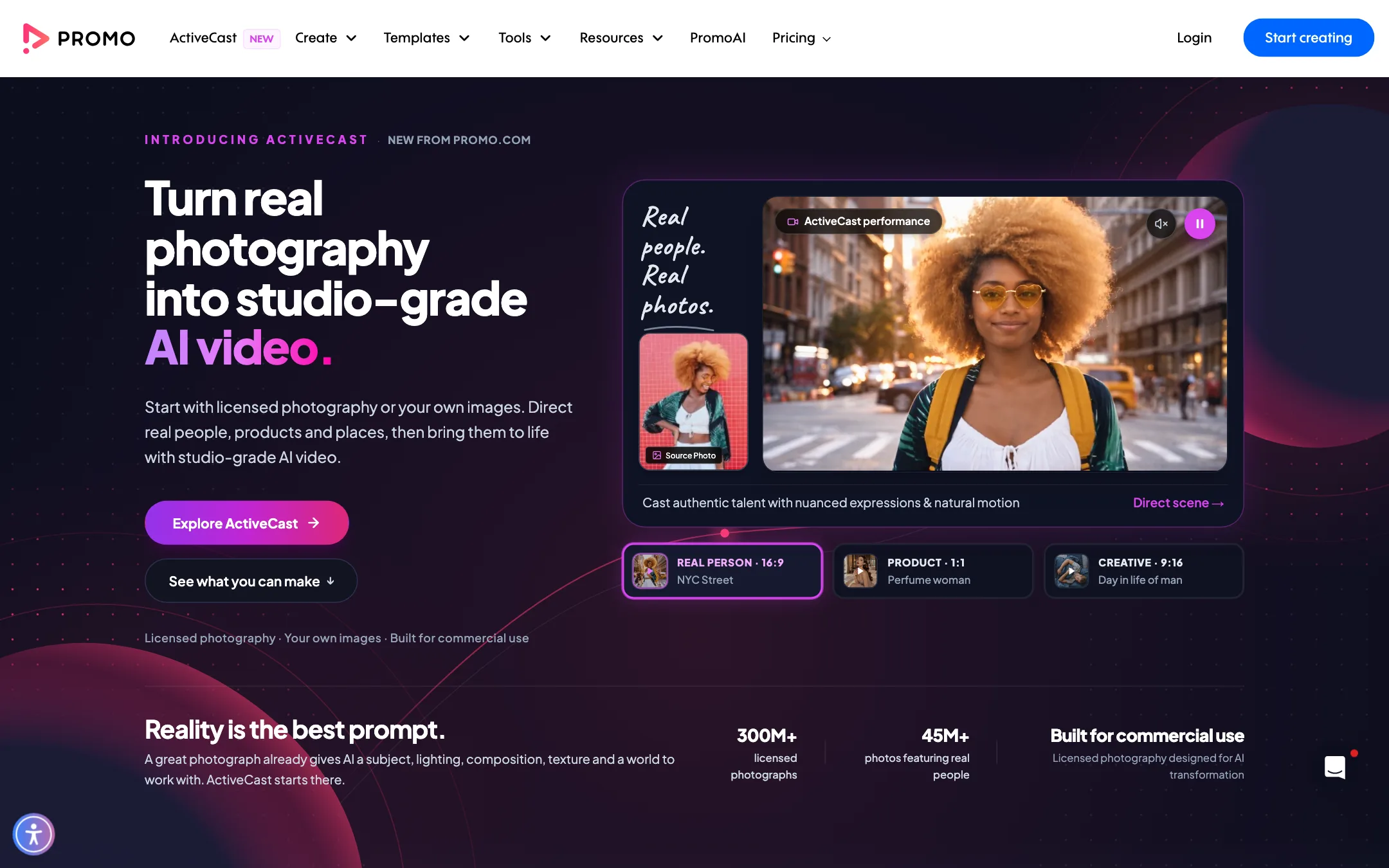
- ActiveCast is a newer, separate product. It turns licensed photographs or your own images into AI video, using partner models. It has its own plans and credits.
The site now brands itself around PromoAI, and the homepage leads with ActiveCast. But day to day, most of what you do in Promo is still template editing.
Who it is for
Promo fits you if:
- You run a small business and need regular social posts and ads without a designer.
- You manage several brands or clients and want brand kits, white label sharing and resale rights.
- You care about licensing and want stock and music you can safely use in paid ads.
- You want planning, editing and publishing in one tool.
Skip it if:
- You are a solo creator who mainly needs a free or cheap editor. CapCut or VEED cover editing for far less.
- You want AI-generated footage from a prompt. ActiveCast does that, but as a separate subscription, and dedicated text-to-video tools are a better place to start.
- You want to try before paying. You can draft freely but cannot download a single video without a plan, and Promo does not sell single videos.
How it works
There are three main ways in.
Templates
The template library is the heart of Promo. Templates are grouped by platform (Facebook, Instagram, TikTok, YouTube, Stories), by industry (real estate, fitness, food, e-commerce, recruiting, education) and by format (short ads, listicles, slideshows, memes, six-second videos, YouTube intros). Promo says it adds new templates weekly.
A typical run looks like this:
- Pick a template that fits the platform and message.
- Swap the media. Search the stock library or upload your own footage, photos and music.
- Edit the text, then apply your brand kit for logo, colors and fonts.
- Pick an aspect ratio. Promo supports wide, square, vertical and banner sizes.
- Add a branded outro with your saved business info.
- Download as MP4 or publish straight to your social accounts.
Videos can run up to five minutes on every plan, and Promo says every plan exports at 1080p.
PromoAI
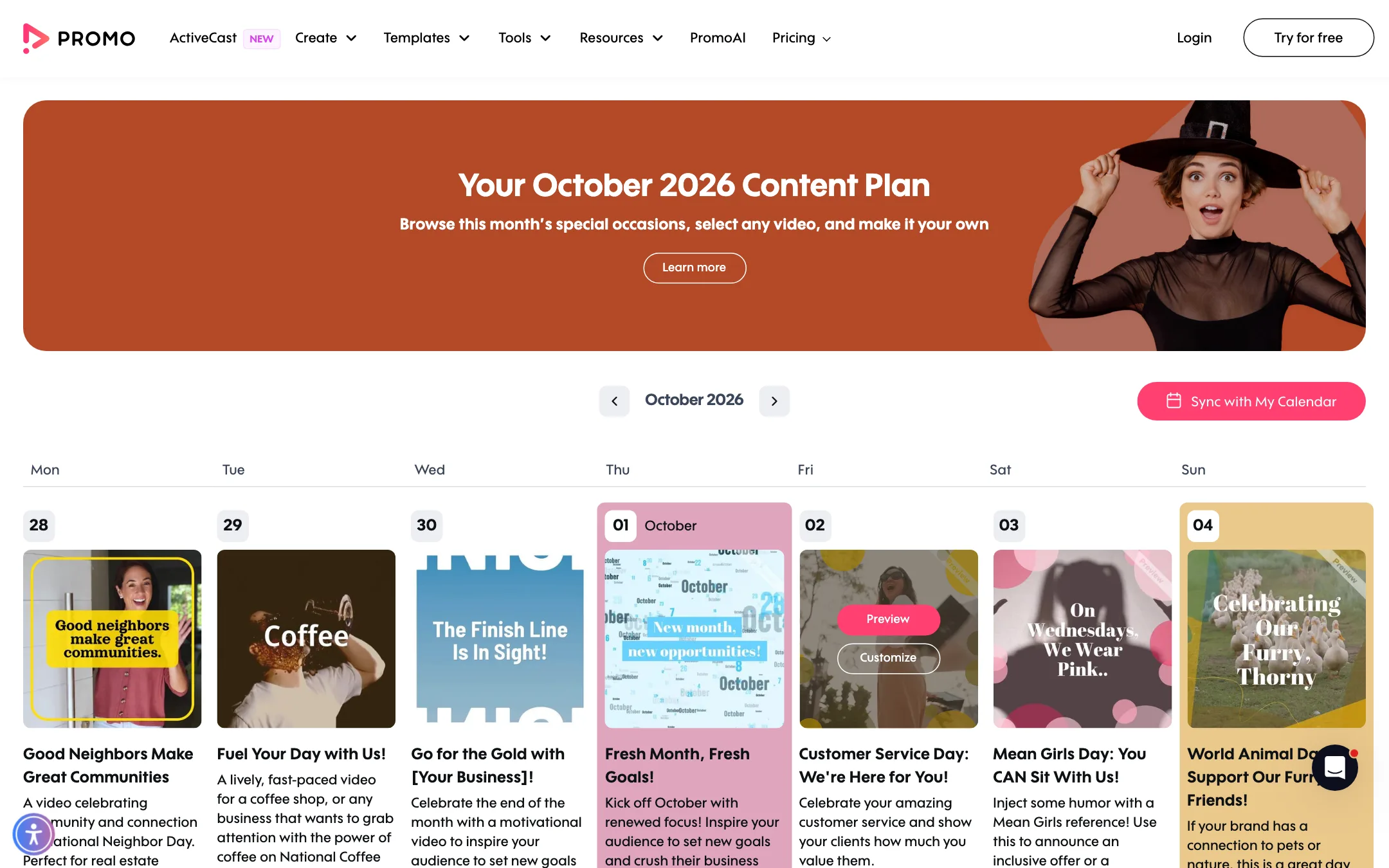
PromoAI is Promo’s AI copilot. Promo says it creates “30 unique videos that are personalized for your business in just one click.” You describe your business, and it produces a month of posts in a calendar. Promo also pitches it for Amazon product videos and Airbnb listing videos, where you paste a listing URL and it builds the video.
Once a video exists, you can edit it by chat. Promo’s examples include swapping clips, tightening text and changing pacing, with the preview updating as you go.
Two catches. First, Basic plan users can preview PromoAI videos but cannot download or publish them. You need Standard or higher. Second, Promo’s pages do not name the AI models behind PromoAI. From Promo’s own description, it works by picking templates, stock and copy, so think of it as automated template assembly rather than generated footage.
Planning and publishing
The social media planner shows a calendar with a suggested video for every day, tied to holidays and awareness days. You can customise any of them, then schedule and publish directly to Facebook, Instagram, YouTube, TikTok and X. Promo also uploads to Google Drive, Dropbox, HubSpot and Wistia.
ActiveCast
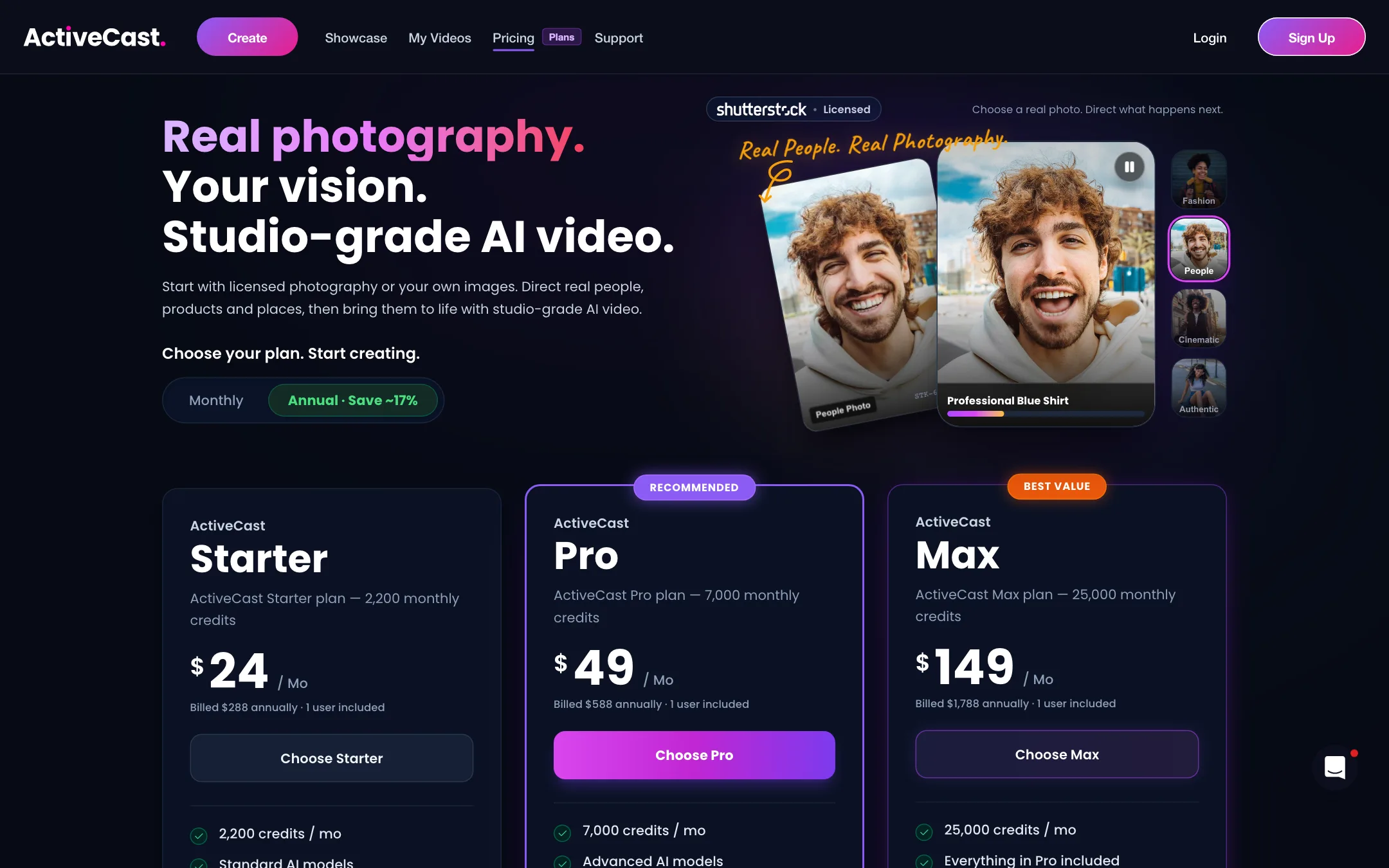
ActiveCast starts from a photograph rather than a prompt. You pick a licensed photo of a real person, product or place, or upload your own, then direct what happens and animate it with AI. ActiveCast’s own site lists partner models including Seedance, Veo, Kling, FLUX, MiniMax, GPT Image and Nano Banana. So ActiveCast is a wrapper around third-party models with a licensed photo library on the front.
There is a contradiction worth knowing. Promo’s homepage says the 300M+ photo library is licensed from Getty Images. The ActiveCast pricing page says you search “Shutterstock’s vast library of licensed photography” and mentions bonus Storyblocks value packs. Check the current terms if the source matters to your legal team.
Output quality
We have not made videos with Promo, so this is based on Promo’s own pages and templates.
Template videos look like professional stock ads. They are clean, on-brand and fast to produce. They also look like many other stock ads. If your competitors use Promo or similar tools, your videos may feel familiar.
Strengths Promo claims:
- Licensed, high-resolution media. Getty and iStock clips are well shot, and the music is pre-cleared for the main social platforms.
- Consistency. Brand kits keep logos, colors and fonts the same across every video.
- Volume. PromoAI aims to give you a month of posts at once.
Weak spots:
- Generic feel. Template plus stock is the opposite of a distinctive brand film.
- Editorial footage limits. Templates can include editorial clips of celebrities, sports and news. Promo’s FAQ says these cannot be used to sell or promote anything. Watch for them in ad templates.
- AI depth. PromoAI’s chat editing handles simple changes. For complex edits you are back in the manual editor.
Pricing
Promo has no free download plan. You can sign up free, draft as much as you like and get sent to pricing when you want to export.
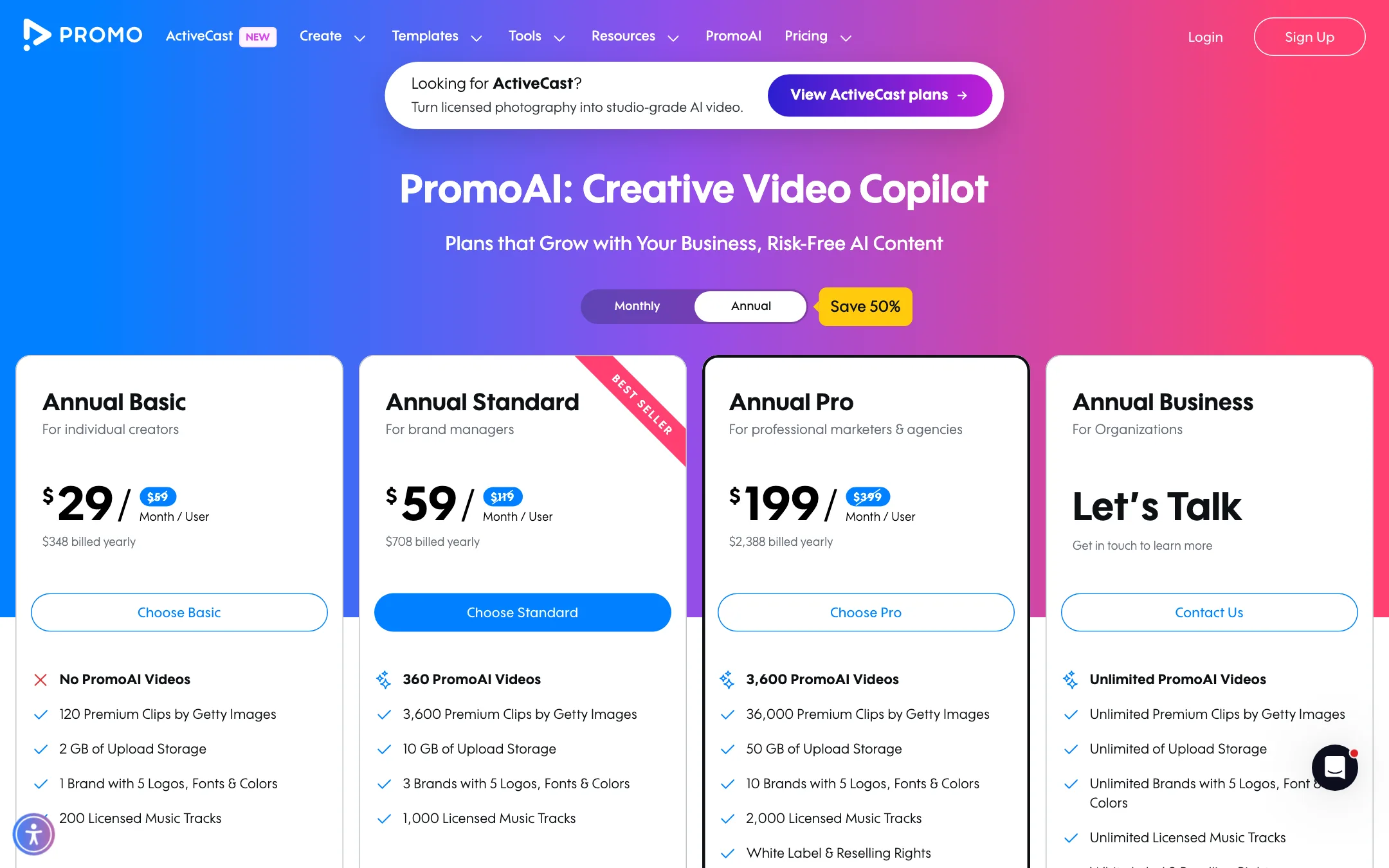
| Plan | Price | What you get |
|---|---|---|
| Basic | $29/mo yearly, $59 monthly | Your own edits, no PromoAI downloads, 1 brand, 2 GB |
| Standard | $59/mo yearly, $119 monthly | 30 PromoAI videos a month, 3 brands, 10 GB |
| Pro | $199/mo yearly, $399 monthly | 300 PromoAI videos a month, 10 brands, 50 GB, resale and white label |
| Business | Contact sales | Unlimited PromoAI videos, brands and storage |
ActiveCast is billed separately: Starter $24, Pro $49 and Max $149 a month, billed yearly, with 2,200, 7,000 and 25,000 credits.
Things the pricing page does not make obvious:
- Monthly is double. Every plan costs roughly twice as much month to month. Annual plans are paid upfront and can only be cancelled for the following year.
- PromoAI starts at $59. The pricing FAQ says “PromoAI subscriptions begin at $59 per month.” That is the Standard plan billed yearly. Basic is the cheaper entry, but it does not include PromoAI downloads.
- PromoAI videos do not roll over. Unused AI videos reset each billing cycle. The main FAQ says unused videos roll over, but the pricing FAQ says PromoAI videos do not, unless you upgrade.
- The numbers disagree. The main FAQ says Basic gets 3 premium clips a month and downloads in 720p. The pricing table says Basic gets 10 premium clips a month and 1080p export. The plan cards say 120 premium clips a year. Promo also cites 275M+, 100M+ and 15M+ for its stock library on different pages. Confirm with support before you rely on any one figure.
- Refund window. The 7-day money-back guarantee only applies if you have not downloaded, published or scheduled anything. Test in drafts first.
- Nonprofits. Promo offers discounted nonprofit plans through support.
Alternatives
If Promo’s price or download-only model puts you off, a few tools cover similar ground:
- InVideo offers templates plus an AI workflow that builds videos from a prompt, with stock media included on paid plans.
- Animaker leans toward animated explainers and character videos, useful when stock footage does not suit your message.
- VEED is a strong browser editor with captions, brand kits and templates, and it costs less if you mostly edit your own footage.
Promo’s edge over all three is the Getty and iStock library with indemnification and the built-in social calendar. If neither matters to you, test a cheaper option first.
Verdict
Promo.com is a solid choice for small businesses and agencies that need a lot of branded social ads and value licensed stock and music above all else. The templates are broad, the brand tools are good, and publishing is built in.
It is a weaker deal for creators. You pay to download anything, the AI features that give the product its current name start on the $59 Standard plan, and Promo’s own pages contradict each other on several plan details. If you mainly need an editor, start with a cheaper tool. If you need licensed ad creative at volume, Promo is worth a draft session before you pay.
