What 2short.ai is
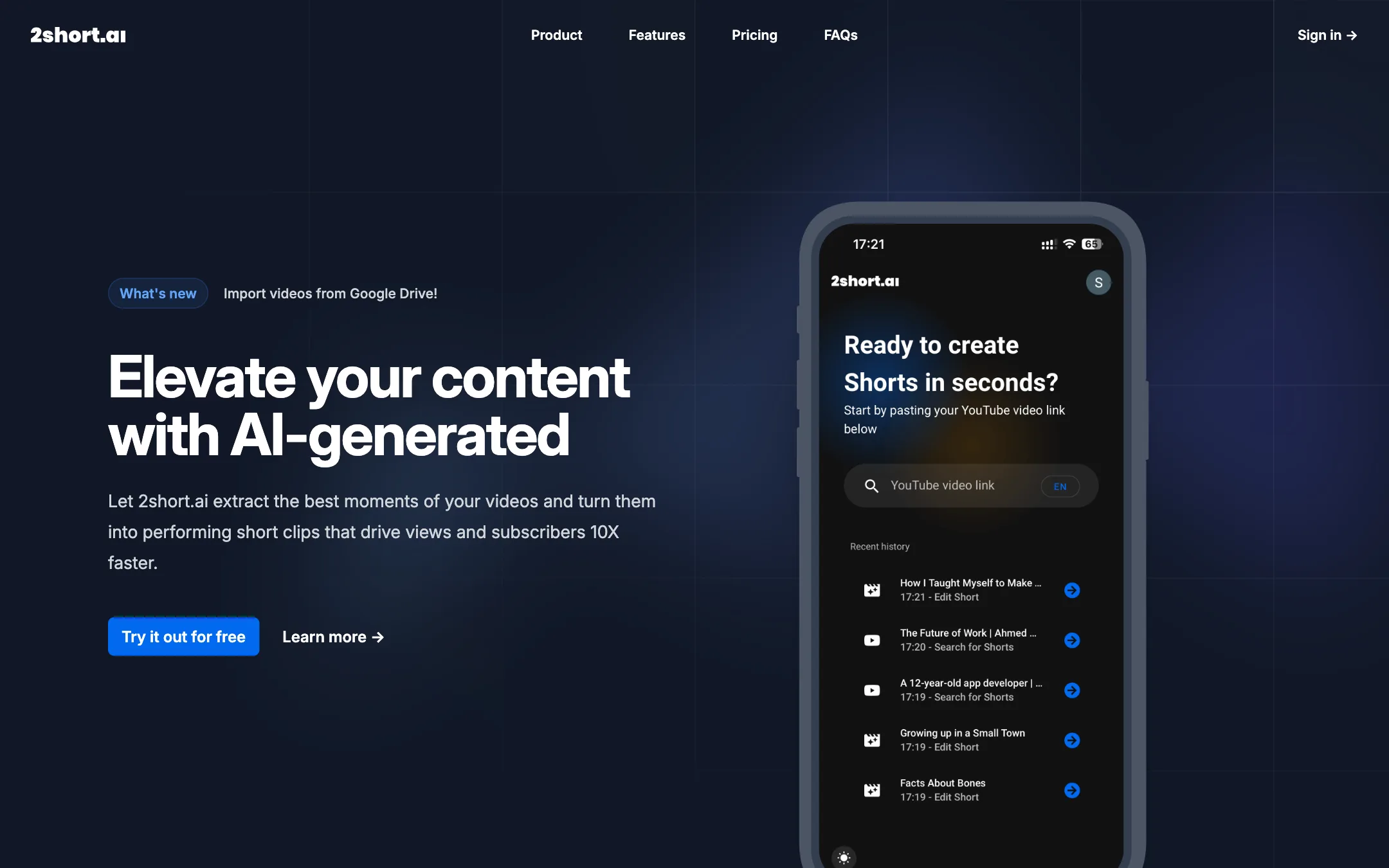
2short.ai is an AI clipper for YouTube. You paste a link to a long video, it reads the speech, picks the moments it thinks will hold attention, and cuts them into short clips. Each clip gets face tracking to keep the speaker in frame and optional animated subtitles. You then export in vertical, square or horizontal format.
That is the whole product, and the site is honest about it. There is no text-to-video, no AI avatars, no stock footage library and no scheduler. It is a repurposing tool for people who already make long videos.
The pricing model is unusual and simple. You do not pay per clip or per credit. You pay for hours of AI video analysis a month. Every plan, including the free one, gets every feature.
This review is based on 2short.ai’s public site, pricing and FAQ. We did not run our own videos through it, so quality claims below are 2short.ai’s own.
Who it is for
2short.ai fits you if:
- You run a podcast, interview show, lesson channel or commentary channel on YouTube.
- You want Shorts, Reels and TikToks from that footage without opening an editor for every clip.
- You want a predictable bill. Paying by hours analysed is easy to plan around if you know how much you upload each month.
- You want the cheapest paid clipper that still promises 1080p and no watermark.
Skip it if:
- Your videos are mostly music, gameplay without commentary, B-roll montages or silent footage. 2short.ai only processes videos with captions.
- You want an all-in-one tool that also writes scripts, adds AI b-roll, generates voiceovers or posts to your channels on a schedule.
- You work mainly in Chinese, Hindi or Arabic. None of those appear in the supported language list.
- You need a team workspace, approvals or an API. None are mentioned on the site.
How it works
The workflow has three steps.
- Import. Copy the link of a YouTube video and paste it into the app. On paid plans you can also pull files from Google Drive or from a public URL. The homepage flags Google Drive imports as the latest addition.
- Analyse. 2short.ai reads the transcript and picks out clips. This is the step your plan meters. A one-hour podcast uses one hour of your monthly analysis allowance.
- Edit and export. Review the suggested clips, adjust the crop, switch on subtitles and add your brand preset. Then export at 1080p.
Why captions matter
2short.ai’s FAQ is clear that it can only work with videos that have captions. It uses the spoken words to decide which parts are worth clipping. The good news is that YouTube auto-generates captions for most uploads, so in practice most talking videos qualify.
This has two knock-on effects you should plan for:
- Bad captions mean bad picks. If YouTube’s auto-captions mangle your speech, because of heavy accents, crosstalk or poor audio, the AI is choosing from a garbled transcript. Uploading a corrected caption file to YouTube first is worth the five minutes.
- Visual moments get missed. A great reaction shot, a stunt or a visual punchline with no words around it will not register. If your channel’s best moments are visual, a clipper that only reads text is the wrong fit.
Face tracking and manual crop
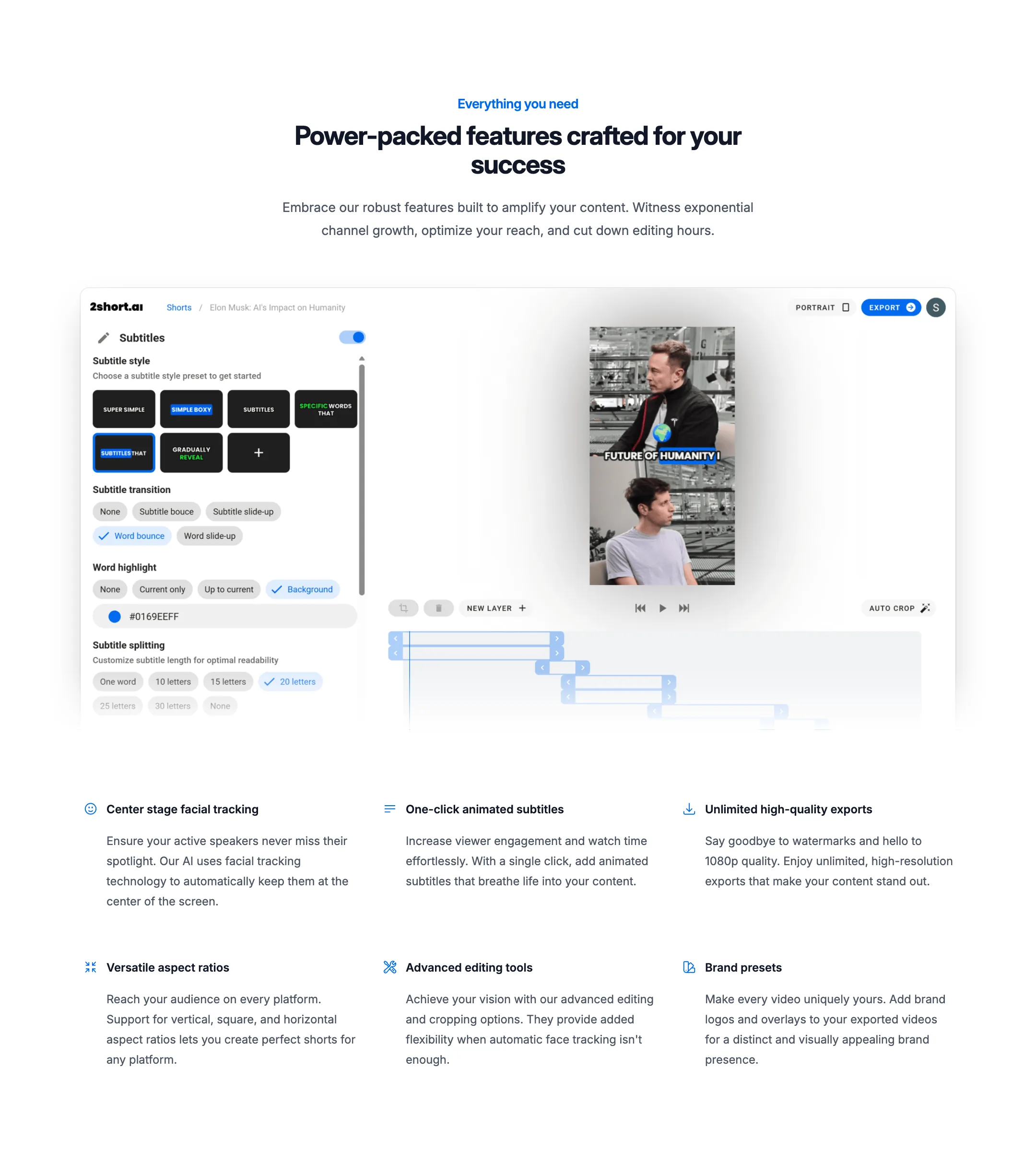
Turning a 16:9 video into a 9:16 clip means throwing away most of the frame. 2short.ai’s answer is “center stage” facial tracking. It finds the active speaker and keeps them in the middle of the vertical frame.
The site is upfront that this will not always work. It offers advanced editing and cropping tools “when automatic face tracking isn’t enough.” That is the honest pitch. Two-person podcasts where people talk over each other, wide stage shots and screen recordings are the usual trouble spots for any auto-reframe tool. Expect to fix some clips by hand.
Subtitles and branding
Animated subtitles are one click, per 2short.ai. Captions on Shorts and Reels are close to mandatory now, since many people watch with the sound off. The editor shown on the homepage has a handful of subtitle style presets plus a custom option, transitions such as word bounce and slide-up, word highlighting with a colour picker, and a setting for how many letters appear per caption line. It also shows an auto crop button and a simple layer track.
Brand presets let you add a logo and overlays to every export. If you clip several shows, you can keep one preset per show.
Aspect ratios
Vertical is the default for Shorts, TikTok and Reels. Square still works for some feeds and LinkedIn. Horizontal lets you cut highlight reels or trailers for YouTube itself. All three are on every plan.
Captions and editing compared with bigger clippers
2short.ai sits in a crowded category. Tools like SendShort, Vidio and vidIQ’s clipper all do the core job of long video in, short clips out. Where 2short.ai differs:
- What it does not have. None of its pages mention a virality score, AI b-roll, AI emoji or keyword highlighting, a social scheduler, a content calendar or an MCP or API connection. Several competitors list all of those.
- What it does have. Every feature on the free plan, simple hour-based plans and a low entry price.
- Where it stops. The editor covers subtitles, crop and simple layers, not a full multi-track timeline. If you want to stitch clips, add music beds or layer text, you will finish the job in CapCut or a similar editor.
Whether the missing extras matter depends on how you work. If you already have an editor you like and you just want a fast first cut of twenty candidate clips, 2short.ai’s narrow scope is a feature. If you want one tool from upload to posted Short, look at SendShort or Vidio first.
Output quality
2short.ai promises 1080p exports without watermarks on every plan. It does not publish sample clips on its homepage, and it does not say how the AI scores moments beyond reading the speech. That makes quality hard to judge from the outside.
What you can reasonably expect from a transcript-based clipper:
- Good at finding self-contained answers, punchlines, strong opinions and short stories in talking videos.
- Weaker at clip boundaries. Clips can start a beat late or end mid-thought, so plan to trim.
- Dependent on caption quality and audio quality. Clear, single-speaker audio gives the best picks.
Use the free allowance on a video you know well. You will quickly see whether its picks match the moments you would have chosen yourself.
Languages
The FAQ lists 26 supported languages: Bulgarian, Czech, Danish, Dutch, English, French, Finnish, German, Greek, Hungarian, Indonesian, Italian, Japanese, Korean, Latvian, Lithuanian, Norwegian, Polish, Portuguese, Romanian, Russian, Slovak, Spanish, Swedish, Turkish and Ukrainian. That is a broad European list plus Japanese, Korean and Indonesian. 2short.ai says more are on the way. Chinese, Hindi, Arabic, Vietnamese and Thai are not on the list today.
Pricing
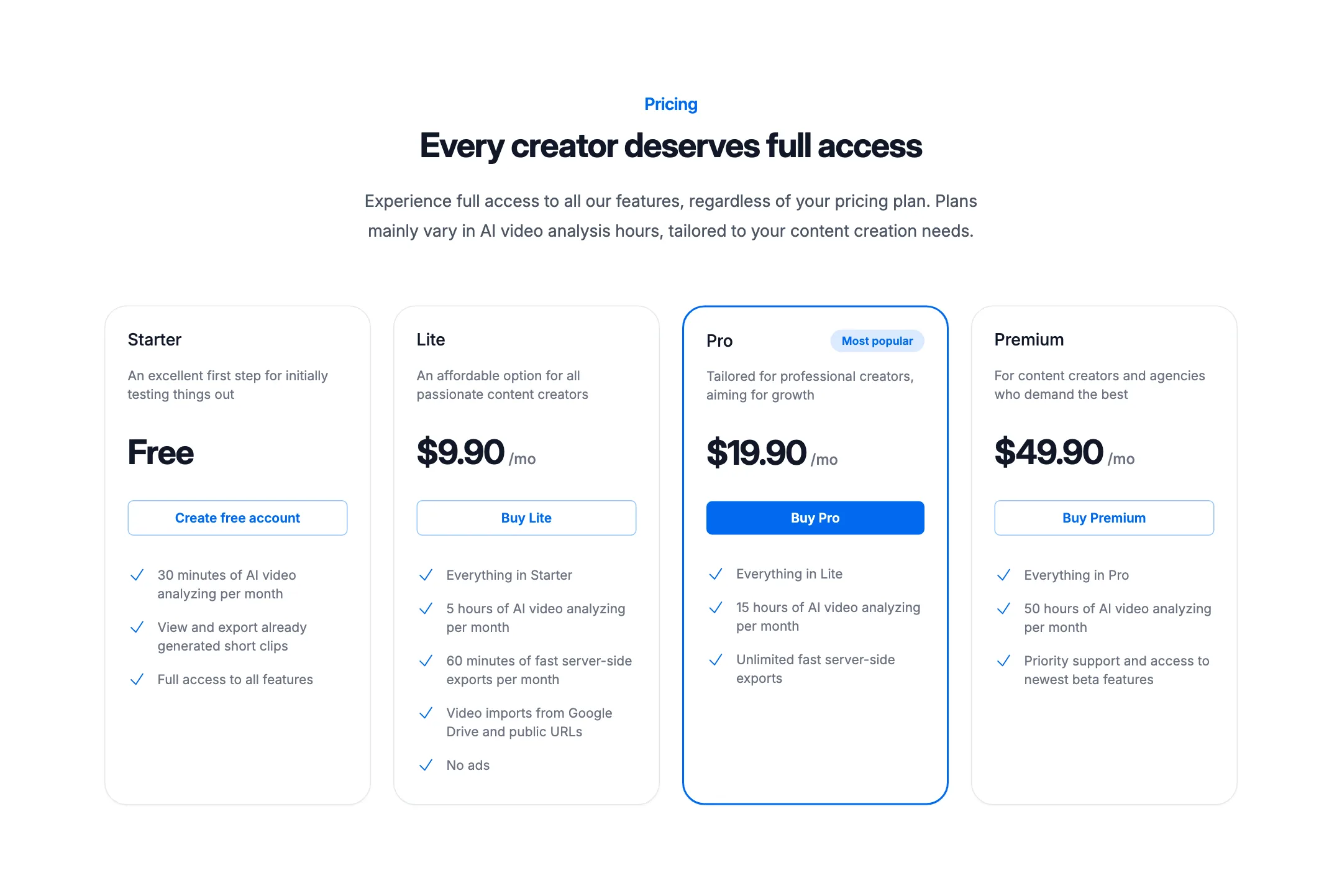
2short.ai charges by hours of AI video analysis per month. All features are on every plan.
| Plan | Price | Analysis a month | Extras |
|---|---|---|---|
| Starter | Free | 30 minutes (15 per the footer) | View and export generated clips |
| Lite | $9.90/mo | 5 hours | 60 min of fast exports, Drive and URL imports, no ads |
| Pro | $19.90/mo | 15 hours | Unlimited fast exports |
| Premium | $49.90/mo | 50 hours | Priority support, beta features |
Things the pricing table does not spell out:
- The free allowance is unclear. The pricing card says 30 minutes a month. The banner at the bottom of the same page says 15 minutes. Plan on the lower figure.
- Free users see ads. “No ads” appears as a Lite feature, which implies the free plan shows them.
- Fast exports are a paid perk. Lite gets 60 minutes of fast server-side exports, and Pro and Premium get unlimited. Free exports may be slower.
- No yearly billing. The site lists monthly prices only. There is no discount for paying a year up front.
- Analysis is the meter, not output. You pay for the length of the video you feed in, not the number of clips you keep. A tight 20-minute interview gives you far more value per minute than a rambling three-hour stream.
Which plan to pick
A weekly one-hour podcast uses about four hours a month, so Lite at $9.90 covers it. Two or three long videos a week push you into Pro. Premium is for agencies or creators clipping daily streams.
Refunds
The public site does not describe a refund policy. Test on the free plan before you pay.
Verdict
2short.ai does one job and prices it fairly. If you make long, talky YouTube videos and you want a cheap first pass at Shorts, it is worth a test. Every feature is on the free plan, there is no watermark, and Lite at $9.90 a month is among the cheapest paid clippers we list.
Its limits are just as clear. It needs captions, it is built around YouTube links, and it skips the scheduling, b-roll and AI extras most rivals now bundle. Treat it as a fast way to find clip candidates, then finish your best ones in a proper editor.