What FocuSee is
FocuSee is a screen recorder for Windows and Mac made by iMobie, a software company best known for phone utilities. Its idea is simple: you record your screen, and FocuSee does the editing a pro would do afterwards.
That means automatic zooms where you click and type, a smooth and stylish cursor, gentle 3D motion, a nice background behind your window and a webcam bubble you can move around. Then there is an AI layer on top: subtitles, filler word removal, voice enhancement, background removal and virtual avatars.
If you know Screen Studio, the Mac-only recorder that made auto zoom popular, FocuSee is in the same category. Its big differences are that it also runs on Windows and costs less.
Who it is for
FocuSee fits you if:
- You record product demos, SaaS walkthroughs or feature launches.
- You make tutorials, online courses or onboarding videos.
- You want screen recordings that look edited, without learning keyframes.
- You work on Windows and cannot use Screen Studio.
Skip it if:
- You mostly film yourself or edit camera footage. FocuSee is built around screen capture.
- You need a full multi-track video editor. FocuSee polishes recordings; it is not Premiere.
- You want quick, unedited async messages. A tool like Loom is faster for that.
How it works
Record
You choose full screen, a single window or a custom area. FocuSee can capture your screen, webcam, microphone and system audio in one take. It can also record an iPhone or Android screen when you plug the phone in over USB.
Two recording helpers stand out for tutorial makers:
- Teleprompter: your script scrolls on screen while you record, with adjustable font size, speed and position.
- Keyboard shortcut capture: FocuSee records the shortcuts you press and shows them on screen automatically.
Auto-polish
When you hit stop, FocuSee builds the edit. Per its feature pages:
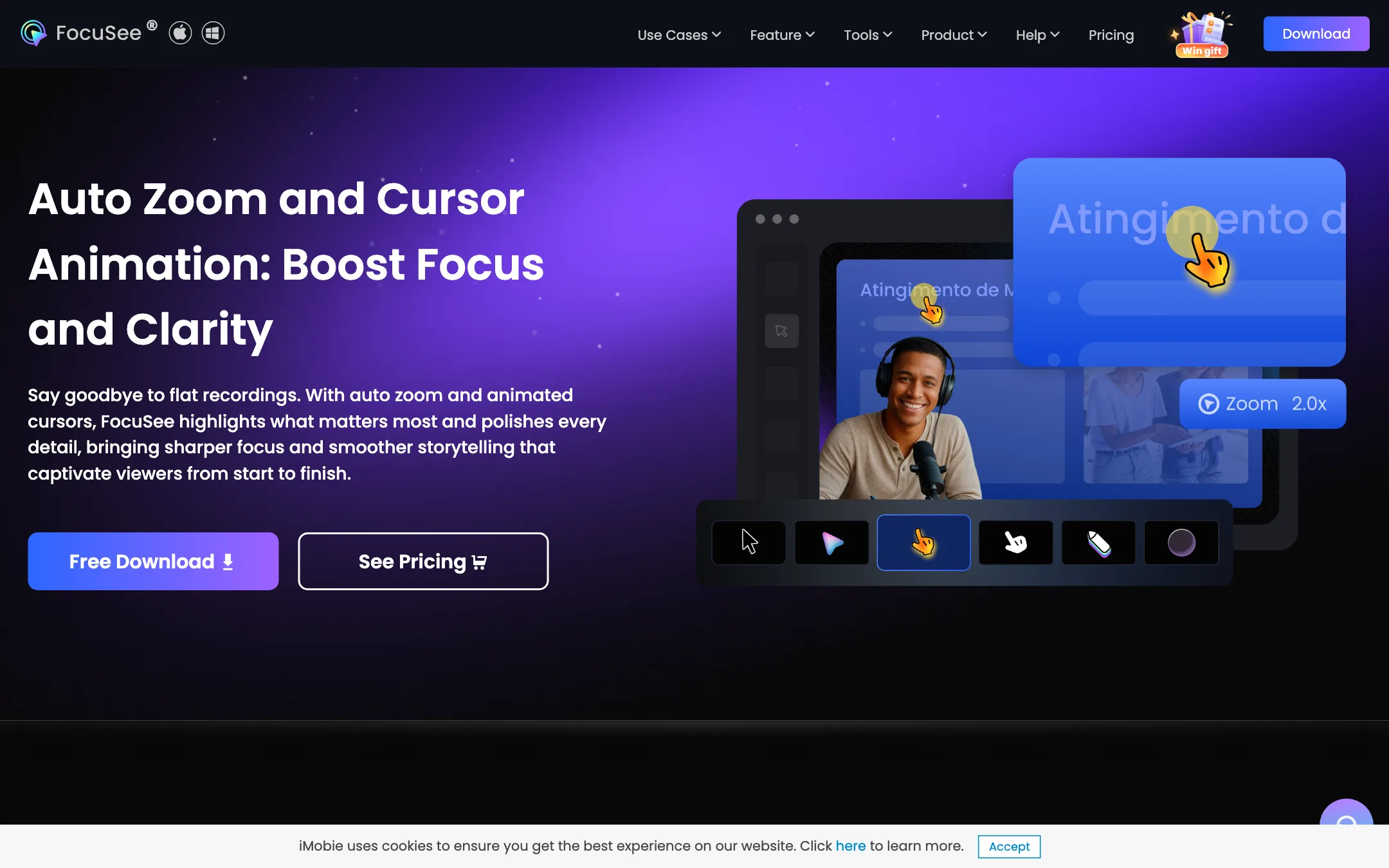
- Auto zoom detects click locations and typing sections and zooms in on them, then out again. You can move or adjust zoom points in the editor.
- Cursor effects smooth out jittery mouse movement and hide the cursor when it is idle. You can pick from up to 40 cursor styles and 8 click effects, with click sounds.
- 3D motion tilts the view with your cursor for a more cinematic look.
- Smart typing speed-up detects typing sections so you can speed them up with one click.
- Spotlight, annotations and blur let you add arrows, callouts, text and privacy blur on sensitive data.
Edit and enhance
In the editor you can trim, change speed, pick camera layouts and switch between picture-in-picture and full-screen camera. You can add background music, a custom watermark, rounded corners and shadows, and save the look as a preset.
The AI tools sit here:
- AI subtitles in more than 50 languages. FocuSee claims over 98% accuracy. You can edit text and timing, split or merge caption blocks and import SRT files.
- AI Smart Cut removes “um,” “ah” and long pauses.
- AI voice enhancement and noise reduction clean up a cheap mic.
- AI background removal blurs or replaces your webcam background without a green screen.
- AI virtual avatar gives you an on-screen presenter if you do not want to show your face.
Export
You can export up to 4K at 60fps, export a GIF, or share a link with password and permission controls. One-click resizing reframes the same recording for TikTok, YouTube, Instagram, Facebook and X.
Output quality
We have not tested FocuSee hands-on, so quality claims here come from iMobie and from users quoted on its site.
The core features, auto zoom and cursor polish, are what most users praise in the testimonials. Several quoted users say they switched from Screen Studio, one calling FocuSee “the closest option available” on Windows. Another notes that cursor tracking took some effort to get working on a Windows PC. These are hand-picked quotes, not independent tests.
FocuSee’s own FAQ includes an entry titled “What if auto zoom doesn’t zoom where I expect?” That is honest. Automatic zoom is a guess based on your clicks. If you click around a lot while thinking, you will get zooms you do not want. Record with deliberate clicks and review the zoom points before export.
On privacy, FocuSee says recordings are saved locally by default, cloud upload is optional, and cursor tracking and click detection run on your machine.
Pricing
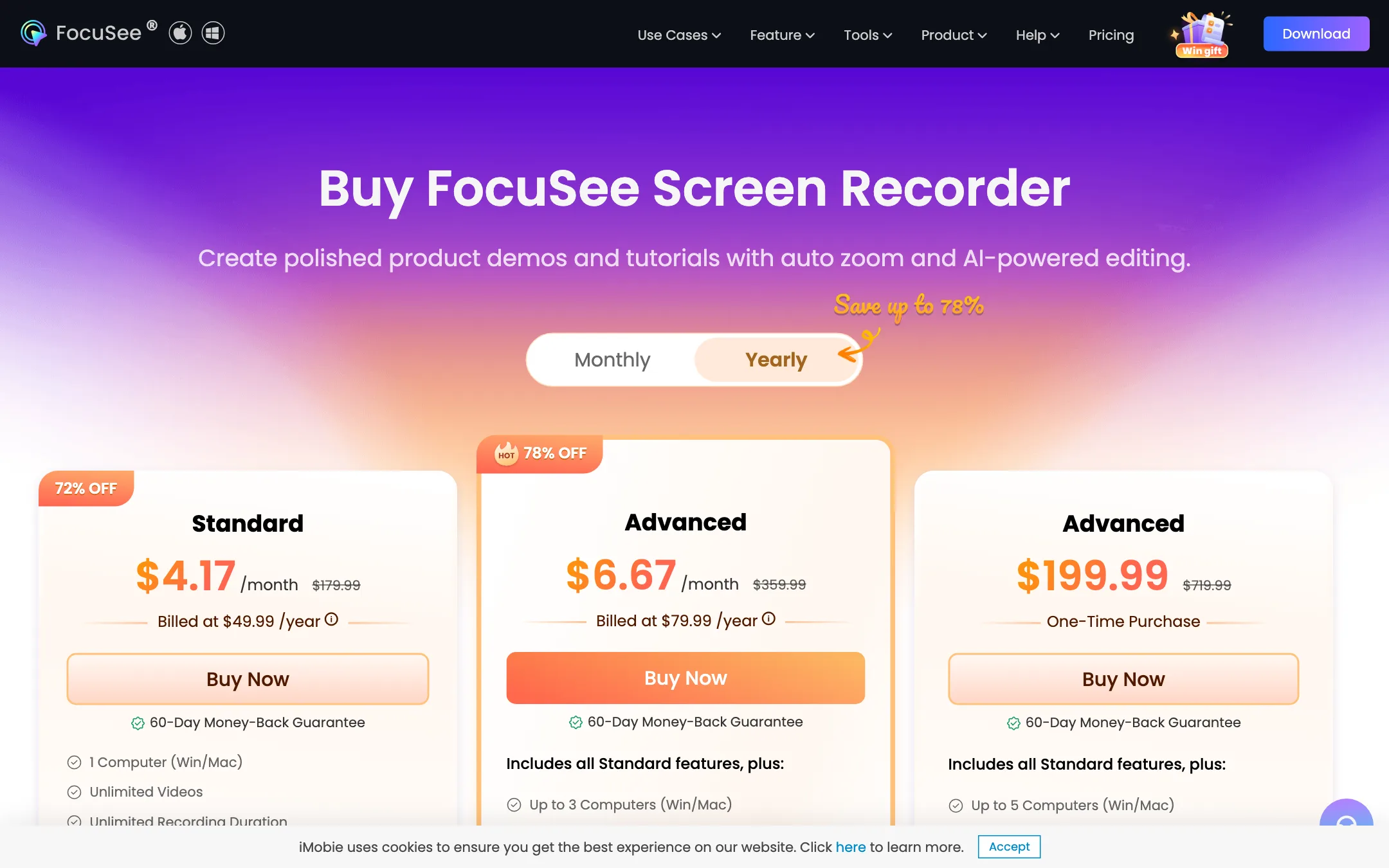
FocuSee sells yearly, monthly and lifetime licenses.
| Plan | Yearly | Monthly | What you get |
|---|---|---|---|
| Standard | $49.99/yr (about $4.17/mo) | $19.99/mo | 1 computer, unlimited recordings, 4K 60fps, 5 GB cloud, no AI credits |
| Advanced | $79.99/yr (about $6.67/mo) | $24.99/mo | 3 computers, AI features, 300 credits a month |
| Advanced lifetime | $199.99 once | n/a | 5 computers, 1,000 credits valid one year, FocuSee 2.x for life |
Things the pricing page does not make obvious:
- Standard has no AI. Auto zoom, cursor effects, layouts, teleprompter and annotations are included. AI subtitles, filler removal, voice enhancement and avatars all consume credits, and Standard has none. Oddly, the comparison table also lists “Auto Subtitle” as a feature on all plans, next to “AI Subtitle” as a credit feature. Check which one you get before you rely on it.
- Credits expire. Subscription credits last one month. Lifetime credits last one year, and after that you are buying more.
- Yearly is much cheaper. Monthly Standard costs $19.99, close to half the yearly price for a single month.
- The “was” prices are not real-world prices. The page shows $179.99, $359.99 and $719.99 crossed out, to make the discounts look like 72% to 78% off.
- Lifetime means version 2. The next major version is a paid upgrade, with a discount for existing users.
- Refunds deduct credits. You get 60 days on yearly and lifetime plans and 7 days on monthly, minus the cost of any AI credits you used.
- Device moves are limited. iMobie will transfer your license to a new device up to twice a year.
There is a 30% education discount for students and teachers.
The affiliate program
iMobie runs one affiliate program across its products, including FocuSee. Its partner page advertises up to 70% commission and a 45-day cookie, with sign-up through Impact and Avangate.
FocuSee compared with the alternatives
FocuSee’s own site compares itself with Screen Studio, Loom, Cursorful, OBS, Bandicam, Screen Charm, Movavi and Camtasia. That list shows where it sits: between free recorders and full editing suites.
- Against Screen Studio: both focus on auto zoom and cursor polish. FocuSee runs on Windows too and is cheaper. Screen Studio is Mac only.
- Against Loom: Loom is built for quick async messages and sharing. FocuSee is built for polished videos you publish.
- Against OBS: OBS is free and powerful for streaming and raw capture, but it does no automatic editing.
- Against Camtasia: Camtasia is a full screen recording editor with a long history and a deeper timeline. FocuSee is faster for polished demos with less manual work.
If you need general video editing as well, a desktop editor like Wondershare Filmora or a free one like CapCut can sit alongside FocuSee. Record and polish in FocuSee, then cut together longer videos in the editor.
Tips for better screen recordings
Auto zoom only works as well as your recording. A few habits make a big difference:
- Click with purpose. Every click is a possible zoom. Avoid nervous clicking while you think.
- Use a clean screen. Hide desktop icons, close notifications and use a large, readable font size.
- Record at a standard size. A 16:9 window at a common resolution resizes better for social formats later.
- Write a script. Use the teleprompter so you do not ramble, and you will need fewer cuts.
- Check zoom points before export. Delete or move any zoom that lands in the wrong place.
- Save a preset. Once you have a background, cursor and layout you like, save it so every video matches.
Before you buy
Use the free download to answer these questions:
- Does auto zoom suit your style? Record a real two-minute demo and count how many zooms you would delete.
- Do you need the AI tools? If you only want zoom, cursor and layouts, Standard is enough. If you want subtitles and filler removal, plan for Advanced.
- How many computers? Standard covers one, Advanced three, lifetime five.
- Yearly or lifetime? Lifetime costs about two and a half years of Advanced, but its credits run out after one year and it covers only version 2.x.
- Check the current checkout price. The struck-through prices change the look of the deal, not the amount you pay.
Verdict
FocuSee is a good pick if you record software on screen and want it to look edited without editing it. Auto zoom and cursor polish come on every plan, it runs on Windows as well as Mac, and Standard at $49.99 a year is cheap for what it does.
Go in knowing the AI side costs more. If you want AI subtitles and filler removal, budget for Advanced, and use your credits before they expire. Use the free export to test auto zoom on a real demo first.
